EasyManua.ls Logo

Milesight MS-C3262-FPNA - Page 52

Milesight MS-C3262-FPNA
92 pages
Print Icon
To Next Page IconTo Next Page
To Previous Page IconTo Previous Page
Loading...
46
Step3: Click to play the video files found on this date.
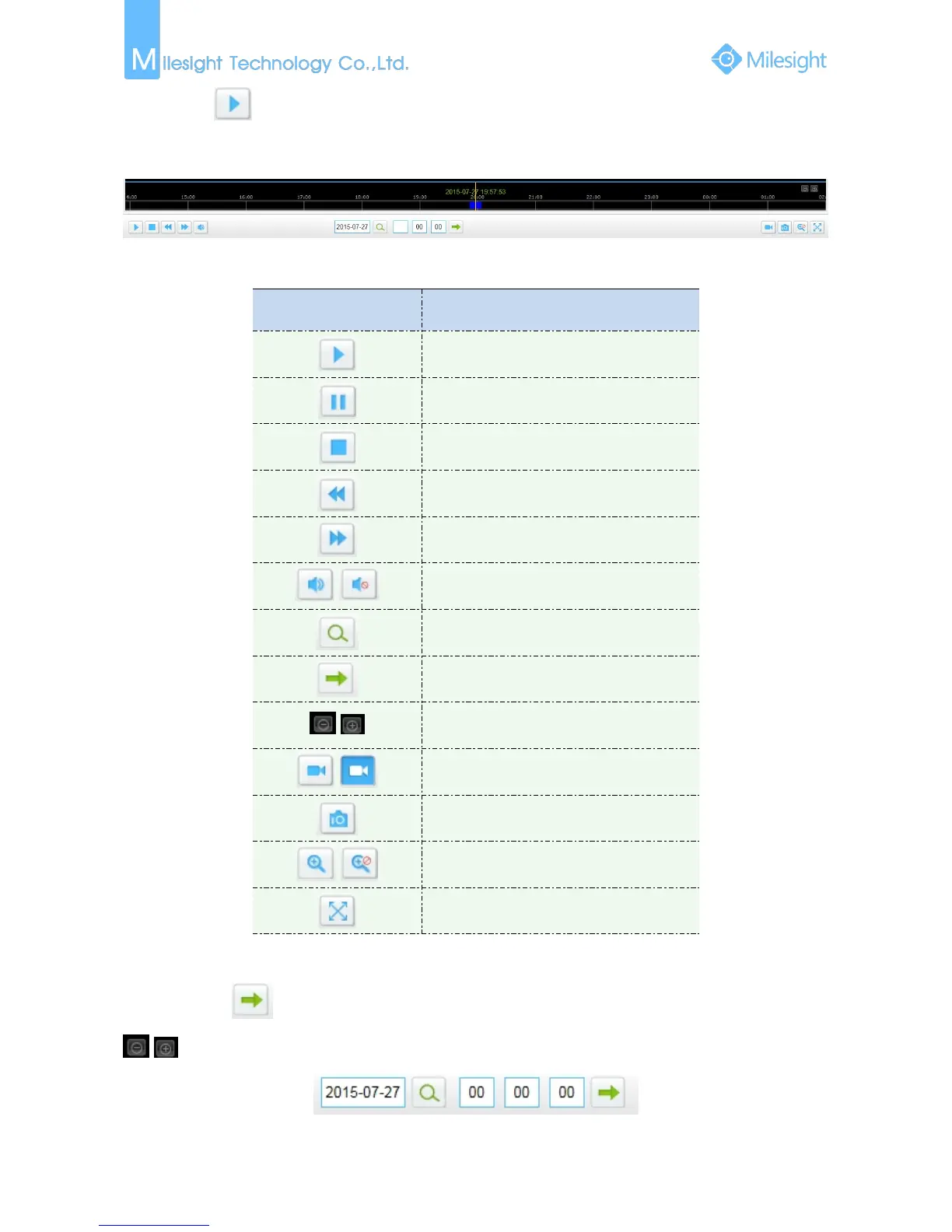
The toolbar on the button of playback interface can be used to control playing progress.
Figure 4-2-3 Playback Toolbar
Table 4-1-2 Description of the buttons
Button
Operation
Play
Pause
Stop
Slow Forward
Fast Forward
/
Audio On/Off
Search
Go To
/
Time Narrow/Expand
/
Start/Stop Recording
Snapshot
/
Zoom On/Off
Full Screen
Note:
Drag the progress bar with the mouse to locate the exact playback point. You can also input the
time and click to locate the playback point in the Set Playback Time filed. You can also click
/ to zoom out/in the progress bar.
Figure 4-2-4 Set Payback Time

Other manuals for Milesight MS-C3262-FPNA

Related product manuals