4.3.4 Wi-Fi
Wi-Fi
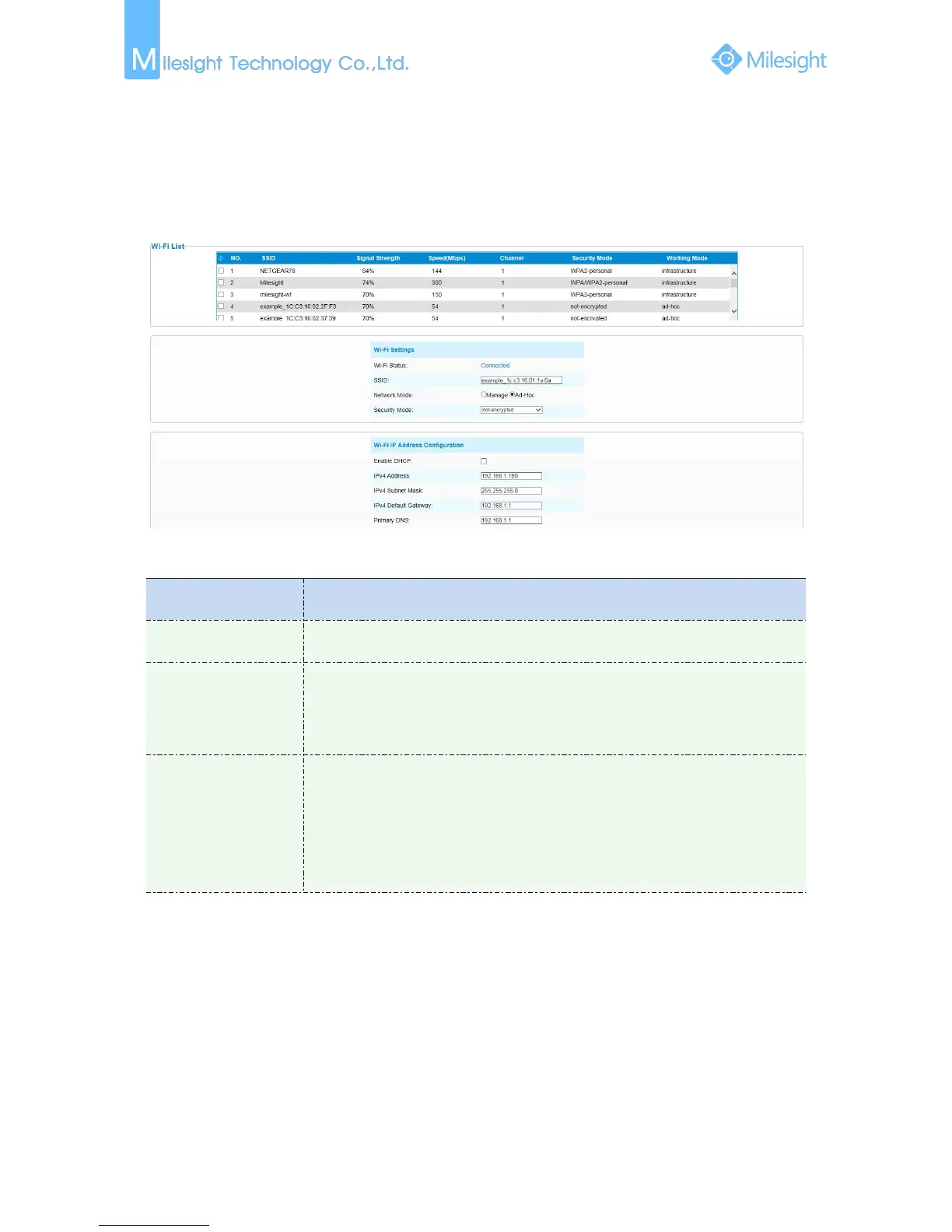
The page is as follows:
Figure 4-3-8 Wi-Fi
Table 4-3-6 Description of the buttons
Wi-Fi Status: Connected/Disconnected
SSID: Wi-Fi source
Network Mode: Wi-Fi option for Manage and Ad-Hoc mode
Security Mode: Select Wi-Fi connection security mode
Wi-Fi IP Address
Configuration
Enable DHCP: Check the checkbox to enable the DHCP function
IPv4 Address: Address used to identify a network camera on the network
IPv4 Subnet Mask: It is used to identify the subnet where the network camera is
located
IPv4 Default Gateway: The default gateway address
Primary DNS: The DNS Server translates the domain name to IP address
WPS(Wi-Fi Protected Setup)
Originally Wi-Fi Simple Config, it’s a network security standard that allows users to easily secure a
wireless home network. The goal of the protocol is to allow home users who know little of wireless
security and may be intimidated by the available security options to set up Wi-Fi Protected Access,
as well as making it easy to add new devices to an existing network without entering long
password phrases.
PIN Method
It’s a personal identification number (PIN) has to be read from either a sticker or the display on the
new wireless device. You can add the PIN code to the router or you add the Router PIN code on
this camera.











 To Next Page