OM-350 Page 16
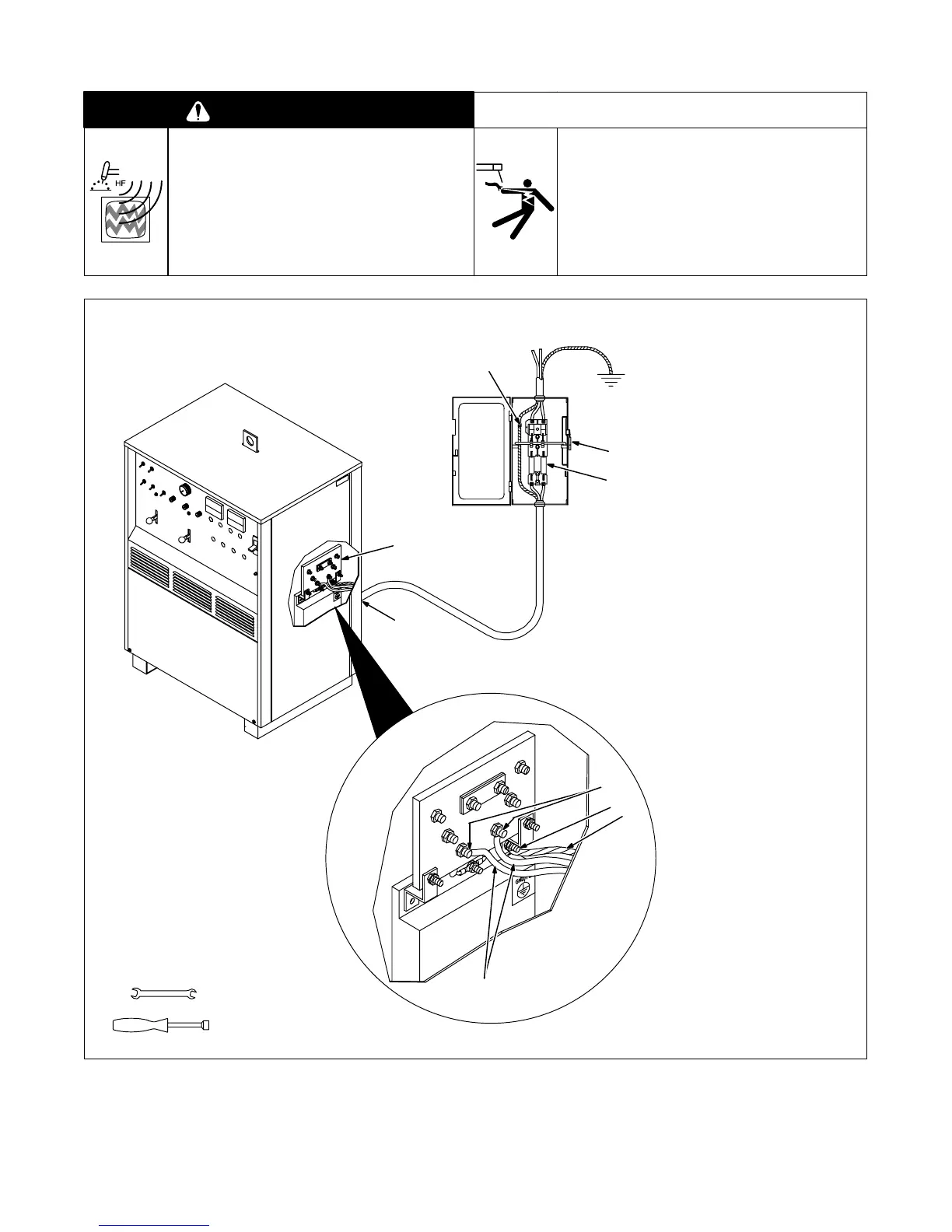
2-17. Connecting Input Power
WARNING
HIGH-FREQUENCY RADIATION can
interfere with radio navigation, safety
services, computers, and communica-
tions equipment.
• Have only qualified person familiar with electronic
equipment perform this installation.
• Read and follow entire Section 6 for proper location
and installation requirements for high-frequency
equipment before installing unit.
ELECTRIC SHOCK can kill.
• Do not touch live electrical parts.
• Turn Off welding power source, and disconnect
input power before inspecting or installing.
• Have only qualified persons install unit.
• Installation must meet National Electrical Code and
all other codes.
swarn13.2 4/93
Have only qualified persons make
this installation.
Remove side panel.
1 Line Disconnect Device Of
Proper Rating
2 Input Conductors
3 Grounding Conductor
Select size and length using Sec-
tion 2-16. Conductor rating must
comply with national, state, and
local electrical codes. Use lugs of
proper amperage capacity and cor-
rect hole size.
4 Strain Relief Connector
Insert conductors through strain
relief.
5 Input Terminal Board
6 Line Terminals
7 Welding Power Source
Ground Terminal
Connect grounding conductor to
ground terminal first. Then connect
input conductors to line terminals.
8 Disconnect Device Ground
Terminal
Install and connect grounding
conductor and input conductors in
conduit or equivalent to deener-
gized line disconnect device.
Connect grounding conductor first,
then line input conductors.
Be sure grounding conductor goes
to an earth ground.
Reinstall side panel.
9 Overcurrent Protection
Select type and size using Section
2-16. Install into deenergized line
disconnect device (fused discon-
nect switch shown).
ssb2.4 1/94 – SB-127 873-C
1
Tools Needed:
9
5
4
6
2
7
3
1/2 in
3/8 in
8





 To Next Page