OM-350 Page 19
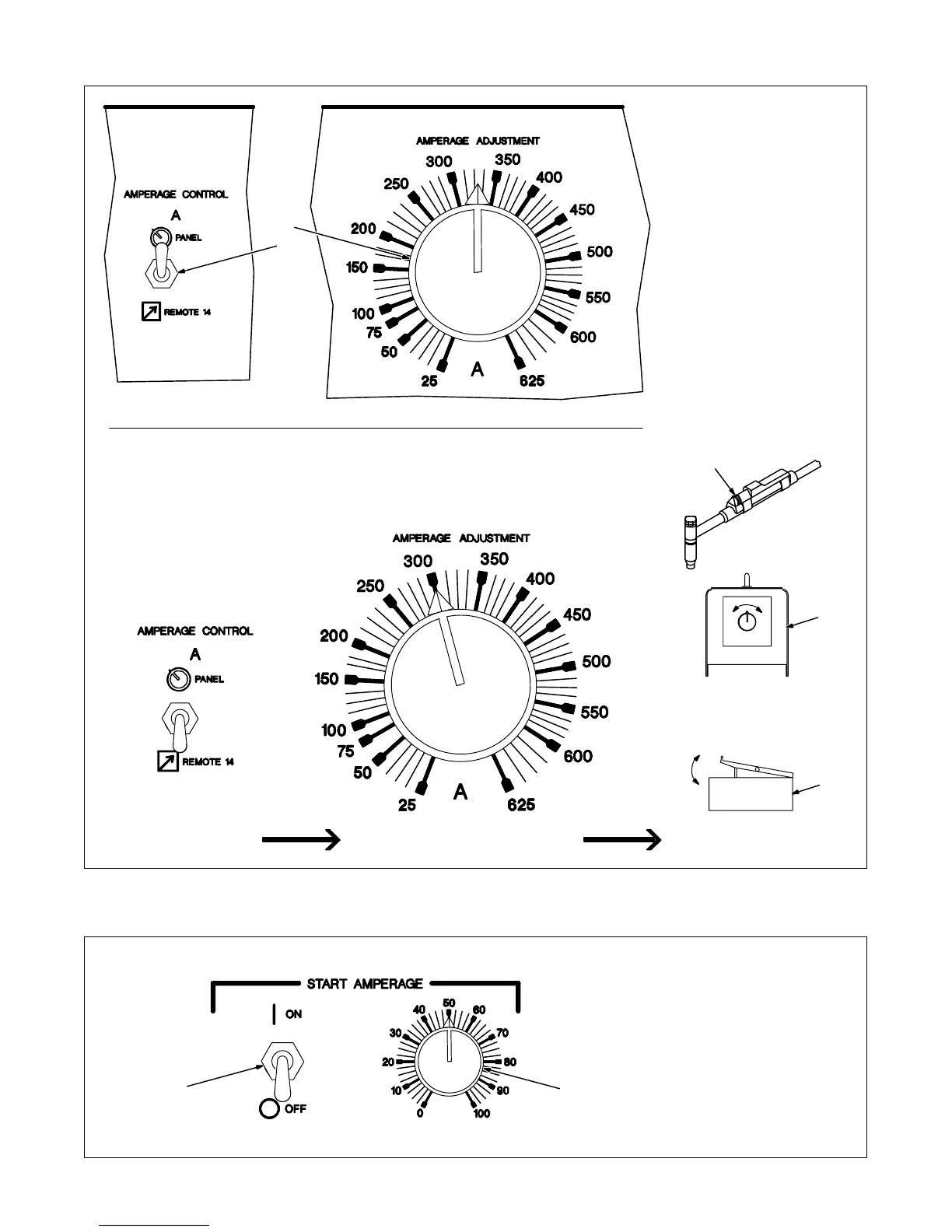
3-4. Amperage Controls
1 Amperage Adjustment Control
Use control to select weld output
amperage.
2 Amperage Control Switch
Use switch to select way of control-
ling amperage adjustment.
For front panel control, place switch
in the Panel position.
For remote control, place switch in
Remote 14 position (see Section
2-13).
3 Fingertip Control
4 Remote Hand Control
5 Remote Foot Control
See example below.
1
Set Switch Adjust Remote ControlSet Desired Maximum Amperage
3
4
5
2
Example Of Front Panel Amperage Control
In Example:
Min = 25 A AC
Max = 300 A AC
3-5. Start Amperage Controls
1 Start Switch
On – provides start amperage
control;
Off – no start amperage control.
2 Start Amperage Control
Use control to select amperage lev-
el for arc starting that is different
than Amperage Adjustment control
setting.
The numbers are a percentage of
the maximum welding amperage of
the unit and not an actual value.
1 2





 To Next Page