OM-350 Page 20
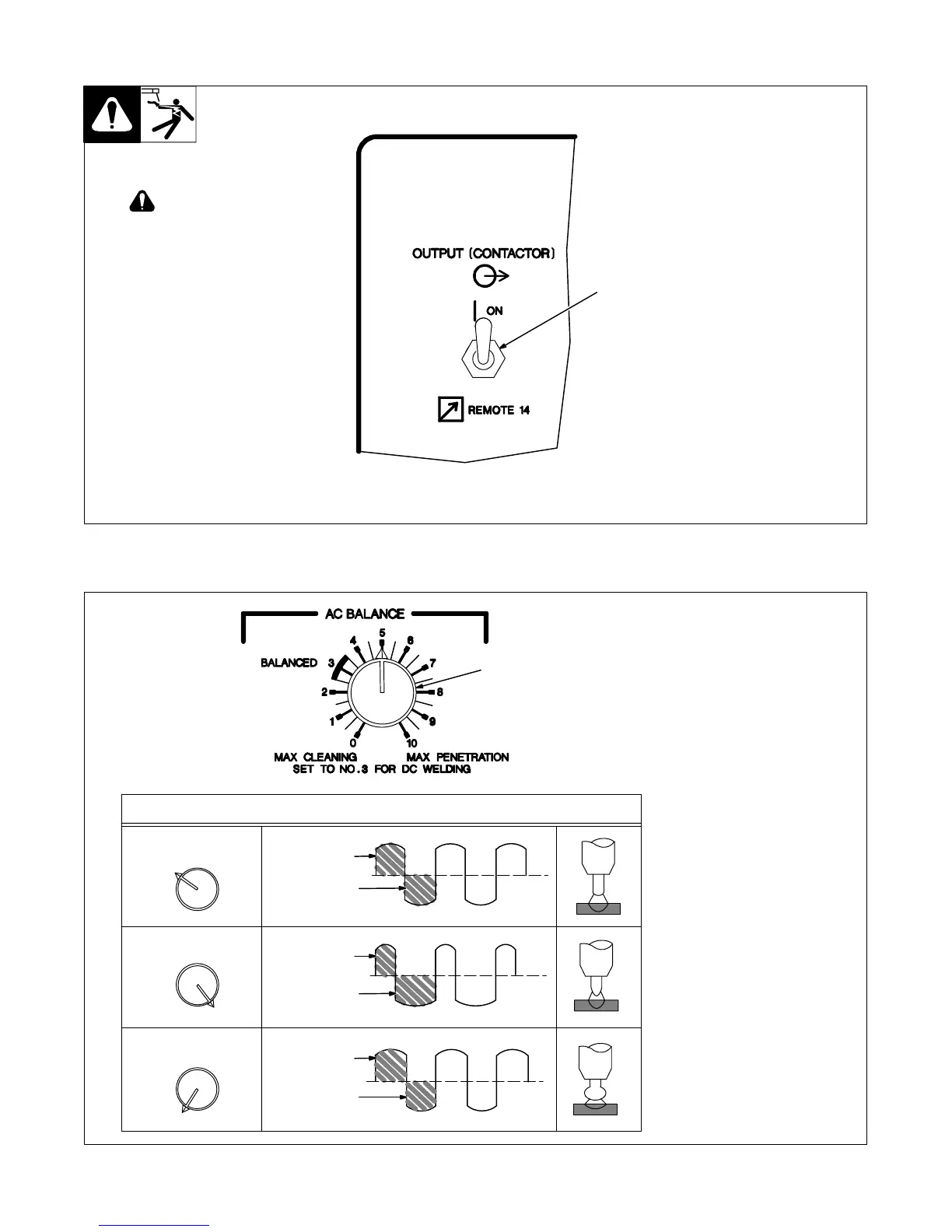
3-6. Output (Contactor) Switch
1 Output (Contactor) Switch
Use switch to select way of control-
ling unit output.
For weld output, place switch in On
position.
For remote output control, place
switch in Remote 14 position (see
Section 2-13).
1
Weld output terminals are
energized when switch is
On and Power is On.
3-7. AC Balance Control
S-0795-A
1 AC Balance Control
Use control to change the ac output
square wave.
Turn control towards 10 to obtain
deeper penetration. Turn control to-
wards 0 to obtain more cleaning ac-
tion of the workpiece. The wave
shape of position 3 (balanced), pro-
vides equal penetration and clean-
ing action, and is a recommended
starting point for GTAW.
50% Electrode
68% Electrode
Negative
50% Electrode
Negative
32% Electrode
Positive
55% Electrode
Positive
45% Electrode
Negative
Positive
3
10
0
1
Balance Control Waveform Examples
More Penetration
Balanced
More Cleaning





 To Next Page