OM-257 798 Page 34
SECTION 8 − CONFIGURATION (IF EQUIPPED)
8-1. Accessing Configuration Web Pages
To access the power source configuration webpages you will need the optional communication panel (See Section 5-6). Connect a PC directly to the
jack on the communication panel with a CAT5 or CAT6 Ethernet cable.
Enter the default IP address, 169.254.0.2, into a web browser and the welder configuration web pages will open to the Home screen.
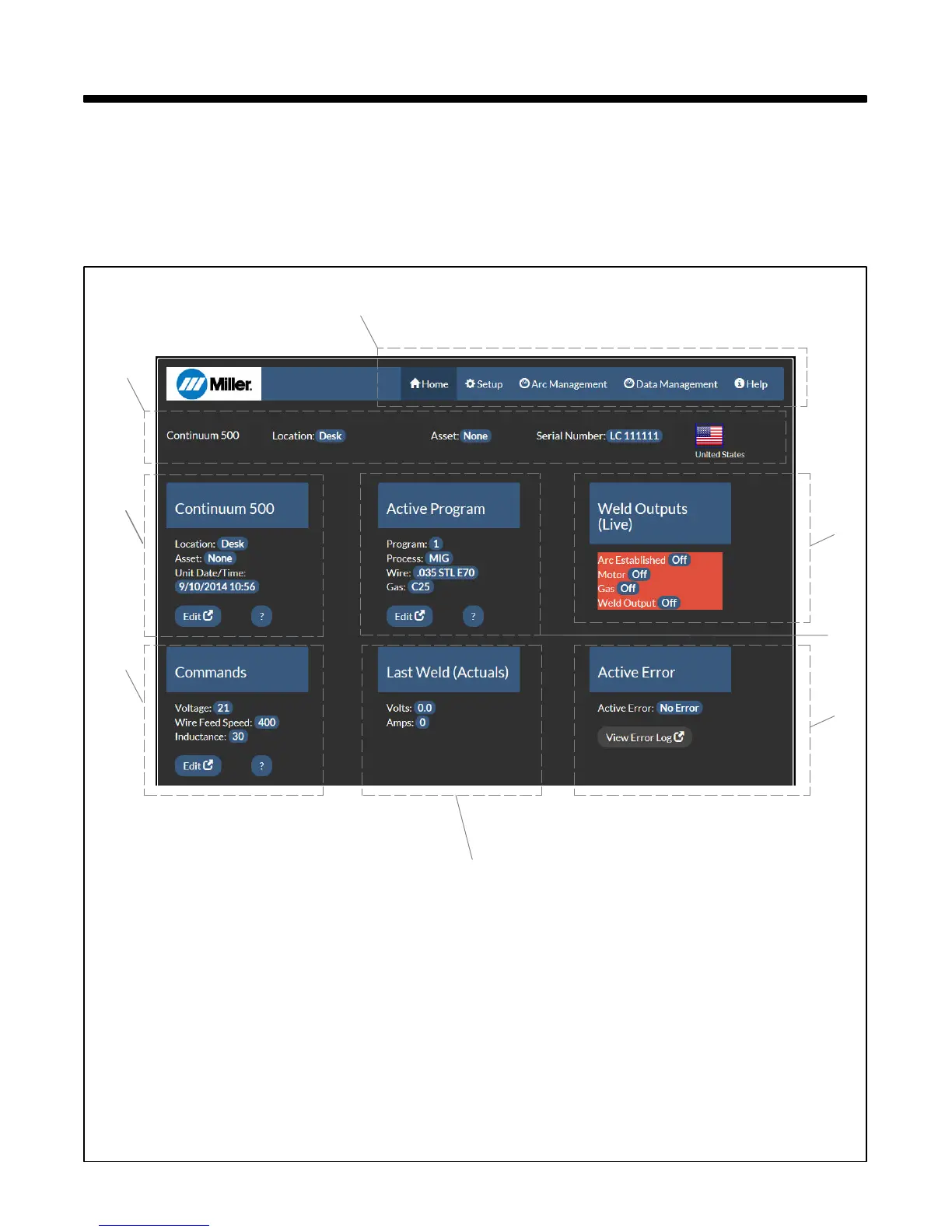
8-2. Home Screen
1 Navigation Bar
Select Home, Setup, Arc Management, Data
Management, or Help screens.
2 Information Bar
Displays general information on power
source, location, asset number, serial num-
ber, and display language.
3 Power Source Information
Displays power source information. Edit but-
ton allows these parameters to be changed.
4 Active Program
Displays the program number, process, wire
size and alloy, and gas. Edit button allows
these parameters to be changed.
5 Weld Outputs (Live)
Displays the weld output conditions of the
power source and feeder in real time.
6 Commands
Displays current user changeable com-
mands. Depending on the weld process being
used these commands will vary. Edit button
allows parameters to be changed.
7 Last Weld
Displays the voltage and amperage used dur-
ing the last weld made.
8 Active Error
Displays any active error messages. View
Error Log button will display a list of previous
errors and the time at which they occurred.
1
2
3
4
5
6
8
7









 To Next Page