OM-257 798 Page 35
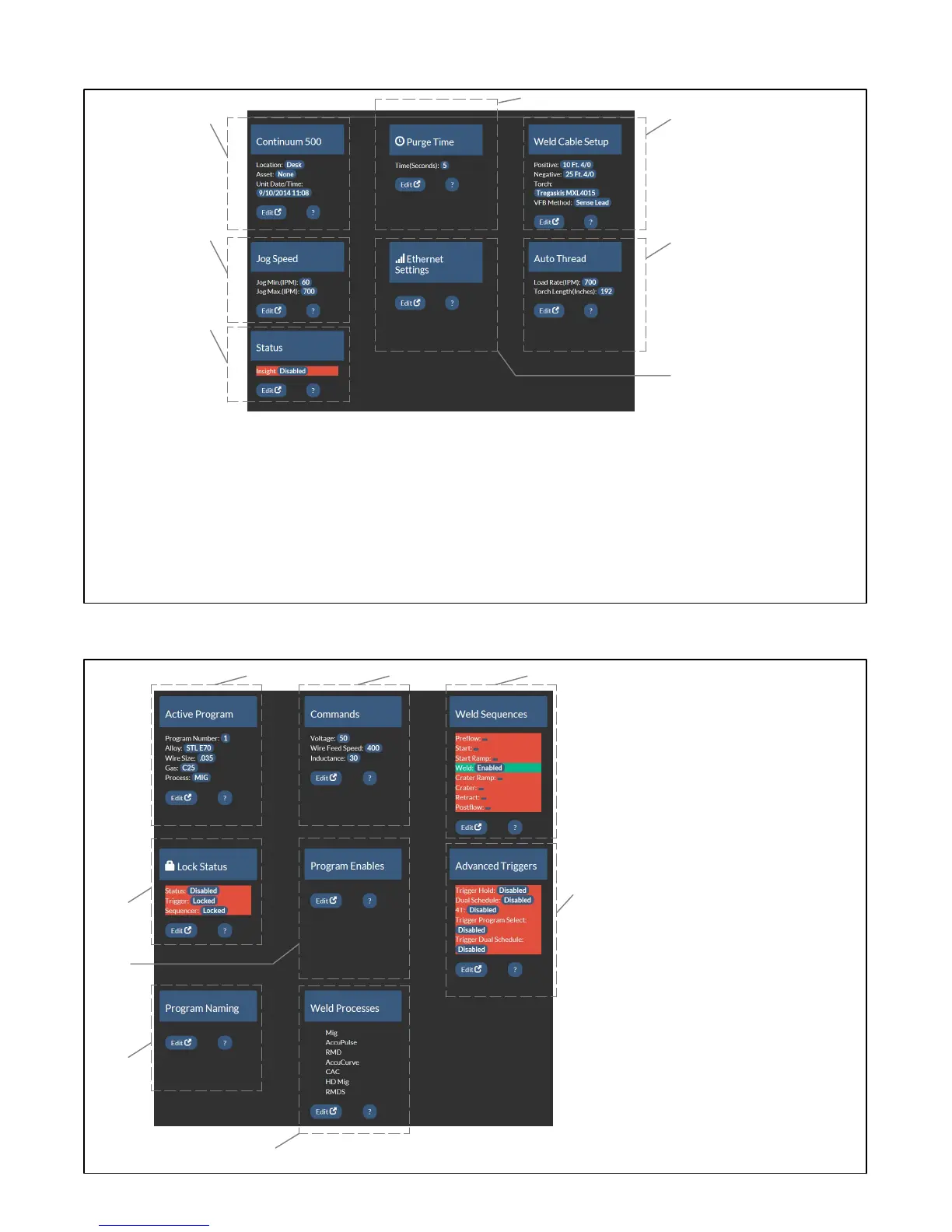
8-3. Setup Screen
1 Information Bar
Displays general information on power source,
location, asset number, serial number, and dis-
play language.
2 Purge Time
Displays the length of time gas will flow when
the purge button is pressed. Edit button allows
time length to be changed.
3 Weld Cable Setup
Displays length and diameter of positive and
negative weld leads, torch, and voltage feed-
back (VFB) method that are selected. Edit but-
ton allows these parameters to be changed.
4 Jog Speed
Displays the minimum and maximum Jog
speeds in inches per minute (IPM). Edit button
allows minimum and maximum jog speed set-
ting to be changed for forward and reverse jog.
5 Ethernet Settings
Edit button allows user to change connectivity
settings.
6 Auto Thread
Displays the Load Rate in inches per minute
(IPM) and Torch Length (Inches) to determine
the length of time for Auto Threading. Edit but-
ton allows these parameters to be changed.
7 Status
Displays the status of Insight software. Edit
button allows that status to be changed.
1
2
5
3
4
7
6
8-4. Arc Management Screen
1 Active Program
Displays the program number, process, wire
size and alloy, and gas. Edit button allows these
parameters to be changed.
2 Commands
Displays current user changeable commands.
Depending on the weld process being used
these commands will vary. Edit button allows pa-
rameters to be changed.
3 Weld Sequence
Displays active weld sequence parameters. Edit
button allows changes to these parameters.
4 Lock Status
Displays the current status of system locks. Edit
button allows the lock configuration to be
changed.
5 Program Enable
Edit button will allow user to select which pro-
grams are available for use.
6 Advanced Triggers
Displays the current status of advanced trigger
modes. Edit button allows status of trigger
modes to be changed.
7 Program Naming
Edit button allows program Machine Display and
Description to be changed for each numbered
program.
8 Weld Processes
Displays available weld processes. Edit button
allows processes to be enabled or disabled.
1
4
2 3
5
6
7
8









 To Next Page