. A complete Parts List is available at www.MillerWelds.com
OM-281426 Page 30
SECTION 6 − OPERATION
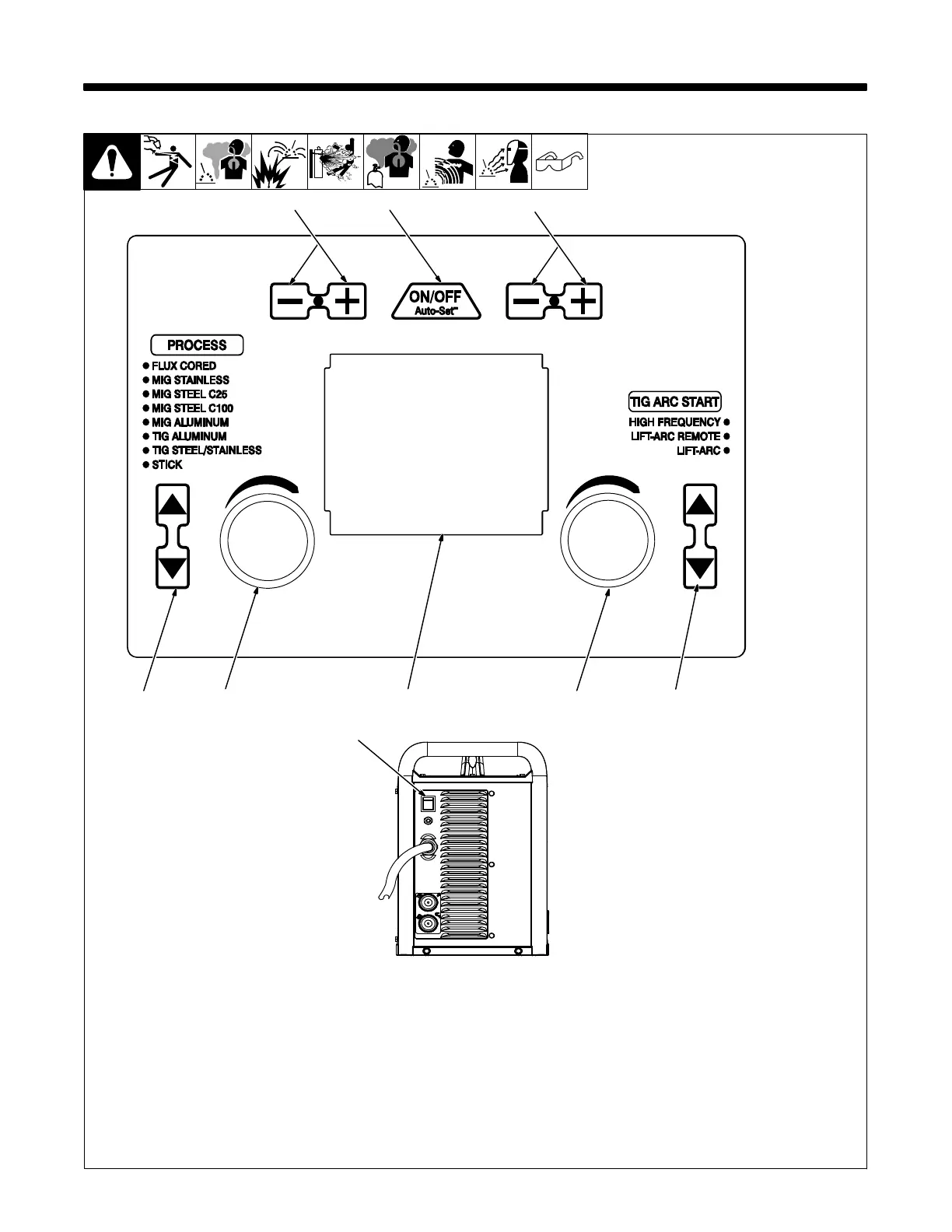
6-1. Controls
1 Process Select Buttons
Press the up and down buttons to select de-
sired welding process.
2 Auto-Set Button
Press button to turn Auto-Set On or Off. Au-
to-Set is On when illuminated.
3 Wire/Rod/Tungsten Buttons
Press the Plus (+) or Minus (−) button to
select the size of wire, rod, or tungsten for
the selected process.
. When MIG Aluminum process is se-
lected, Wire/Rod/Tungsten buttons are
used to select type of spool gun being
used.
4 Material Thickness Buttons
Press the Plus (+) or Minus (−) button to
select material thickness for the selected
process.
5 Display
6 Adjustment Knobs
7 TIG Arc Start Select Buttons
Press the up and down buttons to select de-
sired TIG arc start.
8 Power Switch
Use switch to turn unit On or Off.
Ref. 281252A / 282718A
6
1
2
3
4
5
7
Rear View
6
8












 To Next Page