. A complete Parts List is available at www.MillerWelds.com
OM-281426 Page 31
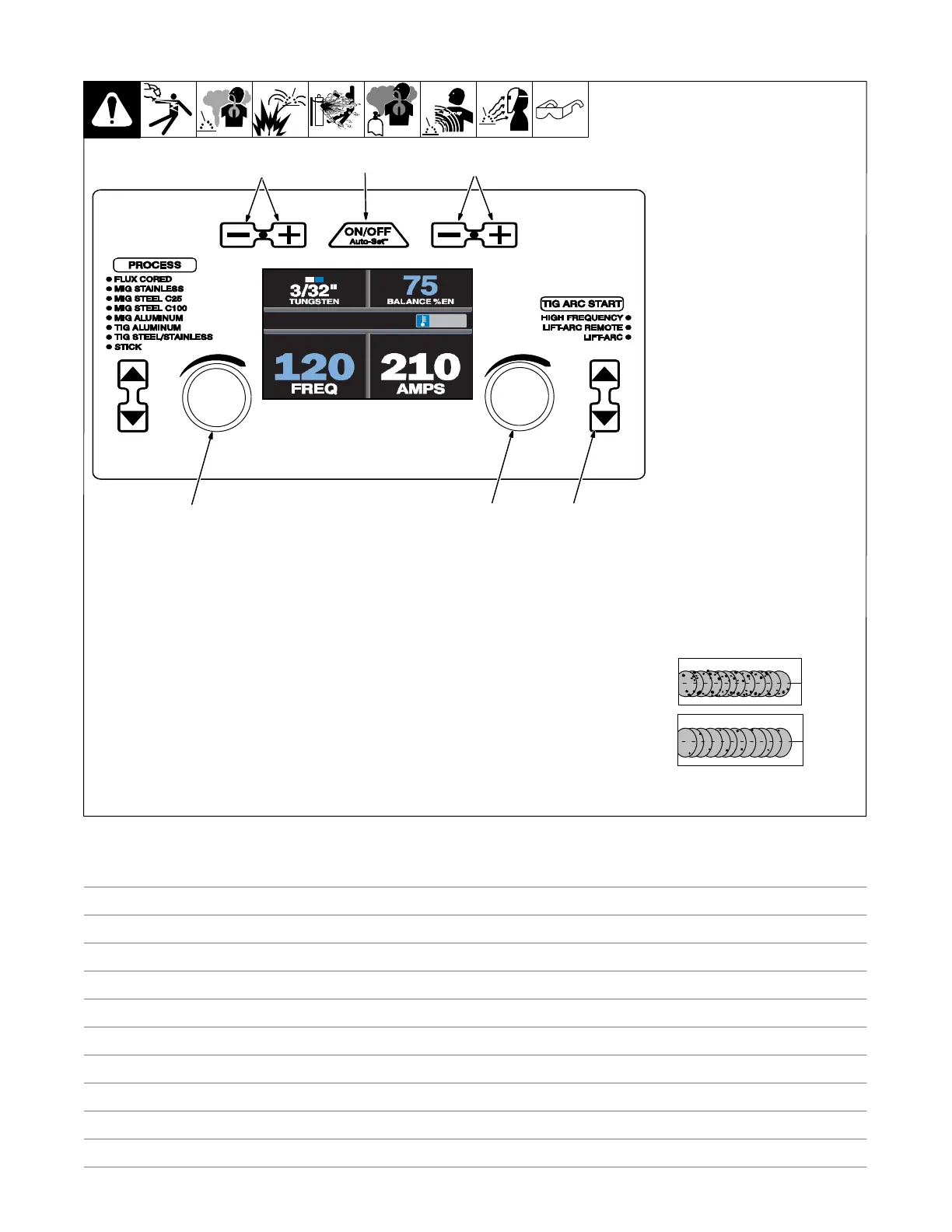
6-2. Controls, TIG Aluminum Manual Mode
1 Auto-Set Button
Press button to turn Auto-Set fea-
ture On or Off. Auto-Set is On when
illuminated.
2 Tungsten Size Buttons
Press the Plus (+) or Minus (-) but-
ton to adjust up or down.
3 Balance Adjustment Buttons
Press the Plus (+) or Minus (-) but-
ton to adjust up or down. The range
is 60-80%. Pro-Set value is 75%
(See tip below).
4 Frequency Adjustment Knob
Frequency range is 60-150 Hz.
Pro-Set value is 120 Hz (See tip be-
low).
5 Amperage Adjustment Knob
6 TIG Arc Start Select Buttons
Press the up and down buttons to
select desired TIG arc start. Lift-Arc
not available for TIG aluminum.
TIP: AC Frequency controls the
width of the arc cone. Increasing
the AC Frequency provides a more
focused arc and increased direc-
tional control.
Note: Decreasing the AC Frequen-
cy softens the arc and broadens the
weld puddle for a wider weld.
TIP: AC Balance controls the
cleaning action. If floating black
spots appear in the puddle the bal-
ance setting is too high. Turn the
balance down until the puddle be-
comes clear.
Ref. 281252A
1
2
3
4
5
6
Notes












 To Next Page