. A complete Parts List is available at www.MillerWelds.com
OM-265 363 Page 25
265207-A / 261064-A
! Turn Off welding power
source and disconnect input
power before opening ac-
cess door.
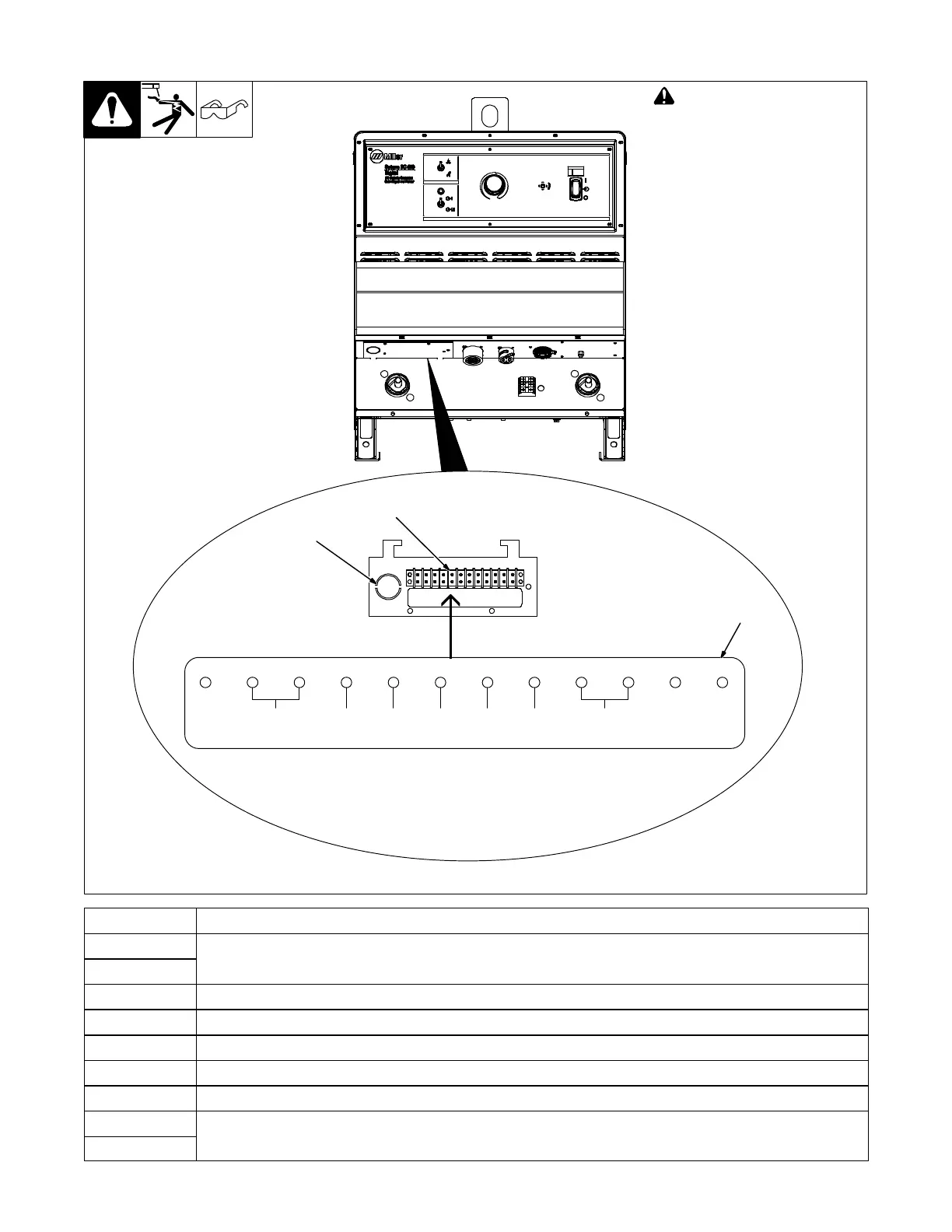
1 Access Hole
Remove knockout from access
hole and install customer supplied
strain relief. Route cable connec-
tions through the access hole.
2 12-Pole Terminal Strip
3 Label
Remove and retain screws and
open terminal strip panel. Make
connections per the label on the
panel. Close panel and replace
screws.
. DC 650/800 model shown. Lo-
cation is the same for DC
1000/1250 models.
1
Tools Needed:
261064-A
RMT CMD
REF
+10VDC
OUTPUT
CMD
0–+10VDC
A
RMT
COMM
B
10VDC
REMOTE
CONTACTOR
ECFD H ML
RMT
POWER
ON/OFF
CURRENT
FEEDBACK
(1V/100A)
VOLTAGE
FEEDBACK
(1V/10V)
2
3
Terminal Function Information
A 10 VDC remote contactor.
B
Connecting terminals A and B will enable output.
C Remote command reference +10 VDC. Connecting terminals C, D, and E will allow remote control.
E Output command 0 − +10 VDC. Connecting terminals C, D, and E will allow remote control.
D Remote common.
F Connecting terminals F and D will provide current feedback (1V/100A).
H Connecting terminals H and D will provide voltage feedback (1V/10A).
M Remote power on/off.
Connecting a switch to terminals M and L allow the power source to be remotely turned on or off.
L


 To Next Page