. A complete Parts List is available at www.MillerWelds.com
OM-265 363 Page 27
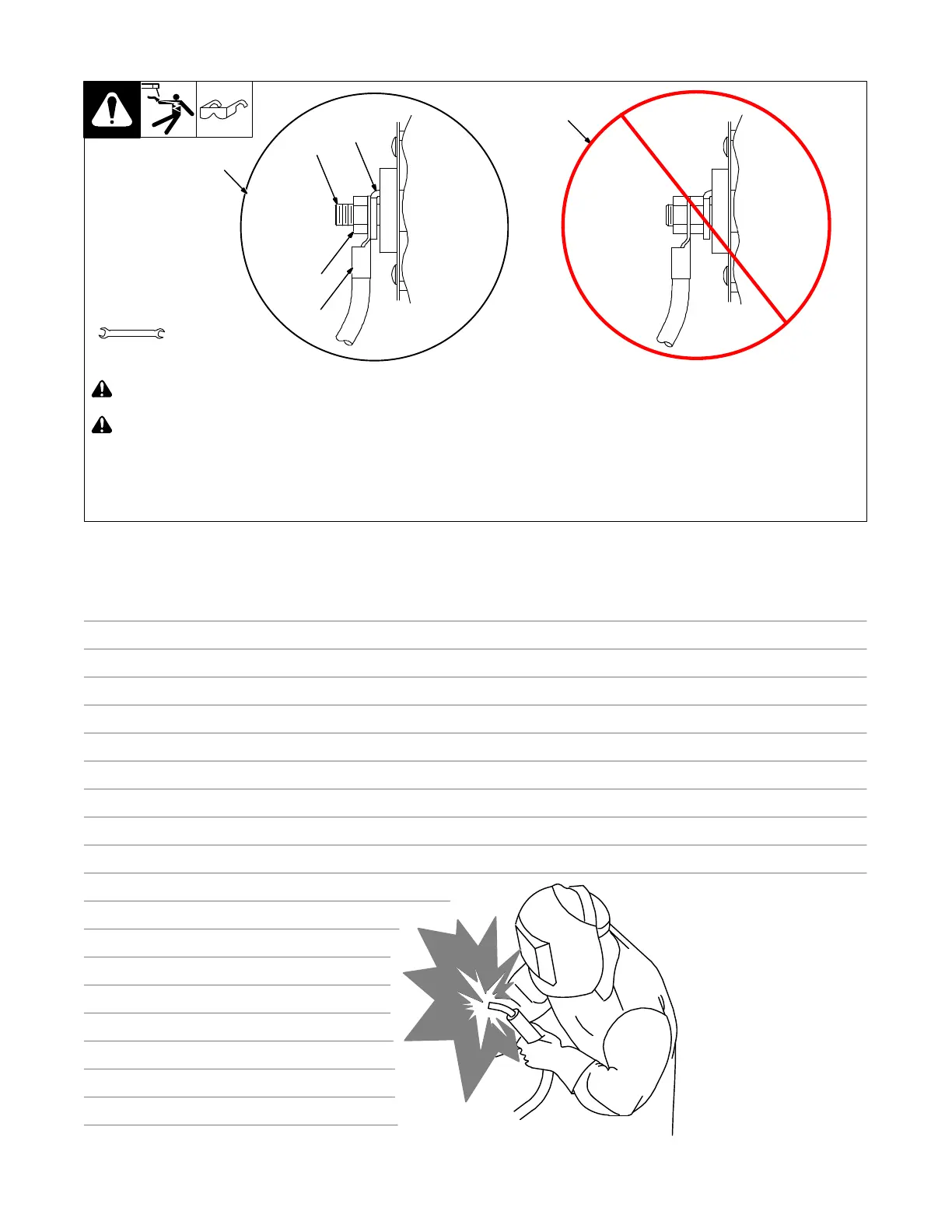
6-2. Connecting Weld Output Cables
803 778-B
! Turn off power before connecting to
weld output terminals.
! Failure to properly connect weld
cables may cause excessive heat
and start a fire, or damage your ma-
chine.
. Do not place anything between weld
cable terminal and copper bar. Make
sure that the surfaces of the weld cable
terminal and copper bar are clean.
1 Correct Weld Cable Connection
2 Incorrect weld Cable Connection
3 Weld Output Terminal
4 Supplied Weld Output Terminal Nut
5 Weld Cable Terminal
6 Copper Bar
Remove supplied nut from weld output ter-
minal. Slide weld cable terminal onto weld
output terminal and secure with nut so that
weld cable terminal is tight against copper
bar.
Tools Needed:
3/4 in. (19 mm)
4
2
3
1
5
6
connecting weld output cables 3−2010
Notes
Work like a Pro!
Pros weld and cut
safely. Read the
safety rules at
the beginning
of this manual.


 To Next Page