INSTALLATION
- 16 -
F
LUSH MODE
The Tank Outlet Valve should be left open during
FLUSH mode.
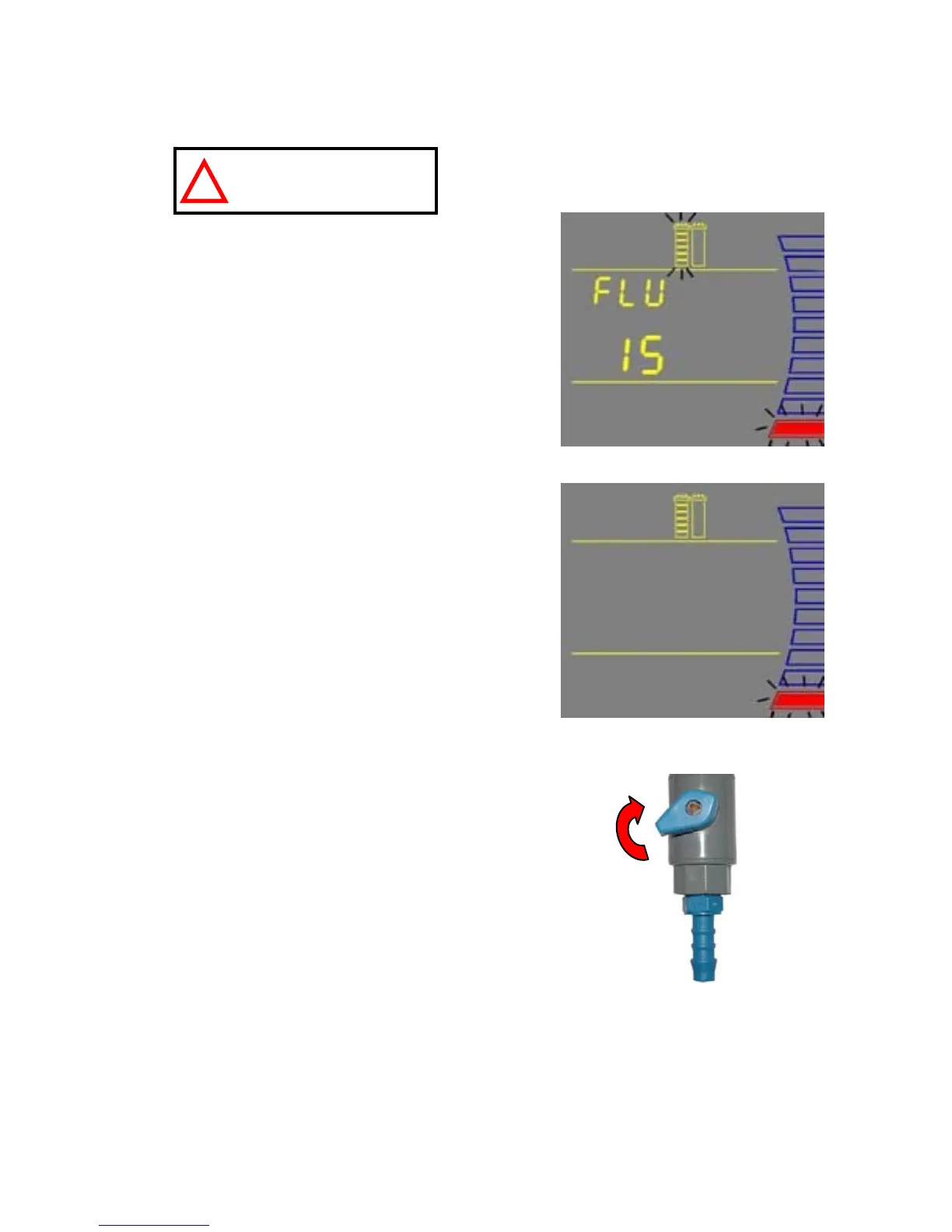
The system will now go into FLUSH mode for
15 minutes (H). This is done to empty the
SmartPak of air and hydrate the material inside.
When FLUSH mode is finished, the system will
go into FILLING TANK mode automatically
(I).
R
INSING THE SMARTPAK
Let FILLING TANK mode run for 15 minutes
with the Tank Outlet Valve open. This will
completely rinse the purification media inside
the SmartPak.
Close the Tank Outlet Valve (J). The tank will
start to fill up with water. It could take
approximately 1.5 to 2 hours to fill the tank.
When it is full, the Display will indicate a full
tank by illuminating the symbols representing
the Tank Level (see Section 5-1 Understanding
the Display).
The Vent Filter needs to be installed. See Section 4-5
Installation of the Vent Filter.
NOTE: for sensitive applications, it is
recommended to leave the system in FILLING
TANK overnight to ensure complete rinsing of the
RO membrane.
H
I
J
ATTENTION


 To Next Page