USING THE DIRECT-Q
- 26 -
Chapter 5 USING THE DIRECT-Q
5-1 UNDERSTANDING THE DISPLAY
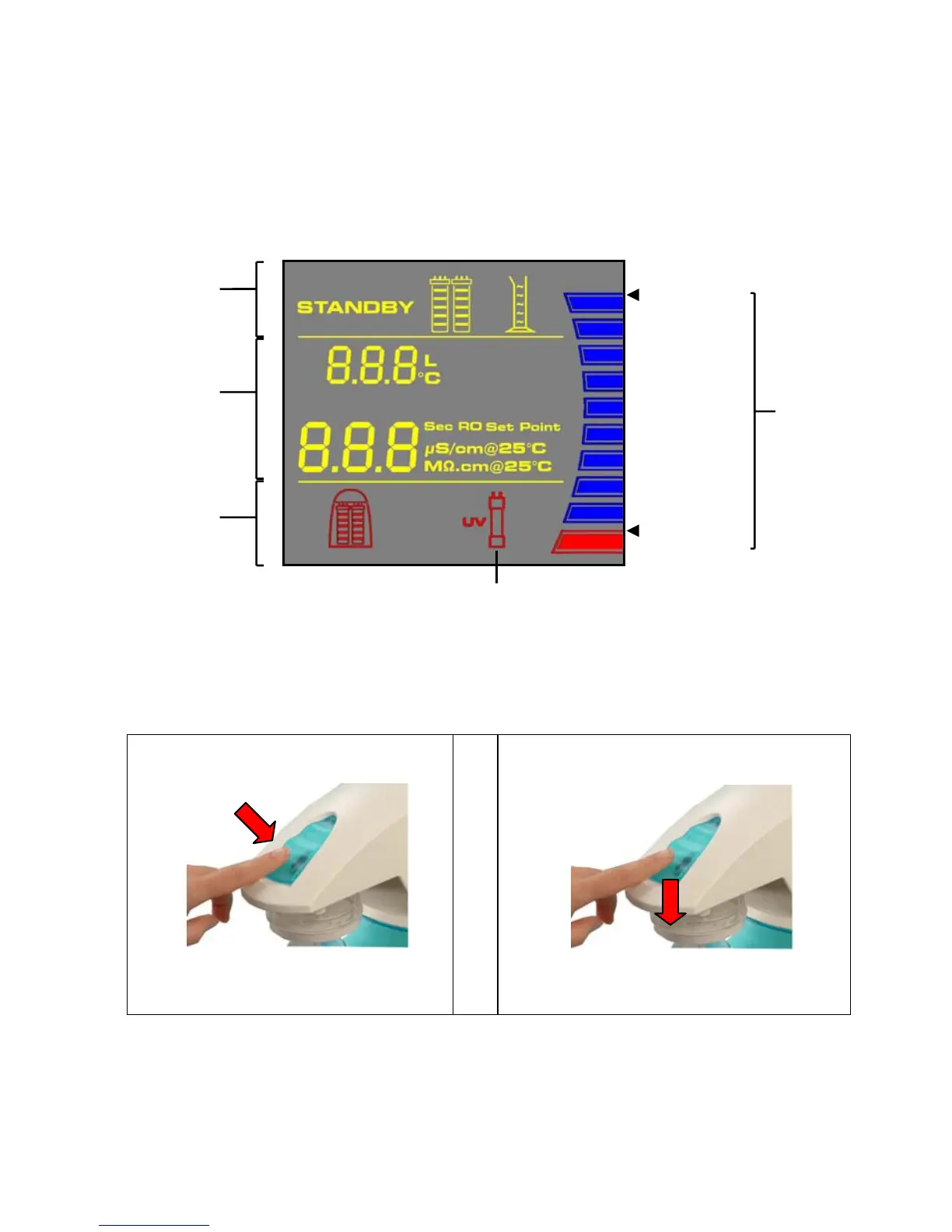
The Display is used to view information about the Operating Modes, the Operating Parameters, Maintenance
or Alarm messages and the Tank Level.
Operating
Modes
100 % TANK
ULL
Tank
Level
Operating
Parameters
Maintenance or
Alarms
10 %
UV System only
5-2 HOW TO GET WATER FROM THE DIRECT-Q
PRODUCT WATER USING THE DISPENSING BUTTON
There are two ways to get water using the Dispensing Button:
Press once and release. OR Press and hold down.
To stop dispensing water, press the
Dispensing Button once again.
To stop dispensing water, release the Dispensing
Button.
The system will dispense water continuously until the 10% Tank Level display is reached. At the
10% level, the system will automatically stop dispensing water.


 To Next Page