EasyManua.ls Logo

Millipore DIRECT-Q 3 SYSTEM - How to Calibrate the Tank Level (C04)

Millipore DIRECT-Q 3 SYSTEM
73 pages
Print Icon
To Next Page IconTo Next Page
To Previous Page IconTo Previous Page
Loading...
MAINTENANCE
- 44 -
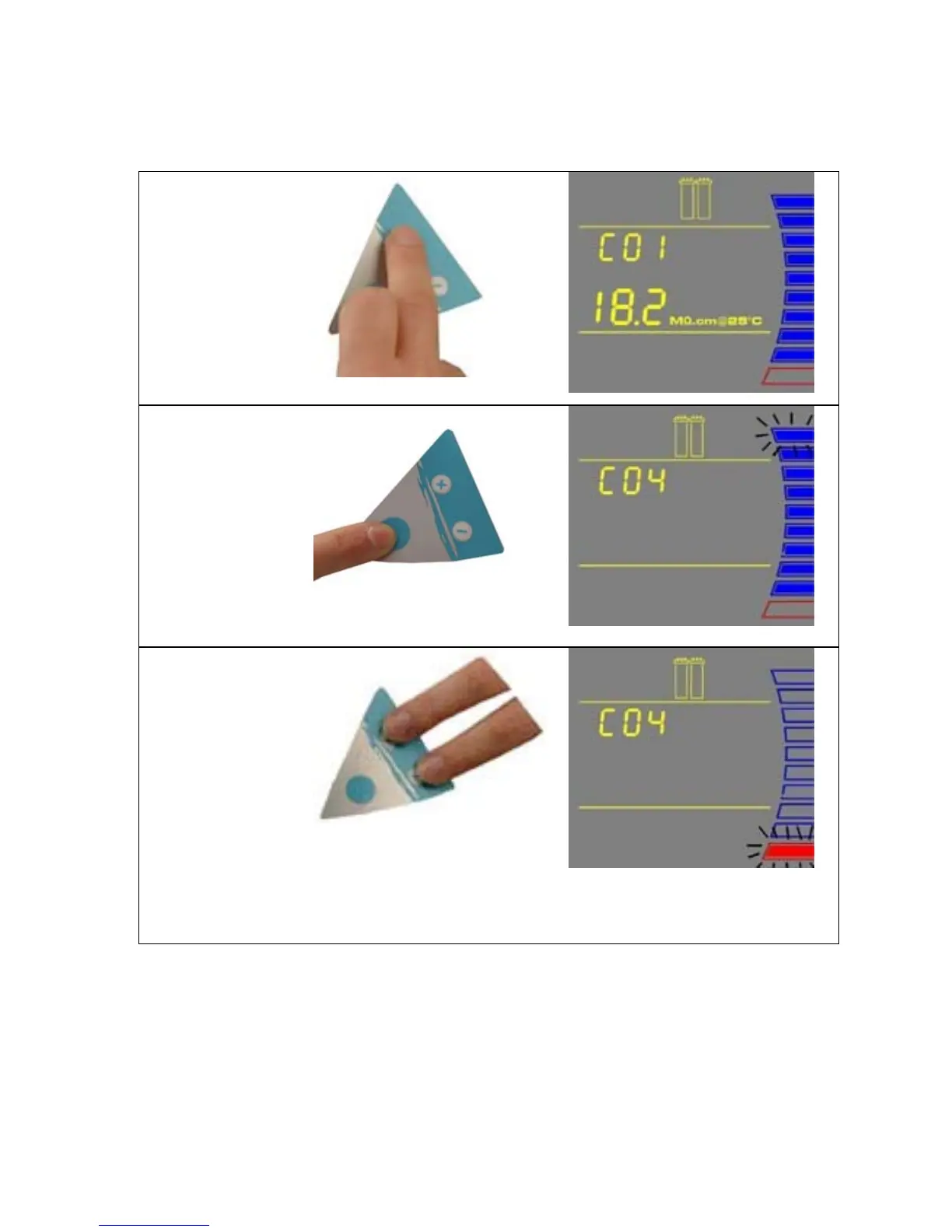
6-5 HOW TO CALIBRATE THE TANK LEVEL (C04)
Before calibrating the tank level, the tank needs to be filled to the 100% level or TANK FULL.
1. Press the Main
and “+“
Buttons
together to
enter the menu.
The Display
will show C01.
2. Press the Main
Button 3 times.
The Display
will show C04.
The highest
Tank Level
display will be
blinking. This
means that the
highest water
level is ready to
be calibrated.
3. Press the “+”
and “-“ Buttons
together to
enter the
highest water
level. The
Display will
show the lowest
Tank Level (red
level) display
blinking.
NOTE: The highest and lowest tank level must be calibrated together or else the tank level is
not calibrated.
CONTINUED ON THE NEXT PAGE

Table of Contents

Related product manuals