EasyManua.ls Logo

Millipore DIRECT-Q 3 SYSTEM - How to Dispense an Exact Amount of Product Water (F01)

Millipore DIRECT-Q 3 SYSTEM
73 pages
Print Icon
To Next Page IconTo Next Page
To Previous Page IconTo Previous Page
Loading...
USING THE DIRECT-Q
- 28 -
H
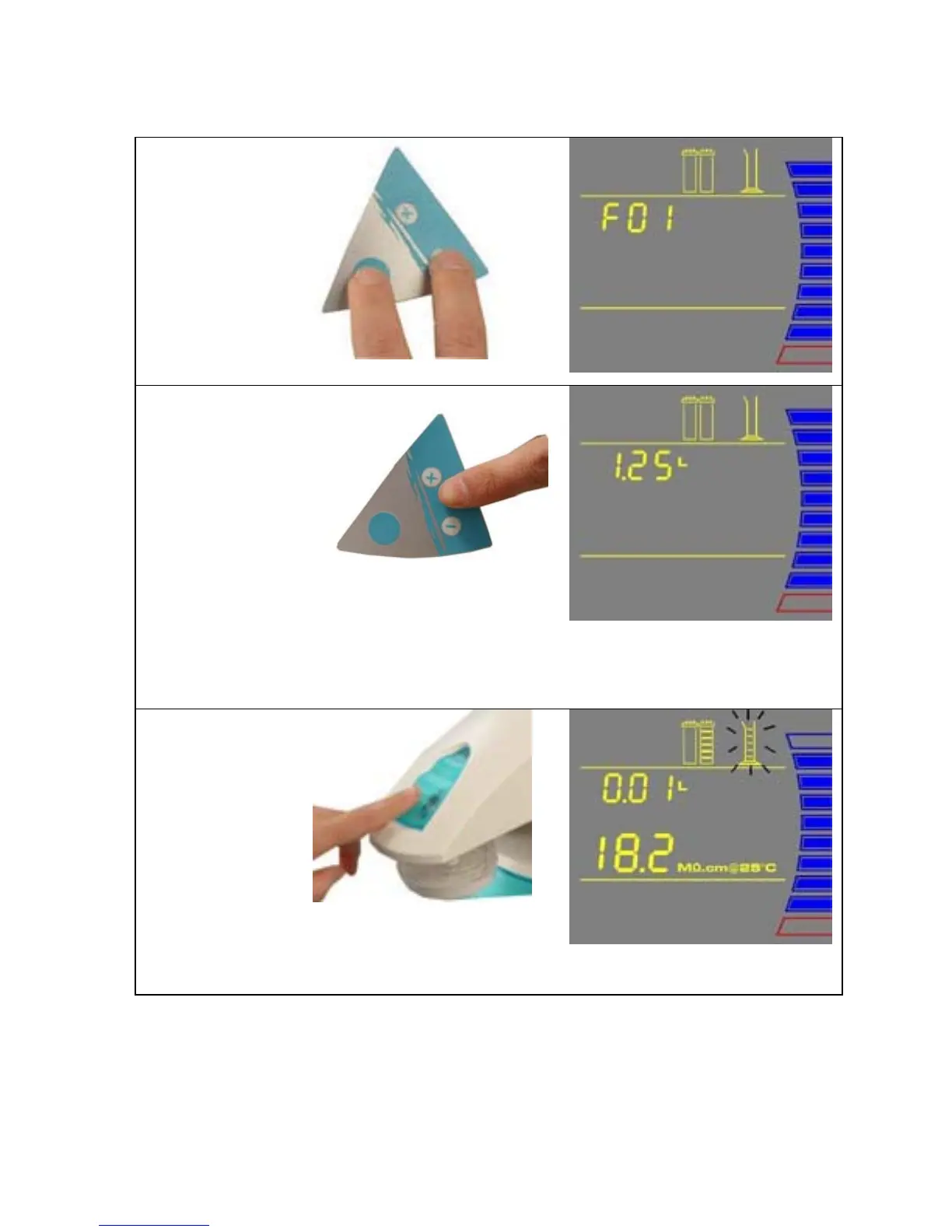
OW TO DISPENSE AN EXACT AMOUNT OF PRODUCT WATER (F01)
1. Press the Main
and “-“ Buttons
together to enter
the menu. The
Display will
show F01.
2. Press the “+” or
“-“ Button to
adjust the exact
amount of
Product Water
(in Litres)
needed. Pre-set
volumes of
water can be
adjusted from
0.25 L to 9.75 L
in 0.25
increments.
NOTE: The accuracy of this is dependent upon the accuracy of the Flow Calibration performed in
Section 4-10.
3. Press the
Dispensing
Button once.
The system will
dispense water.
The Display
will show the
amount of water
dispensed and
the Product
resistivity.
NOTE: To stop dispensing water, press the Dispensing Button once again.

Table of Contents

Related product manuals