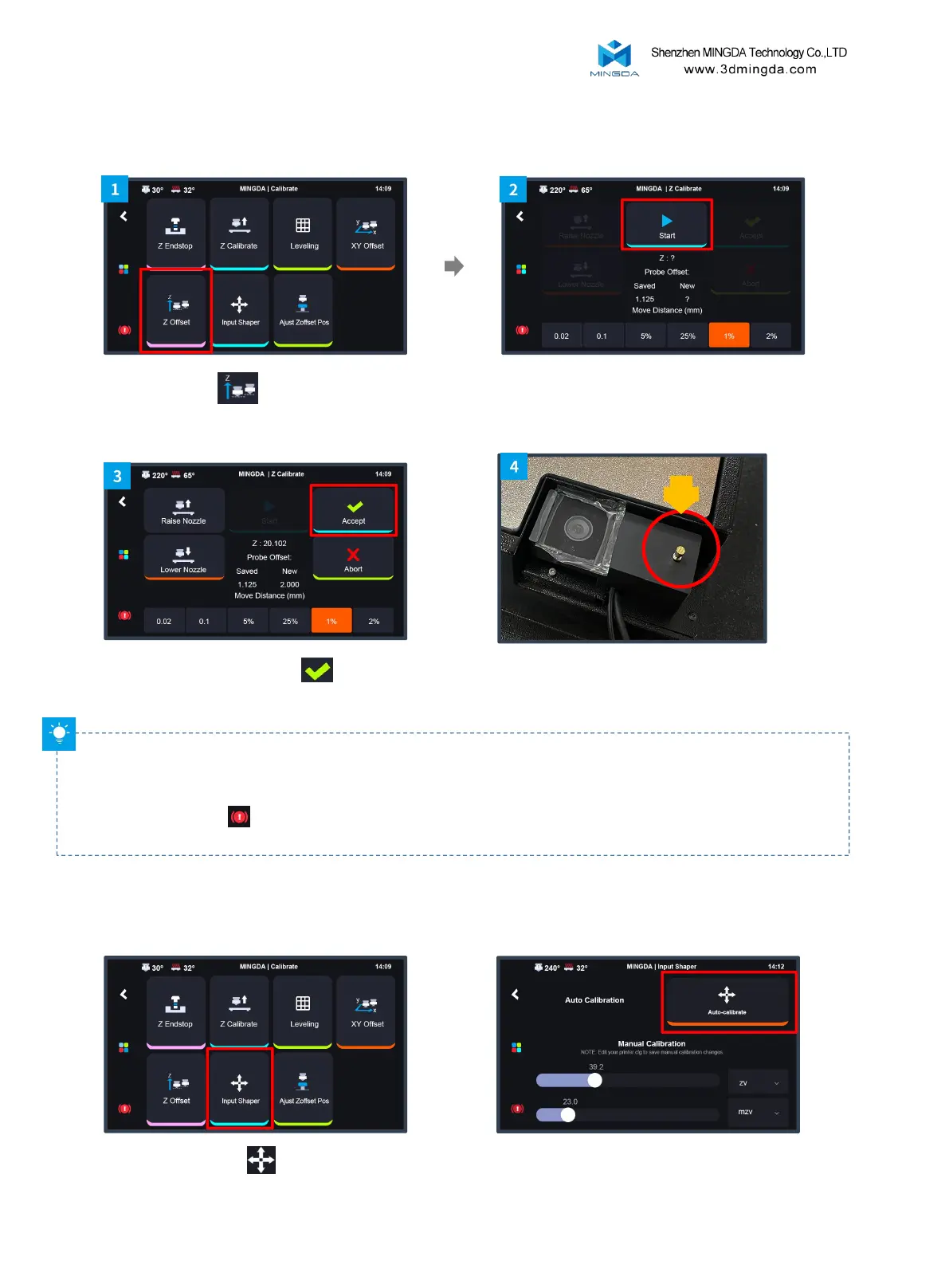
5. Z Axis Offset Calibration
Safety Reminder: To ensure that the nozzle correctly lands on the sensor, please calibrate the XY axis before
calibrating the Z axis. While the extruder is moving downward, pay close attention to its movement. If there is
excessive deviation or signs of extreme extrusion pressure, click the return in the top left corner of the screen or
the emergency stop in the bottom left corner to stop the calibration. Contact customer support or refer to
official videos for troubleshooting solutions.
Click “Start” to start Z offset automatically
Click "Z Offset"
After finishing, click “Accept” and
confirm
While calibrating the Z-axis offset, the extruder
will move towards the sensor located the left side
of the camera.
11
6. Input Shaper
Click "Input Shaper"
Click "Auto-calibrate",After calibration is
complete, click the save button.



 To Next Page