Startup Configuration
1. Select Language and Time Zone
3
1
21
2
2. Wi-Fi
7
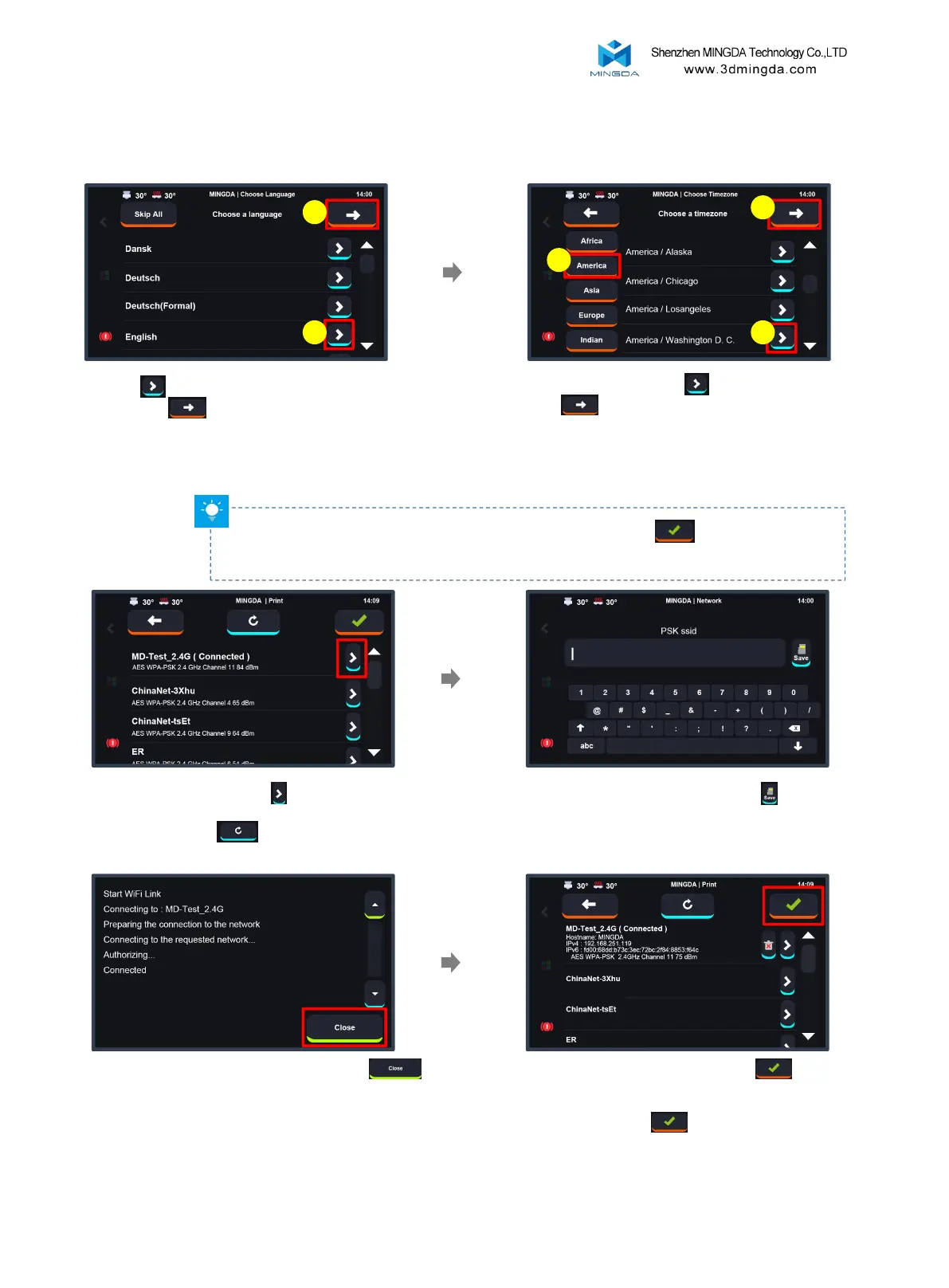
Select timezone, click to confirm, and
click to next step.
[Time zone settings will take effect after
connecting to Wi-Fi and restarting the system.]
Click to choose the language,
and click to proceed to the
next step.
Note: If you find that the printer cannot detect your WiFi signal, you can click to skip this step for
now. After completing the startup wizard, move the printer to a location closer to a stronger signal source,
and then reconnect to WiFi.
Enter the WiFi password and click
Select the WiFi and click
(If your WiFi cannot be displayed for more than
20s, please click to refresh)
Upon successful connection, click the in the
upper right corner to enter the main interface of the
machine. If you do not need to connect to the network,
you can also click the to skip this step.
Once the connection is successful, click



 To Next Page