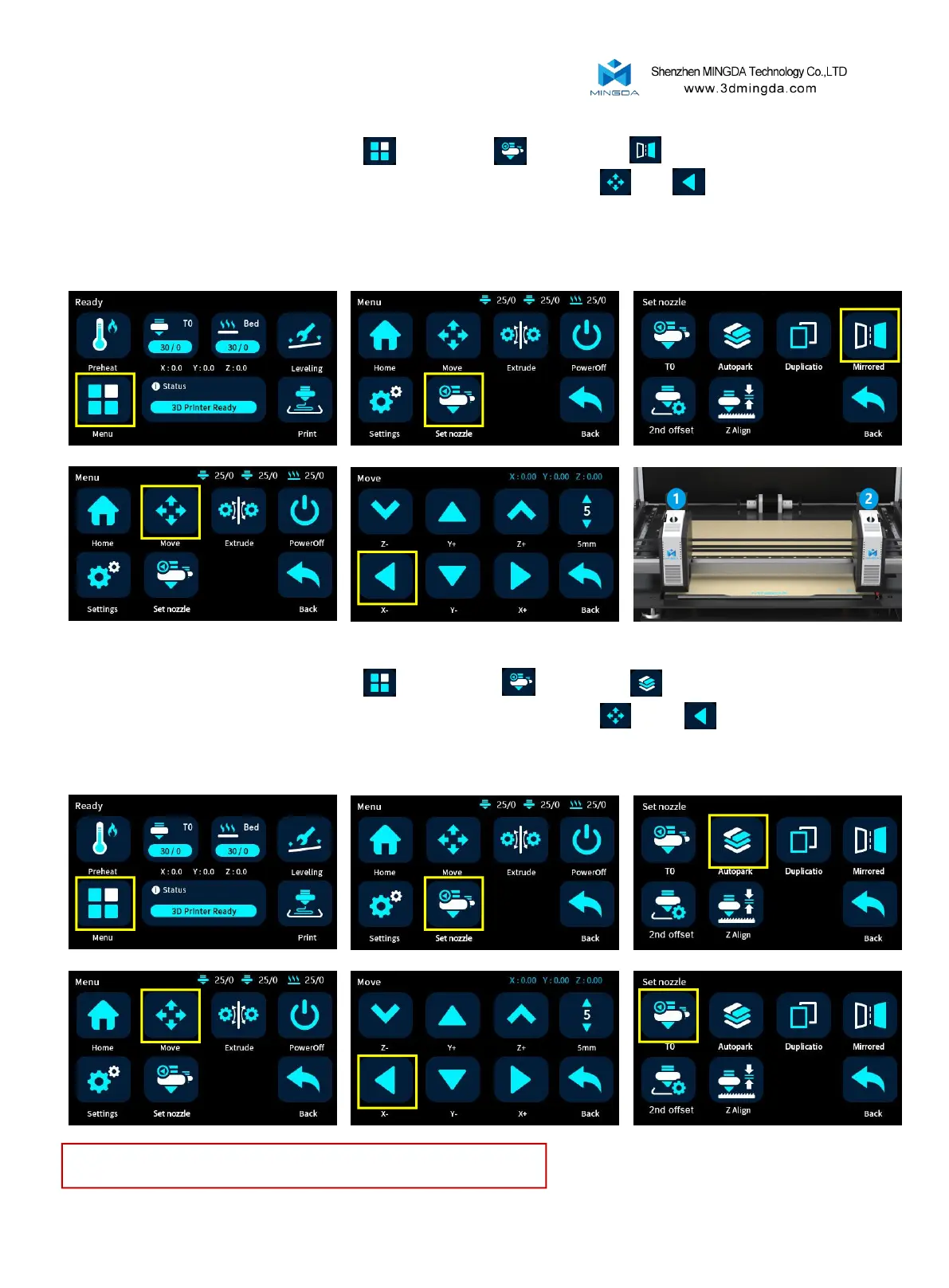
Open the mirrored mode: select "Menu" , "Set nozzle" , "Mirrored " , at this time the extruder will
have a return movement, and then return to the previous step, click "Move" , "X-" , The extruder 2 will move
to the right to the lower right corner of the hot bed. The extruder 1 will move to the left to the lower left corner of the
hot bed. At this time, the distance between the extruder is fixed, and the mirrored mode is successfully opened.
Open the Autopark mode: select "Menu" , "Set nozzle" , "Autopark" , at this time extruder
will have a return action, and then return to the previous step, click "Move" , "X-" , Left print
head will move to the right. If you want to move another print head, return to the mode selection interface,
click T0 to switch to T1, and return to the mobile interface to move the right print head.
Note: The machine will be reset to free mode after each restart
9



 To Next Page