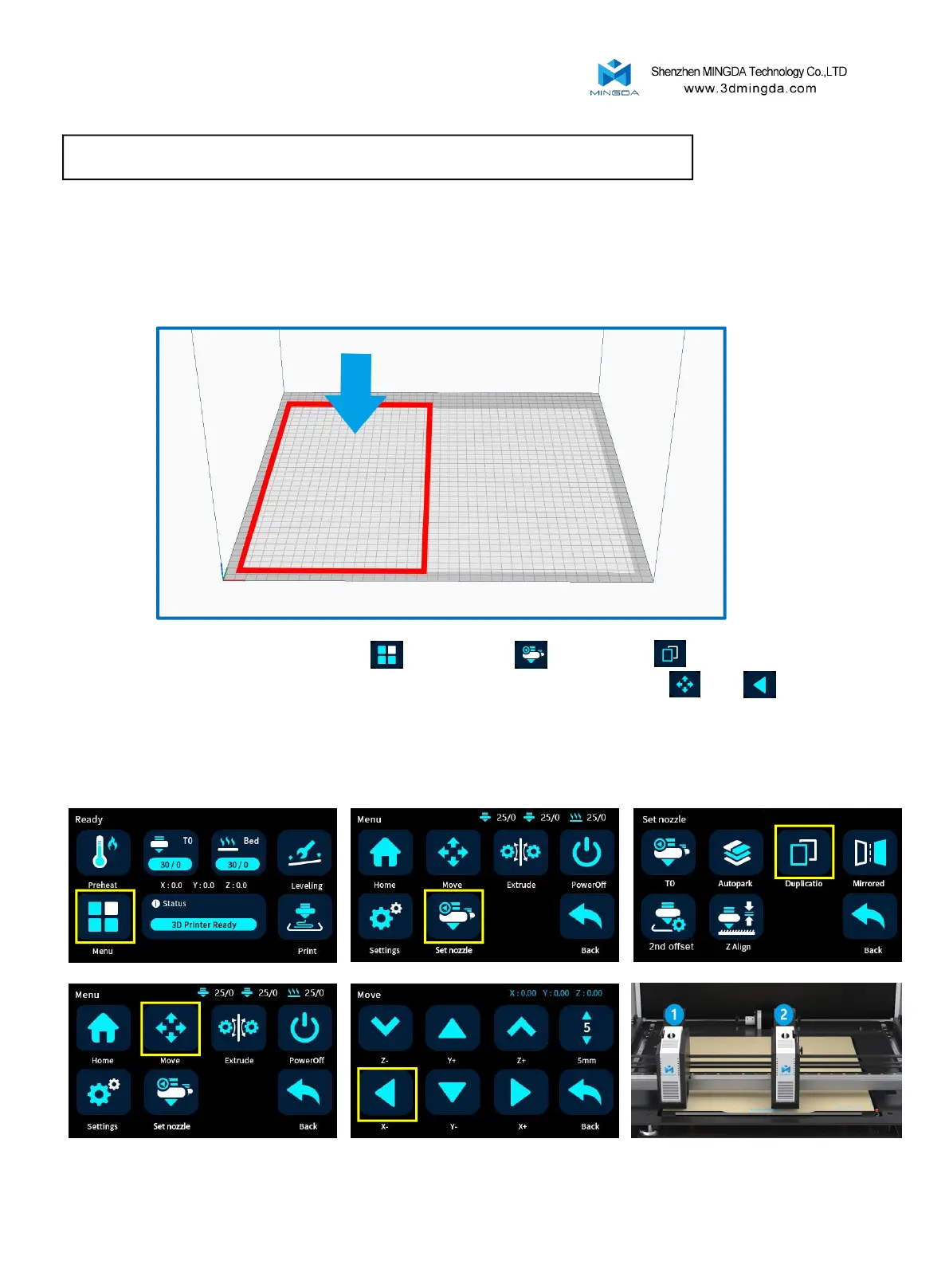
Duplicatio Mode / Mirrored Mode / Autopark Mode
Reminder: When starting the Duplicatio / Mirrored printing mode, the two extruders are printed at the same
time at the left and right ends of the hot bed. Therefore, when slice, we need to put the model at the left end
of the hot bed. When the two extruders are printed at the same time, they will not interfere with each other
to produce collisions, so as to achieve the effect of Duplicatio / Mirrored printing.
Open the duplicatio mode: select "Menu" , "Set nozzle" , "Duplicatio" , at this time the
opportunity to squeeze out of the way, then return to the previous step, click "Move" , "X-" , The
extruder 2 will move to the middle of the hot bed. The extruder 1 will move to the left to the lower left corner of
the hot bed. At this time, the distance between the extruder is fixed, and the duplicatio mode is successfully
opened.
8



 To Next Page