Step 2 Start slicing
The MD-400D is an independent dual nozzle 3D printer that can be switched between three modes on the
machine. They are duplicate mode, mirror mode and free mode.
During the process of using MINGDA CURA, users will have four different usages: duplicate mode, mirror mode,
print support, and print dual color. The following manual introduces the usage of this slicing software in these
four ways.
The slicing software will display print head 1 and print head 2, where print head 1 corresponds to the left print
head of our machine and print head 2 corresponds to the right print head of our machine.
Duplicate Mode
Printing size: X * Y * Z: 200 * 400 * 400mm
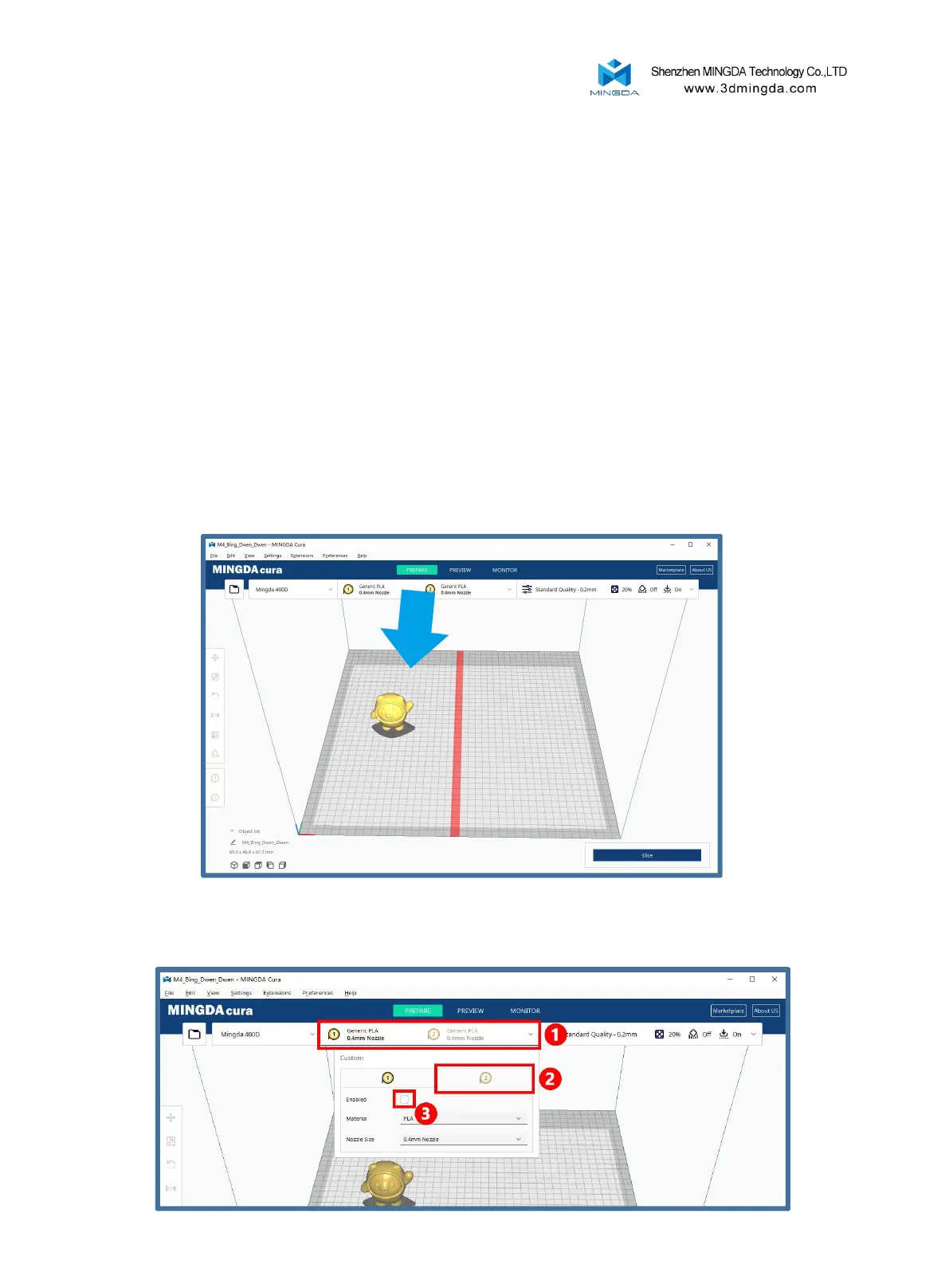
Copy mode printing process: Slice a single nozzle, select Copy mode on the machine, and then print.
Note 1: The red line marking is half the printed size, and the sliced model must be located to the left of the
red line. Otherwise, the right head will hit the outside of the platform or collide with the aircraft. In the actual
printing process, the left head will print on the left side of the red line, and the right head will print on the
right side of the red line.
Note 2: Printing head 1 should be used for slicing, and printing head 2 can be temporarily disabled.
As shown in the figure
23



 To Next Page