INSTALLATION
Communication Protocol Setup
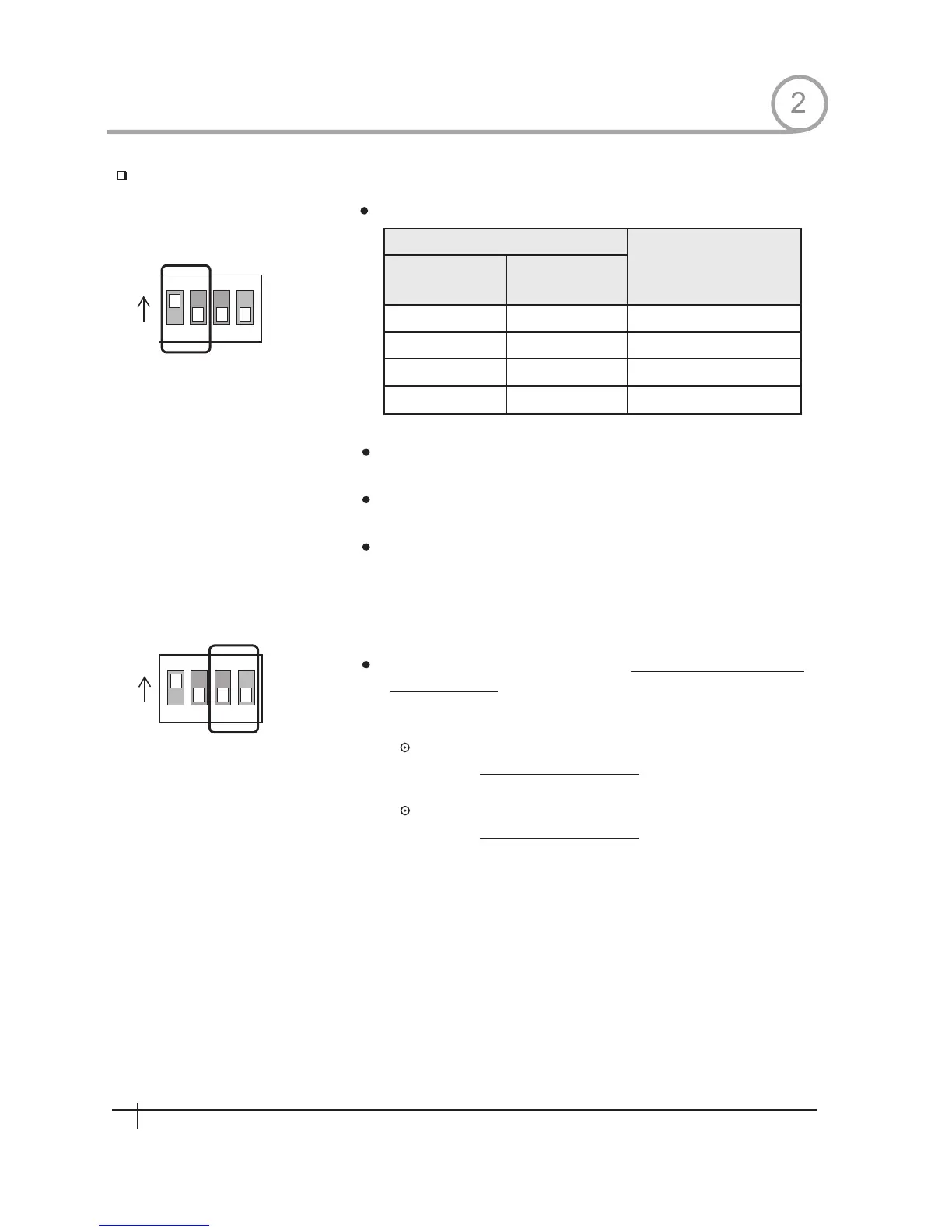
Select the appropriate Prptoco l with DIP switch combination.
Switch State
P0 P1
Protocol
(Pin 1)
(Pin 2)
OFF
ON
OFF
ON
OFF
OFF
ON
ON
PELCO-D,2400 bps
PELCO-D,9600 bps
PELCO-P,4800 bps
PELCO-P,9600 bps
If you want to control using DVR or P/T controller, their protocol must
be identical to camera. Otherwise, you can not control the camera.
If you changed camera protocol by changing DIP S/W,the change
will be effective after you reboot the camera.
Factory default of protocol is“Pelco-D, 2400 bps”
2
8
Spee d Dom e Camera Instruction Manual
ON
ON
ON
ON
1 2 3 4
1 2 3 4
Since Pin 3~Pin 4 is only for supplier,
ORIGINAL STATE. If you change one of these, proper operation can
not be achieved.
Pin 3
Pin 4
PAL / NTSC system selection of Camera.
Factory default value is on, the switch for the systems upgrade
DO NOT CHANGE THESE ITS
DO NOT CHANGE THIS PIN.
DO NOT CHANGE THIS PIN.


 To Next Page