OPERATION
3-10
Mirage 22000/4000/6000User’s Manual
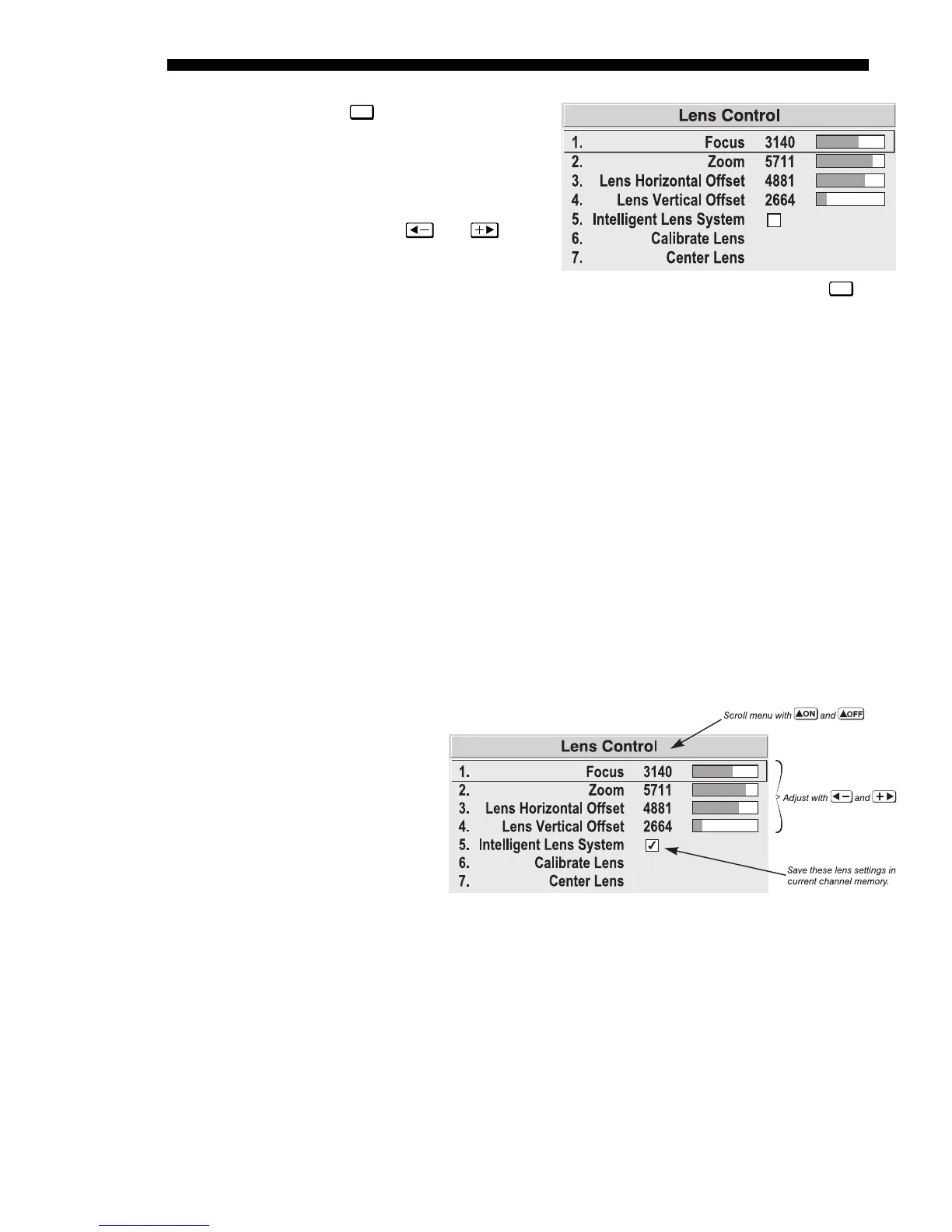
Press
Lens
to access remote
motorized control of
horizontal/vertical offsets, focus
and zoom, and other related
functions in the Lens Control
menu. All slidebars can be
adjusted with
and , or
set with a specific value entered
from the keypad.
NOTE: Since the direction of lens
travel affects the final true position of the lens, setting a lens position (focus, zoom or
an offset) to a specific value may cause the lens to reverse its direction of travel,
depending on its starting point, so that it approaches the setting from the necessary
direction. Any even-numbered setting is approached from above (the slidebar values
will decrease), any odd-numbered setting is approached from below (the slidebar
value will increase). This ensures accurate lens positioning.
FOCUS: Adjust the image clarity. If focus is not uniform throughout the image, bore
sight is likely poor. Contact your dealer for service.
ZOOM: Enlarge or shrink the image (note: requires a non-Vista
GRAPHX
zoom lens).
HORIZONTAL OFFSET:
Shift the lens and image left or right. Note that slidebar values
will not reach extremes of 0 or 9999. This is normal.
VERTICAL OFFSET:
Shift the lens and image up or down. Note that slidebar values
will not reach extremes of 0 or 9999. This is normal.
INTELLIGENT LENS SYSTEM: Enable “Intelligent Lens System” (ILS
TM
) to add the 4
lens positions—focus, zoom, horizontal and vertical offset—to the current channel
settings recorded in projector memory (see 3.5, Using Inputs and Channels if you are
unfamiliar with channels). This feature is particularly useful if you are using sources
with differing aspect ratios, such as anamorphic vs. 5:4. When switching to and from
such displays, the
lens will
automatically
move to the last
defined position
for each channel,
quickly
optimizing the
display for focus,
zoom and offsets.
ILS
TM
is a global
function—any
lens settings you subsequently define for other channels will be recalled whenever
you use those channels. Delete the checkmark if you want to use consistent zoom,
focus and offset settings for all channels—the lens will not move unless you re-adjust
a lens setting.
For full details regarding optimization of ILS
TM
performance, refer to 2.8, Zoom,
Focus and Lens Offset.
CALIBRATE LENS:
Select “Calibrate Lens” to ensure that the physical mid-point for
each of the four lens functions is defined as such in software, and that lens mount
Figure 3.4. Lens Control Menu (
Lens
)
Figure 3.5. Lens Settings and the ILS
TM



 To Next Page