Selecting the on-screen language
This TV allows you to see three different language on-screen
menus: English, Spanish and French.
Customize Viewing
Rename lhe inputs
_, Select Language
Use Video mute
Use Power restore
Use Advanced PIP
Use ADJUST to select.
Then press ENTER.
Press MENU to return to
TV Main Menu.
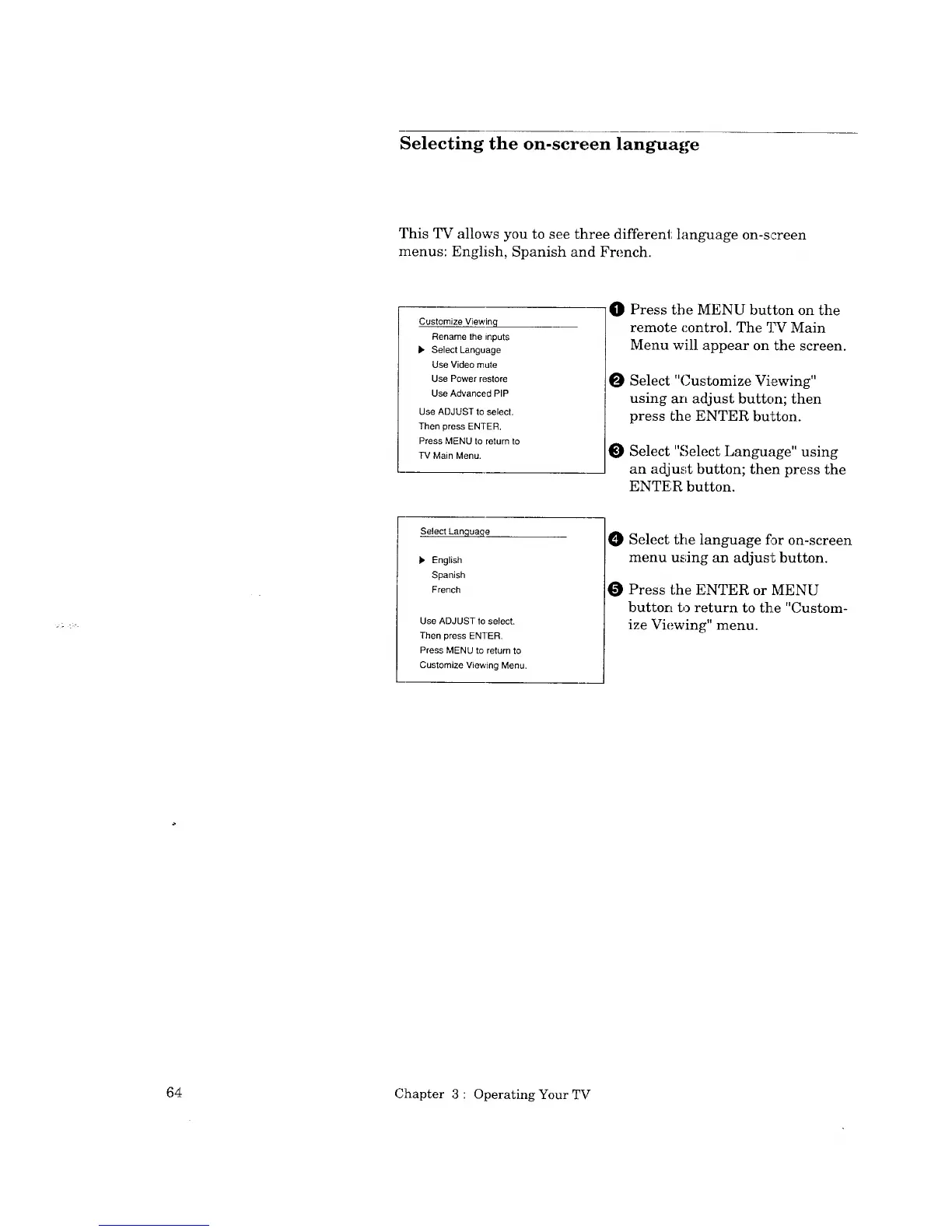
O Press the MENU button on the
remote control. The TV Main
Menu will appear on the screen.
O Select "Customize Viewing"
using an adjust button; then
press the ENTER button.
Select "Select Language" using
an adjust button; then press the
ENTER button.
Select Lanqua,qe
), English
Spanish
French
Use ADJUST to select.
Then press ENTER.
Press MENU to return to
Customize Viewing Menu.
Select the language f_r on-screen
menu using an adjust button.
O Press the ENTER or MENU
button to return to the "Custom-
ize Viewing" menu.
64 Chapter 3 : Operating Your TV



 To Next Page
 Loading...