Using the Replay feature
Use Advanced PIP
Current setting :
Replay
Replay speed : 1
Use ADJUST to select.
Then press ENTER.
Press MENU to return to
Customize Viewing Menu.
Use Advanced PIP
Current setting:
Replay
b. Replay speed : 1
Use ADJUST to select.
Then press ENTER.
Press MENU to return to
Customize Viewing Menu.
O
O
O
O
O
Se],ect "Use Advanced PIP" in
"Customize Viewini#" menu;
then set the current setting to
"Replay." (See "Using the ad-
vanced PIP functions," page 67.)
Set the replay speed between 1
(short interval) and 9 (long
interval).
Use the MENU button to return
to the normal picture.
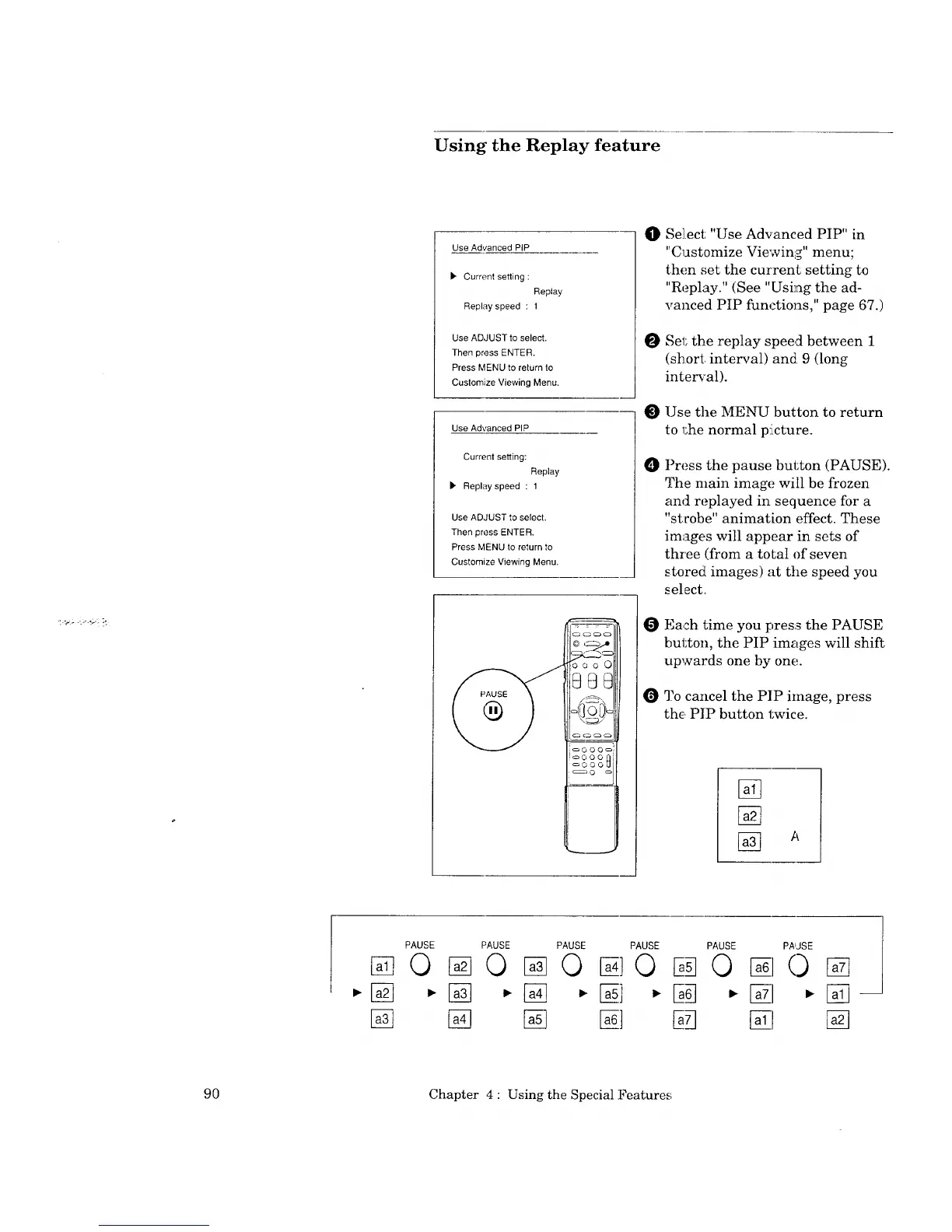
Press the pause button (PAUSE).
The main image will be frozen
and replayed in sequence for a
"strobe" animation effect. These
images will appear in sets of
three (from a total of seven
stored images) at the speed you
select.
Each time you press the PAUSE
button, the PIP images will shift
upwards one by one.
O 3?0cancel the PIP image, press
the PIP button twice.
B-q
PAUSE
©
PAUSE PAUSE PAUSE
%0%0 10
B73
PAUSE
©
PAUSE
0
90 Chapter 4 : Using the Special Features



 To Next Page
 Loading...