Using the Snap-shot feature
Use Advanced PIP
Current setting :
Snap-shot
Use ADJUST to select.
Then press ENTER.
Press MENU to return to
Customize Viewing Menu.
oooo
oOOOB
0
0
0
0
0
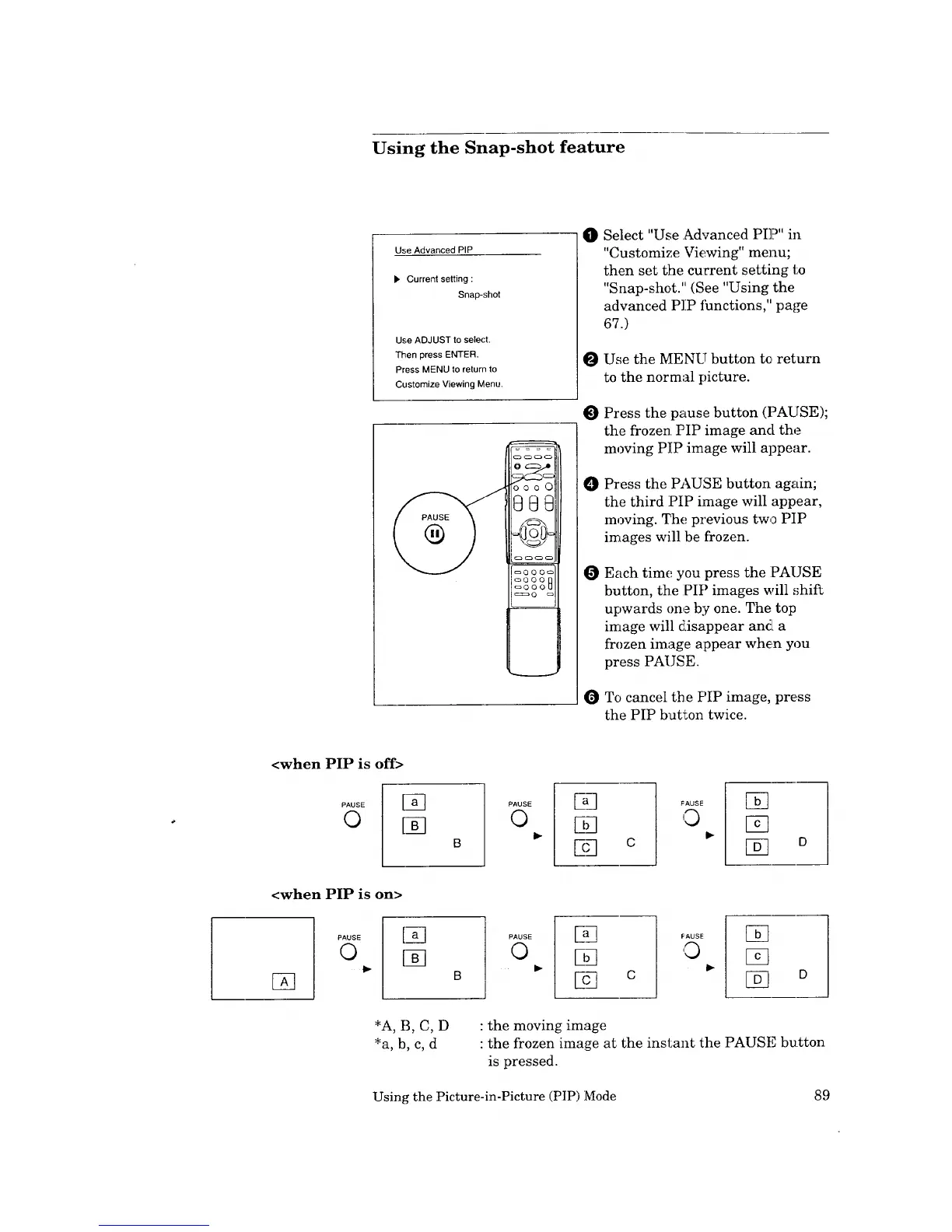
Select "Use .Advanced PIP" in
"Customize Viewing" menu;
then set the current setting to
"Snap-shot." (See "Using the
advanced PIP ihnctions," page
67.)
Use the MENU button te return
to the normal picture.
Press the pause button (PAUSE);
the frozen PIP image and the
moving PIP image will appear.
Press the PAUSE button again;
the third :PIP image will appear,
moving. The previous two PIP
images will be frozen.
Each time you press the PAUSE
button, the :PIP images will shift
upwards one by one. The top
image will disappear and a
frozen image appear when you
press PAUSE.
To cancel the PIP image, press
the PIP button twice.
<when PIP is off>
PAUSE [a_
© [N
PAUSE
©
F,q
riq
12_ c
FAUSE
0
[]
[]
[] o
<when PIP is on>
[]
PAUSE
©
PAUSE
©
E_
D_
c
FAUSE
'0
[]
D
: the moving image
: the frozen image at the instant the PAUSE button
is pressed.
Using the Picture-in-Picture (PIP) Mode 89



 To Next Page
 Loading...