4.4
Writing a Program
Creating a new program
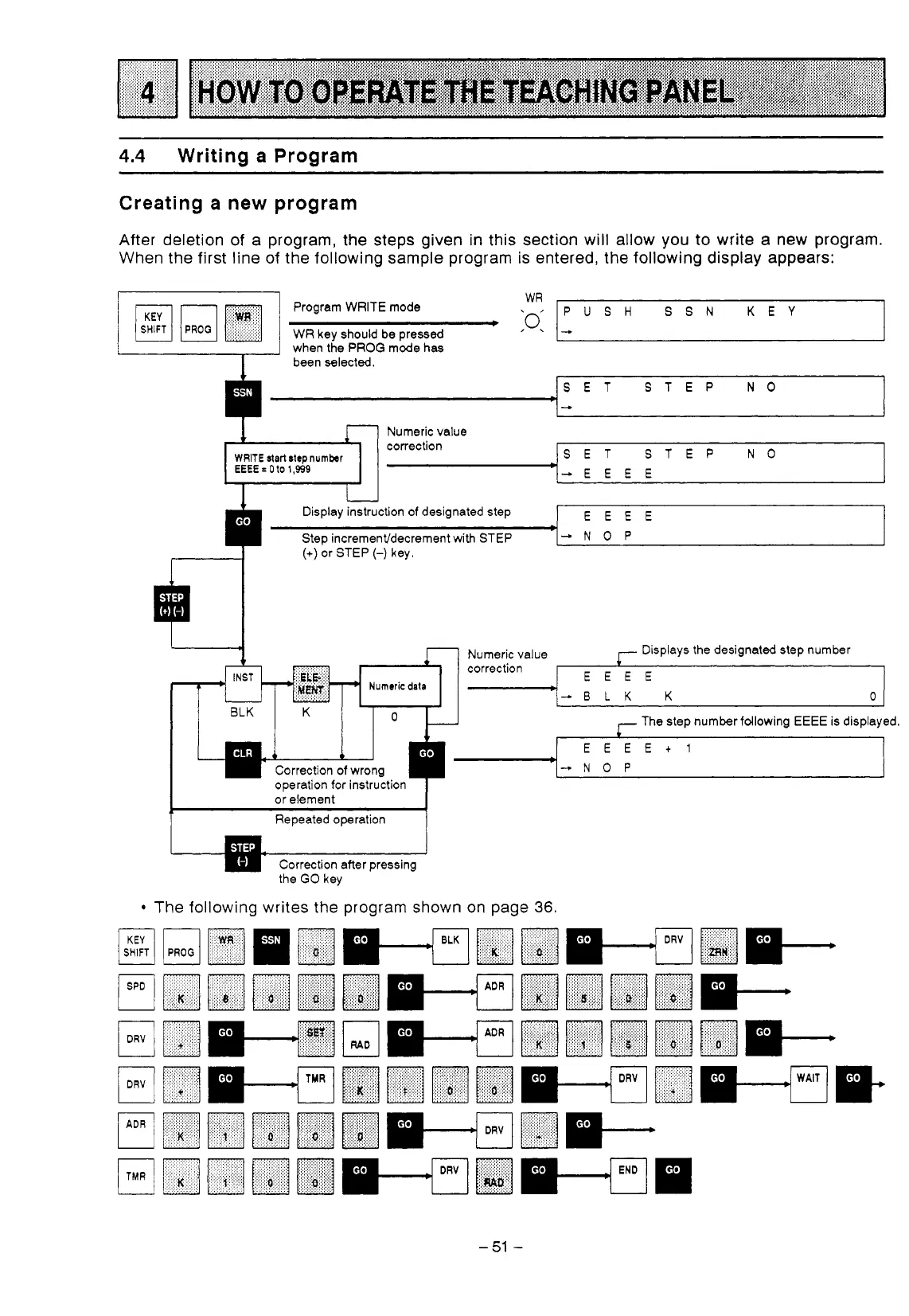
After deletion of a program, the steps given in this section will allow you to write a new program.
When the first line of the following sample program is entered, the following display appears:
Program WRITE mode
WR
key should be pressed
WR
PUSH
SSN
KEY
.
when the PROG mode has
been selected.
SET STEP
NO
+
Numeric value
correction
WRITE
startstepnumber
EEEE
=
0
to
1,939
SET STEP
NO
-EEEE
I
Display instruction of designated step
I
EEEE
-NOP
(+)
or
STEP
(-)
key.
7
Numeric value Displays the designated step number
*
correction
-.
EEEE
Numeric
data
'-ELK
K
0
K
O
The step number fdlowing
EEEE
is displayed.
EEEEt1
Correction
of
wrong
operation for instruction
'--NOP
I
or element
I
1
~
Repeatedoperation
1
Correction after pressing
the
GO
key
The following writes the program shown on page
36.
-51
-



 To Next Page
 Loading...