20 xTablet T1600 User Guide
Read Me First
Operating Your xTablet T1600
Configuring Light Sensor Settings
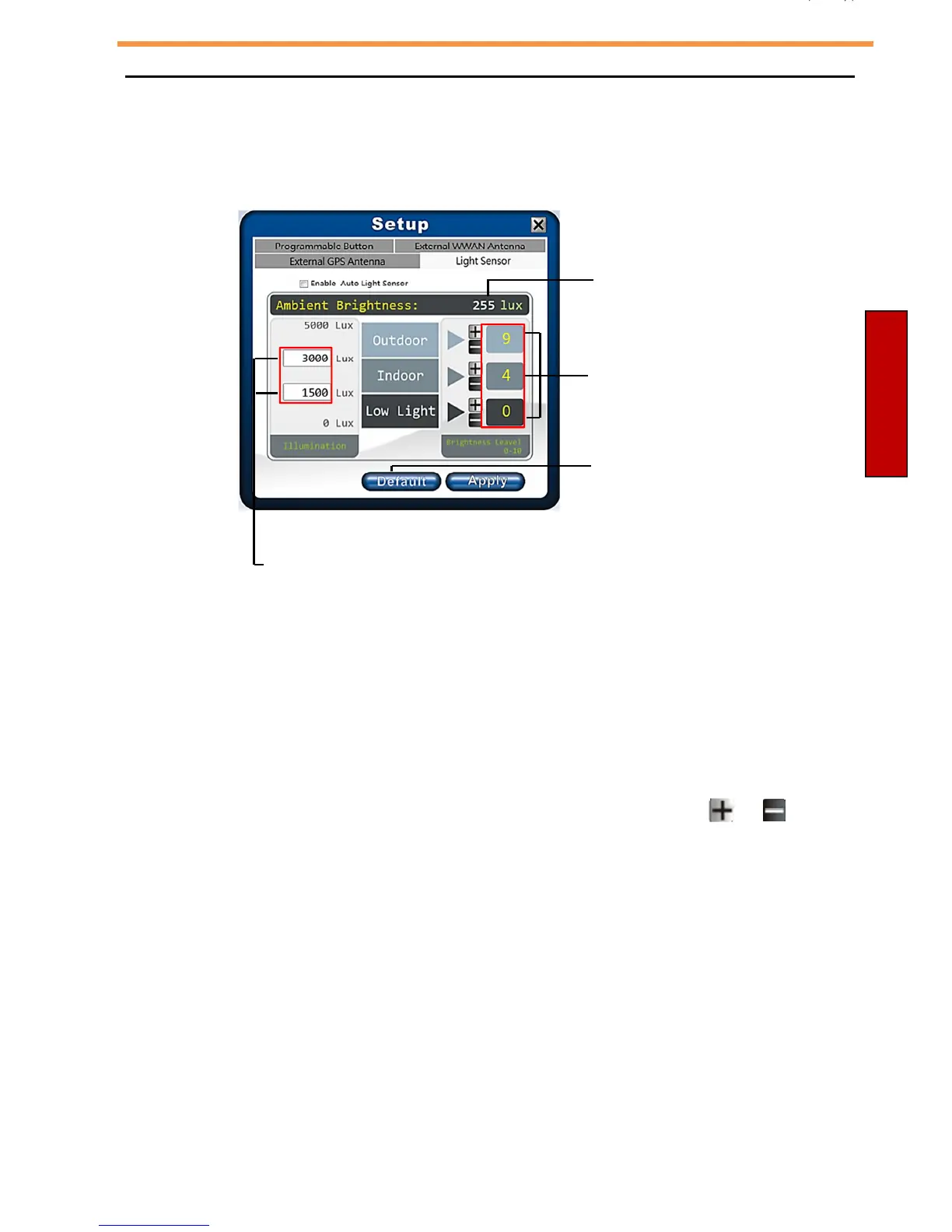
Tap the Light Sensor tab to enable/disable the automatic light sensor, set and
adjust the brightness level.
Current
ambient
brightness reading
Current preset
brightness level
Tap to restore the
default settings.
Set the range of illumination settings.
To change settings:
•
Customize the illumination range according to the ambient lighting, enter the
desired value in the first and second data box.
As an example in the above illustration:
- Outdoor (5000 ~ 500 lux)
- Indoor (500 ~ 50 lux)
- Low Light (50 ~ 0 lux).
•
Adjust the brightness level according to the ambient light, tap or to
adjust the setting (0~10).
•
Save all settings, tap Apply.
•
Enable the automatic light sensor function, tap the Enable Auto Light
Sensor checkbox. The system will automatically adjust the LCD brightness
according to these settings.



 To Next Page