56/112
D15 Camera Manual: Mounting
© MOBOTIX AG • Security-Vision-Systems • Made in Germany
www.mobotix.com • sales@mobotix.com
2.3.6 Replacing the MicroSD Card
If the pre-installed MicroSD card is to be replaced (for example, by a 64 GB MicroSD card),
it is best to do so
before
the camera is installed. The cards should only be replaced when
the camera is disconnected from the power supply.
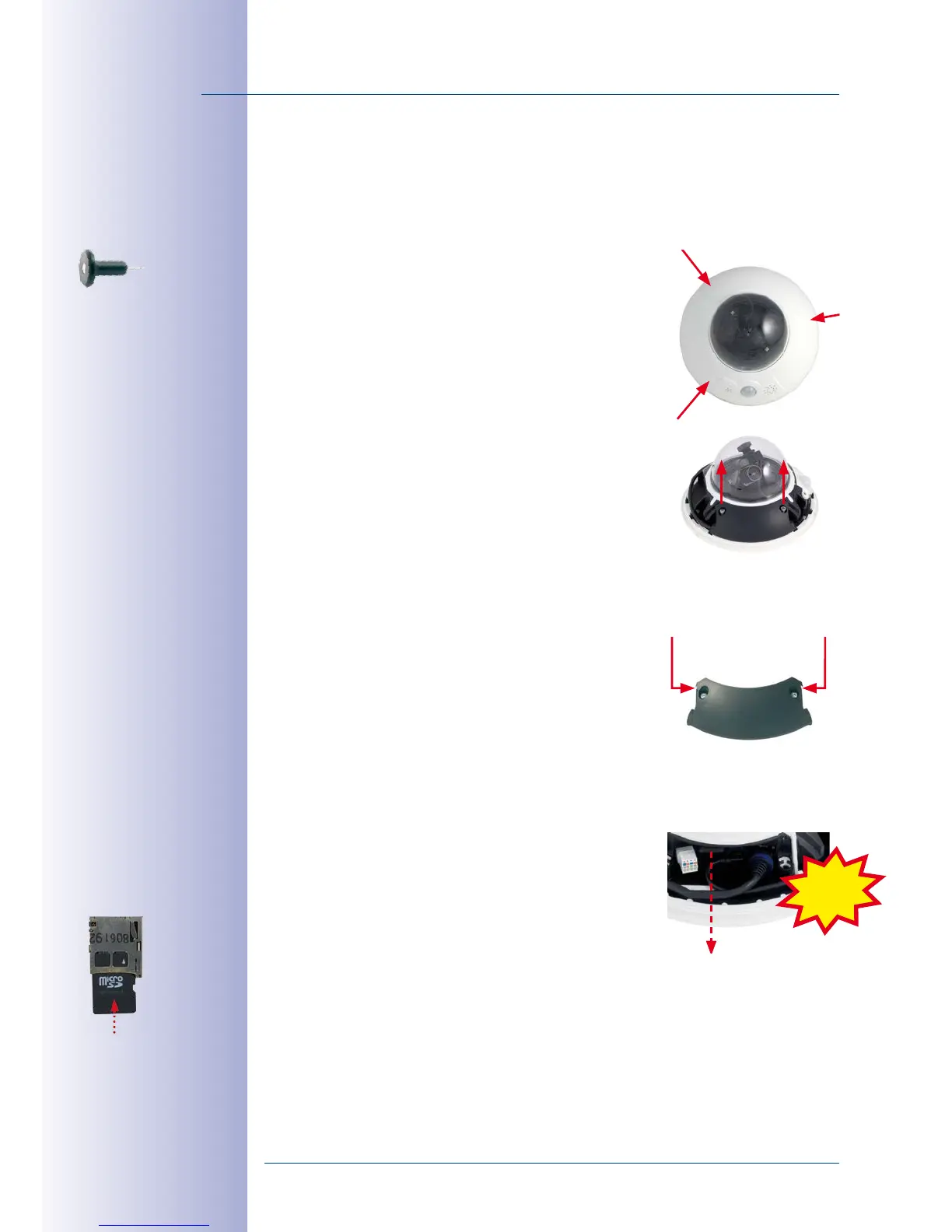
1.
Remove the outer shell
: Remove the outer shell using
the supplied custom tool. Insert the tip of the custom
tool into the three small holes of the shell, one by one.
Lift the outer shell to loosen it from the fixtures.
2.
Remove cable cover
: Remove the two M4x25 Allen
screws from the cable cover using the 3-mm Allen
wrench.
3.
Remove cable cover
: If you are unable to do so by
hand, press a suitable tool (screwdriver) into the
notches provided for this purpose (red arrows).
Carefully lift the cover upwards in the direction of
the dome.
4.
Remove the MicroSD card
: Carefully press the
MicroSD card into the mount until you hear a click.
The card now protrudes from its seat and can be
removed (tweezers may be used to facilitate removal).
Use the supplied
custom tool
Push-push: Push the
MicroSD card in,
then pull it out
Click



 To Next Page