81/112
First Images and the Most Important Settings
© MOBOTIX AG • Security-Vision-Systems • Made in Germany
www.mobotix.com • sales@mobotix.com
3.2.3 First Images and Network Parameter Configuration in MxMC
Installing and Starting MxManagementCenter
Download the current version of MxManagementCenter from the MOBOTIX website
(www.mobotix.com> Support> Software Downloads in the MxManagementCenter
area). Double-click the shortcut for the program or the program file.
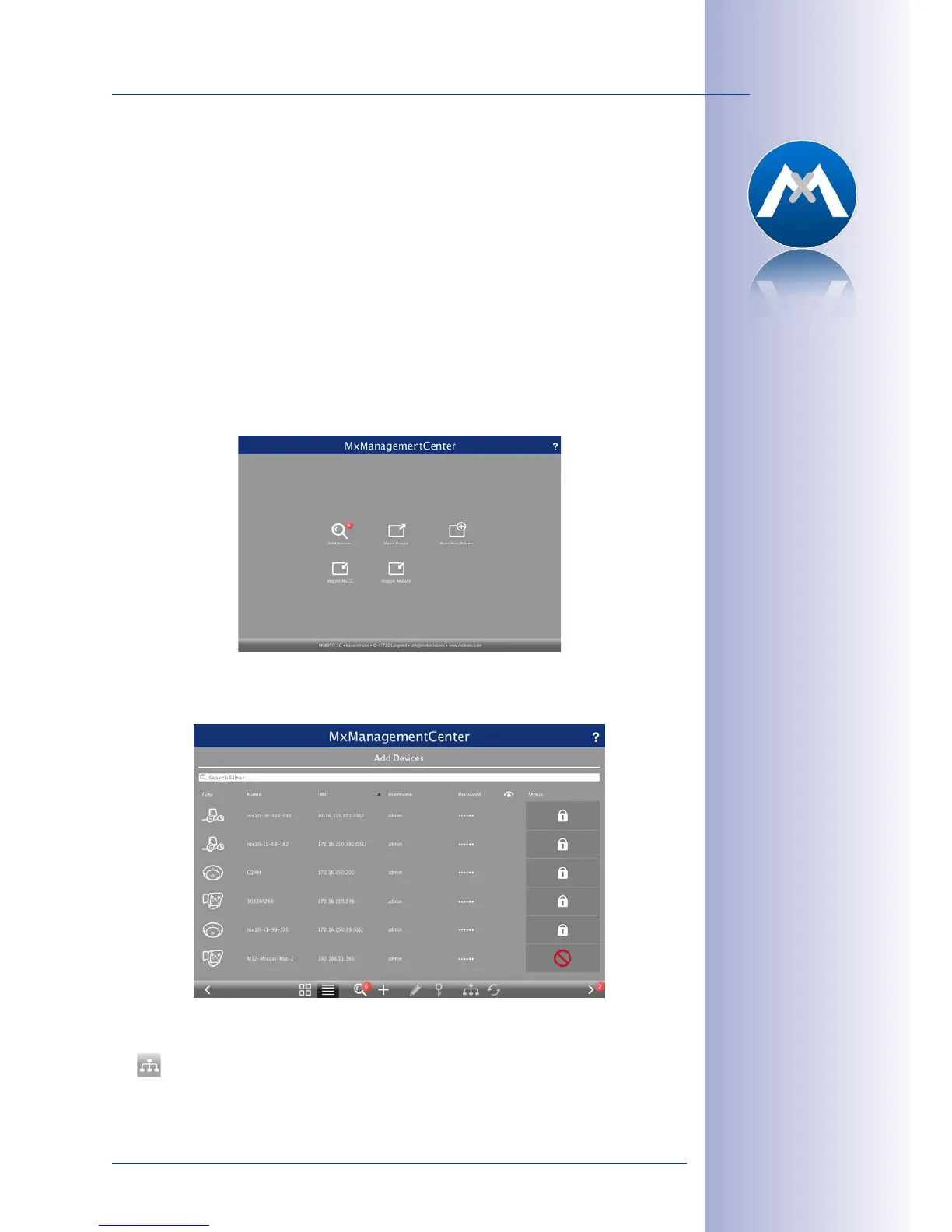
Finding Cameras
When starting MxManagementCenter for the first time, the configuration wizard opens
and automatically starts searching for MOBOTIX cameras. The number of found cameras
is shown next to the Add button. This number is updated automatically if the number of
MOBOTIX cameras on the network has changed (i.e., by connecting new/disconnecting
existing cameras).
Click on Add Devices. The cameras are displayed either in a list or as tiles. Use the List
and Tile buttons to change the display mode.
MxManagementCenter automatically monitors and displays the operating status of all
cameras. Cameras that are not on the same subnet as the computer are indicated by
the
Icon (Camera not in the same network as the computer). Likewise, the cameras
that have an unknown password or for which no user name/password combination has
Download
MxManagementCenter
for free from
www.mobotix.com



 To Next Page