80/164
Q24M Camera Manual: Installation
© MOBOTIX AG • Security-Vision-Systems • Made in Germany
www.mobotix.com • sales@mobotix.com
2.6.3 Procedure
1. Prepare the network connection: Run the network cable above the suspended
ceiling and ensure that enough cable slack is available.
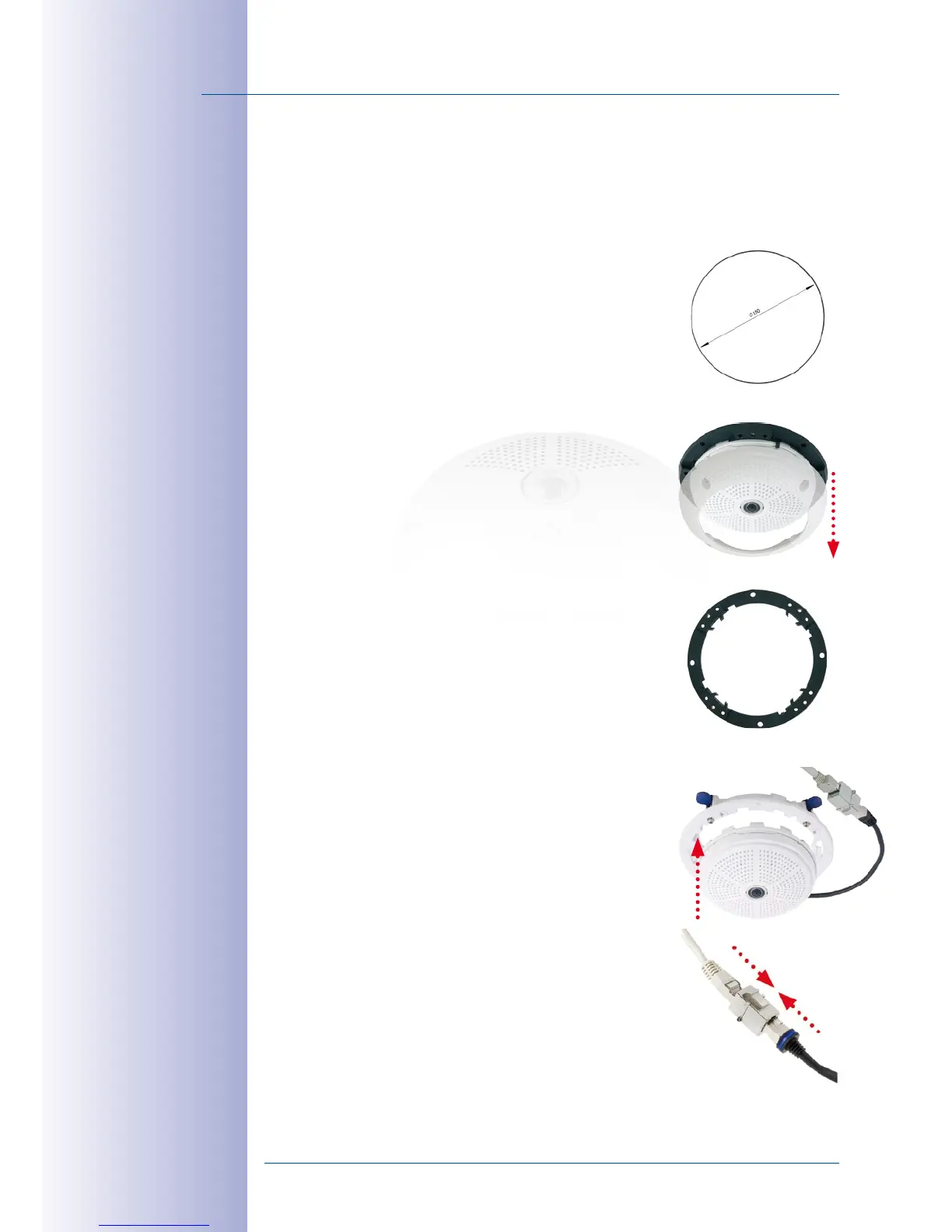
2. Cut a hole for installation: Cut a round hole for cam
-
era installation (e.g. with a 150 mm hole saw). Use the
supplied cutting template of the In-Ceiling Set (fold-out
at the end of the manual).
3. Remove the outer shell: Remove all four Allen screws
using the supplied Allen wrench and lift o the outer
shell.
4. Remove the mounting ring: Separate the mounting
ring from the camera housing. This ring is not required
when mounting the camera in the In-Ceiling Set.
5. Place the camera in the In-Ceiling Set: The dovetail
guides at the back of the camera housing fit exactly
into the openings of the In-Ceiling mounting ring.
6.
Connect the cable: Connect the on-site network cable to
the camera network cable using a standard connector.



 To Next Page