74/164
Q24M Camera Manual: Installation
© MOBOTIX AG • Security-Vision-Systems • Made in Germany
www.mobotix.com • sales@mobotix.com
2.5.3 Procedure
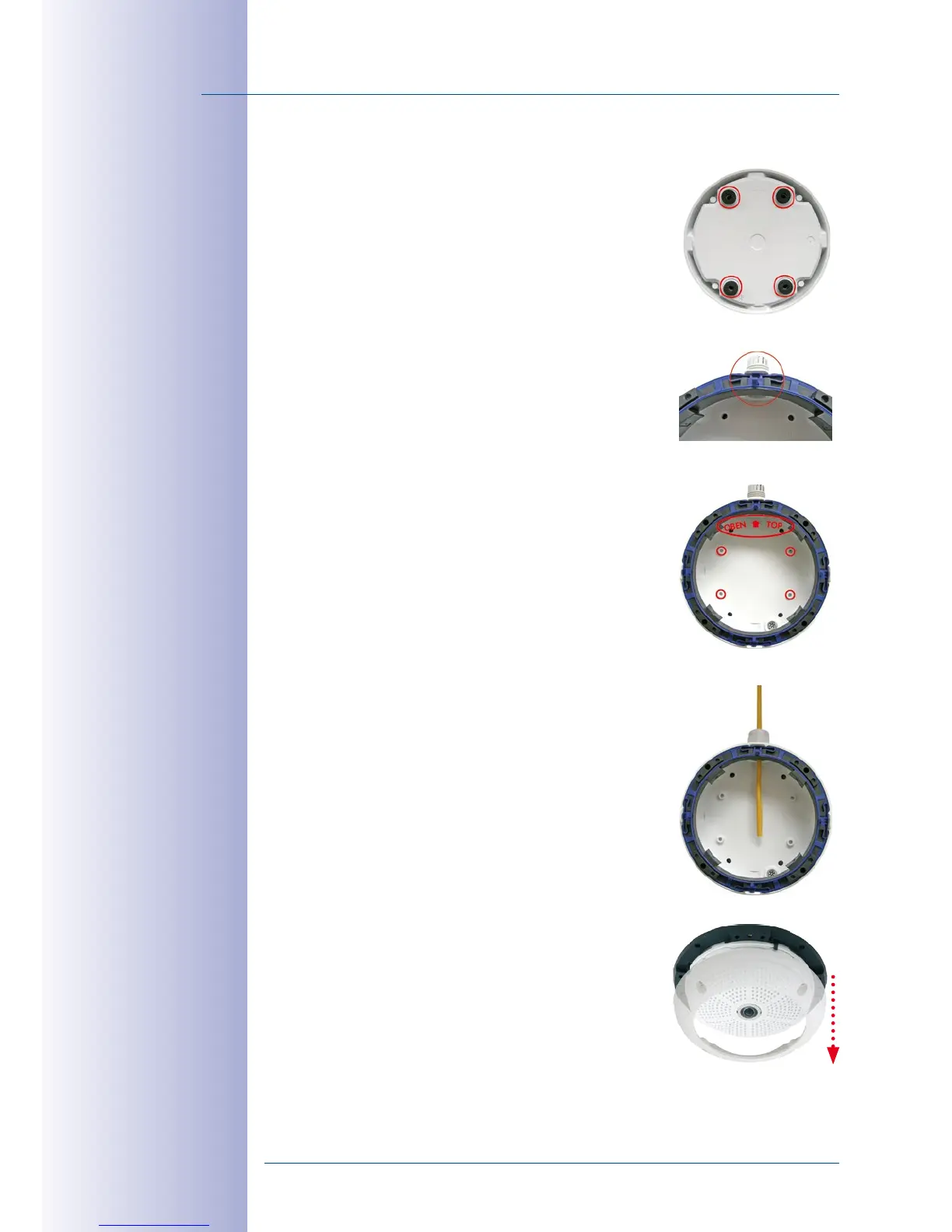
1. Attach washers: Prior to installation, stick a black foam
rubber washer around each of the four screw holes on
the rear side of the on-wall housing (remove the adhe
-
sive foil and press into place, surface must be clean and
free of grease). This prevents water from entering the
housing.
2. Prepare the cabling: Insert the seal into the cable
opening of the On-Wall Set such that the black rubber
seal is on the outside. Fix it in place from the inside
using a small hexagonal nut.
3. Mount the On-Wall Set: Mount the On-Wall Set (with
-
out the camera) at the intended position using e.g. the
wood screws (included with Q24M camera, Pos. 1.13).
Make sure the OBEN / TOP arrow points in the correct
direction.
4. Cable feeding: Attach the counternut to the network
cable, pass it through the seal from the outside and
tighten the nut. The network cable is now screwed into
the On-Wall Set, weatherproof. All unused openings
must be sealed with the included sealant plugs. The
cable passing into the housing must always be installed
using the supplied three-part fittings.
5. Remove the camera outer shell: Unscrew all four
Allen screws with the supplied Allen wrench. Remove
the outer shell.



 To Next Page