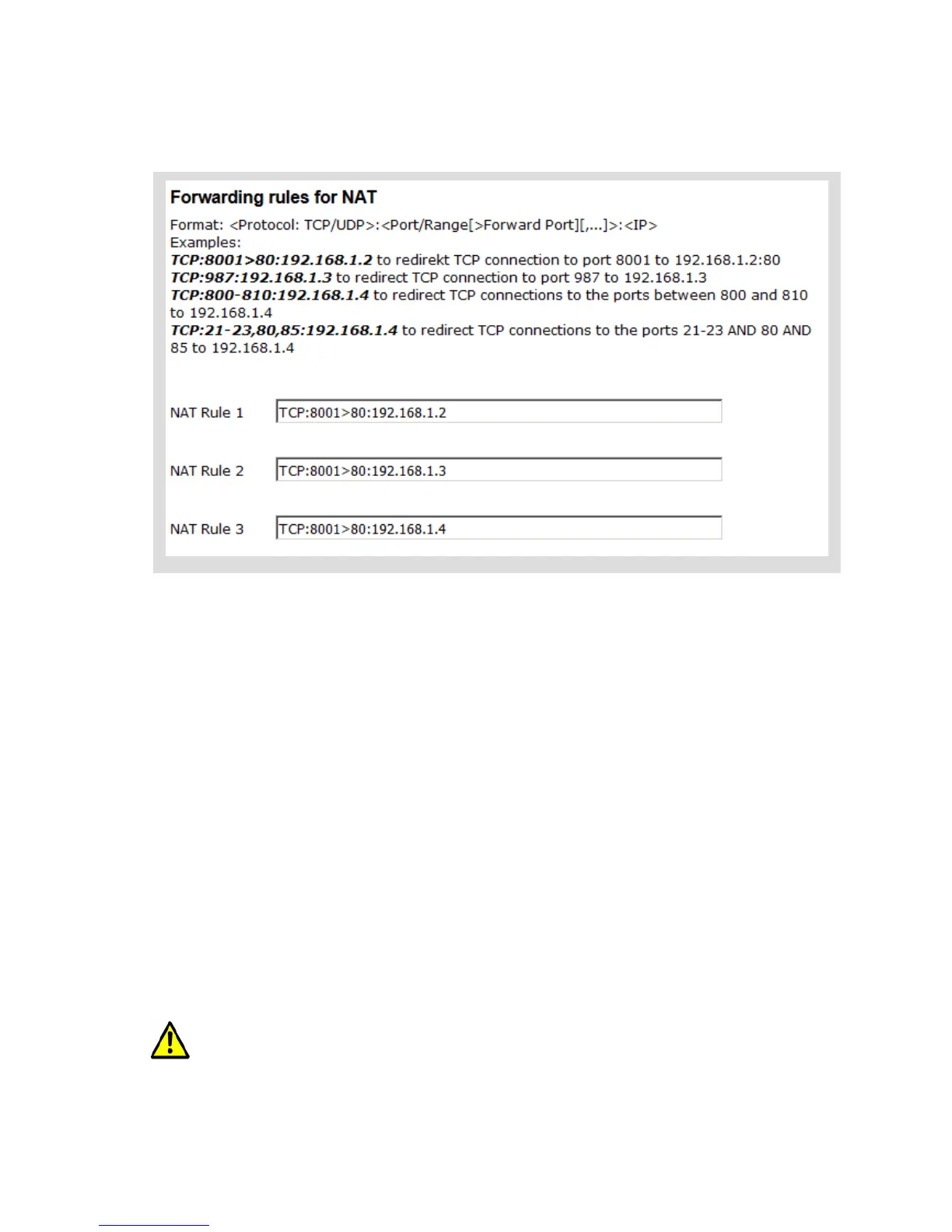
If multiple LAN clients are connected to the MC the NAT mode must be defined.
When the LAN clients offer server services that are addressed via WLAN, the used ports has to be defined in
a port forwarding table (NAT rules).
4.1.2.1 Advantages:
1. Any number of LAN clients can be connected to a MC
2. The MC with all LAN-Clients appear only with one IP address in the WLAN.
3. If many units are working in a project, consisting of multiple LAN clients with an MC, the
configuration for all units is the same. Only the IP address of the MC for the wireless side may need
to be individually configured.
4. The LAN clients are better protected against unwanted access, because the MC switches through
only data for the configured ports.
5. Local broadcast packets (on the LAN side of the MC) are not sent over the WLAN.
Disadvantages:
1. Access to the LAN clients via WLAN is possible only on the ports defined in the NAT rules.
2. If LAN clients offer server services on the same port numbers (eg FTP), the user must define port
forwarding rules in a way that these services are addressed on different ports for each LAN clients.
4.2 Level 2 Bridge Mode
In this mode, each LAN client communicates with its own IP address over the wireless network. However, all
data is sent with the MAC address of the MC-WLAN card. This procedure can make problems in some
WLAN infrastructure systems. Problems can appear when the WLAN controller is working with ARP caching.
All IP 's of the LAN-Clients and the IP of the MC must be in the same network range.
MC Manual Version 2.10c



 To Next Page