PC SOFTWARE – MONI LOG® ANALYZER EnDaL smart
- 46 -
Configure password:
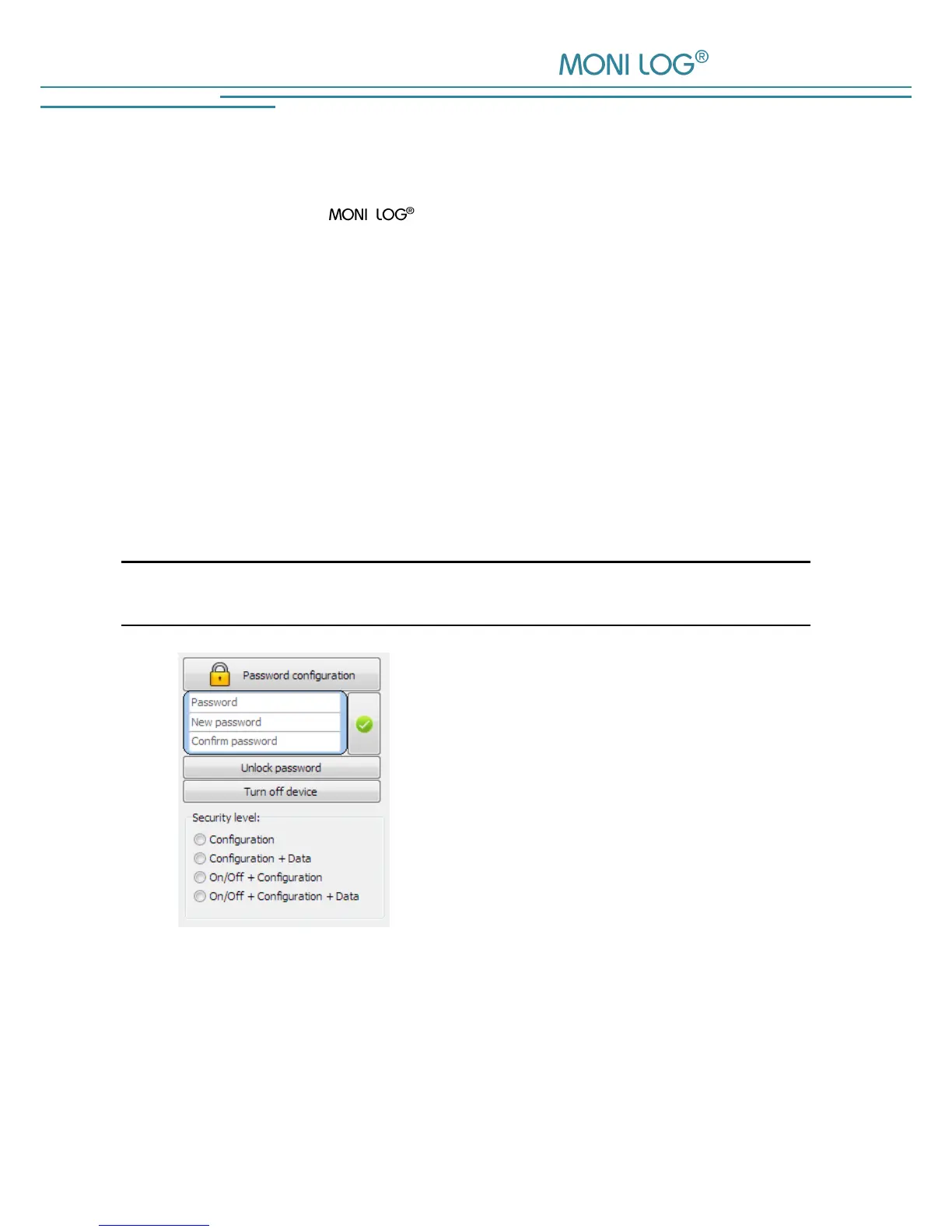
It is possible to protect the EnDaL smart with a password (Figure 34, no. 6). By
means of this password, different operations of the device can be protected. If a password is set,
a user, who does not know the password, has only restricted rights.
There are the following password levels:
- Configuration is password-protected
- Data + configuration are password-protected
- Activation and deactivation of the device + configuration are password-protected
- Activation and deactivation of the device + data + configuration are password-protected
The password may contain up to 4 digits. By clicking on the green check mark, the new password
is transferred.
Note:
In order to remove a password again, just leave the field “New password” empty.
Old password:
Enter the existing password here
New password:
Enter the desired new password here
Repeat password:
Enter the new password again for confirmation
Security level:
Select, which options should be protected with the
password
If you have forgotten the configuration password, you can request a device-specific, time-
limited master password from the manufacturer. Via the button “Resetting the password
settings“, you get to the entry of this.


 To Next Page