OperatingtheDigifold
Tooperatethemotorsmanually,switchthemachine‘on’attheEmergencyStopswitch.
WhilstholdingdownPushButton1,flicktheSet-upswitchto‘setup’.
ThedisplaywillnowreadPresstheSystemswitchto‘on’andusePushButton
1(forward)andPushButton2(reverse)tomanuallyrotatetherollersinshortpulses.
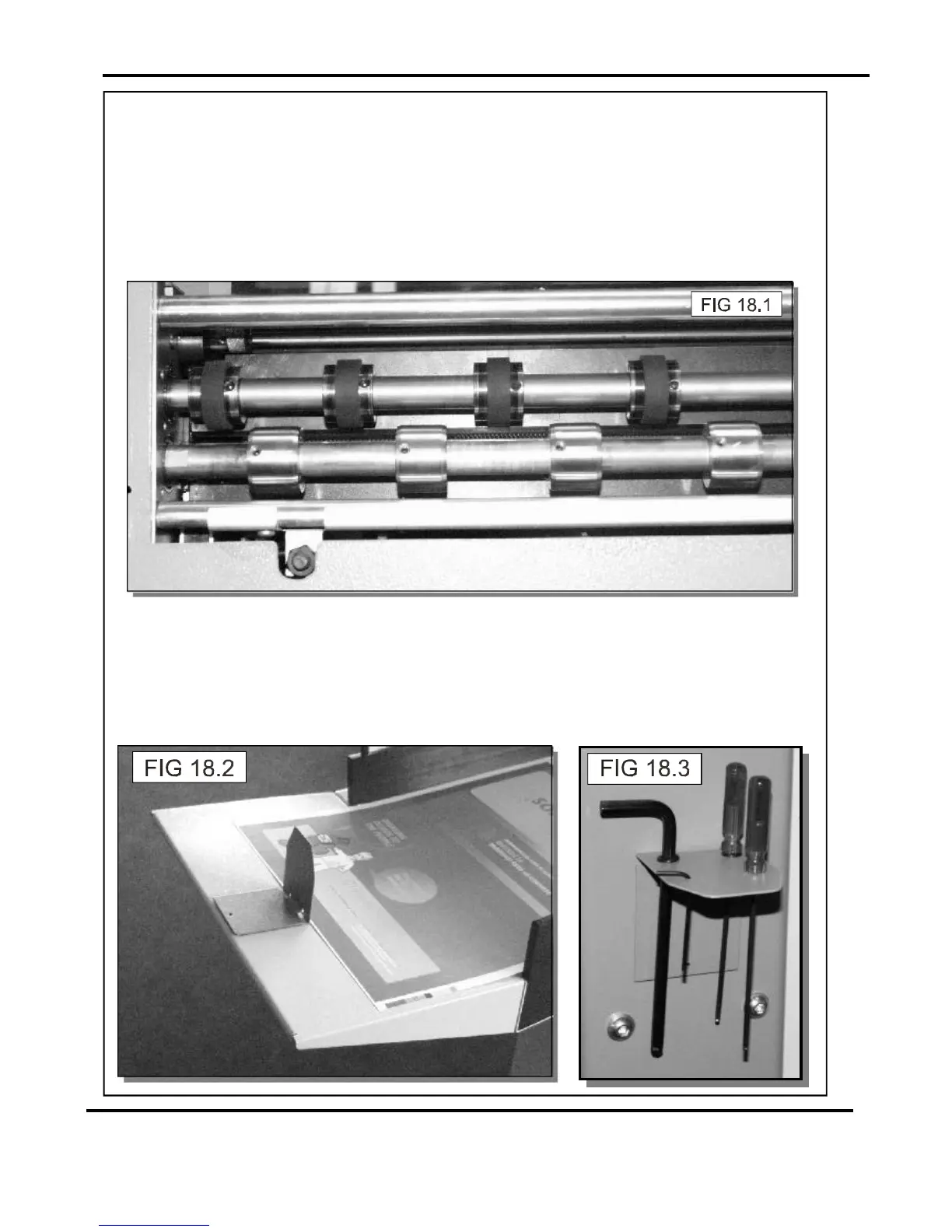
Rotatetherollersuntilthegrubscrewislocated.Lifttheexitguardandthemachinewill
switch‘off’automatically.Loosenthedrivewheelsandhubsbyusinga2mmallenkey.
ArrangethedrivewheelsandhubsasshowninFIG18.1.Inordertoavoidmarkingon
sometypesofmediaensureagapbetweenthedrivewheelsanddrivehubs.
‘hAndLE’.
Settingtheextensiontable
Theextensiontablecanbefixedtothemachineinordertofeedthroughlongersheets.
Thetablecanbesupportedbythetwofixingscrewsasshownonpage4.
ThebackstopcanbeusedtosupportthepaperstackasshowninFIG18.2below.
Theotherbackstopsuppliedwiththemachinecanbeusedasatoolholderasshownin
FIG18.3below.
Page19SYSTEM



 To Next Page