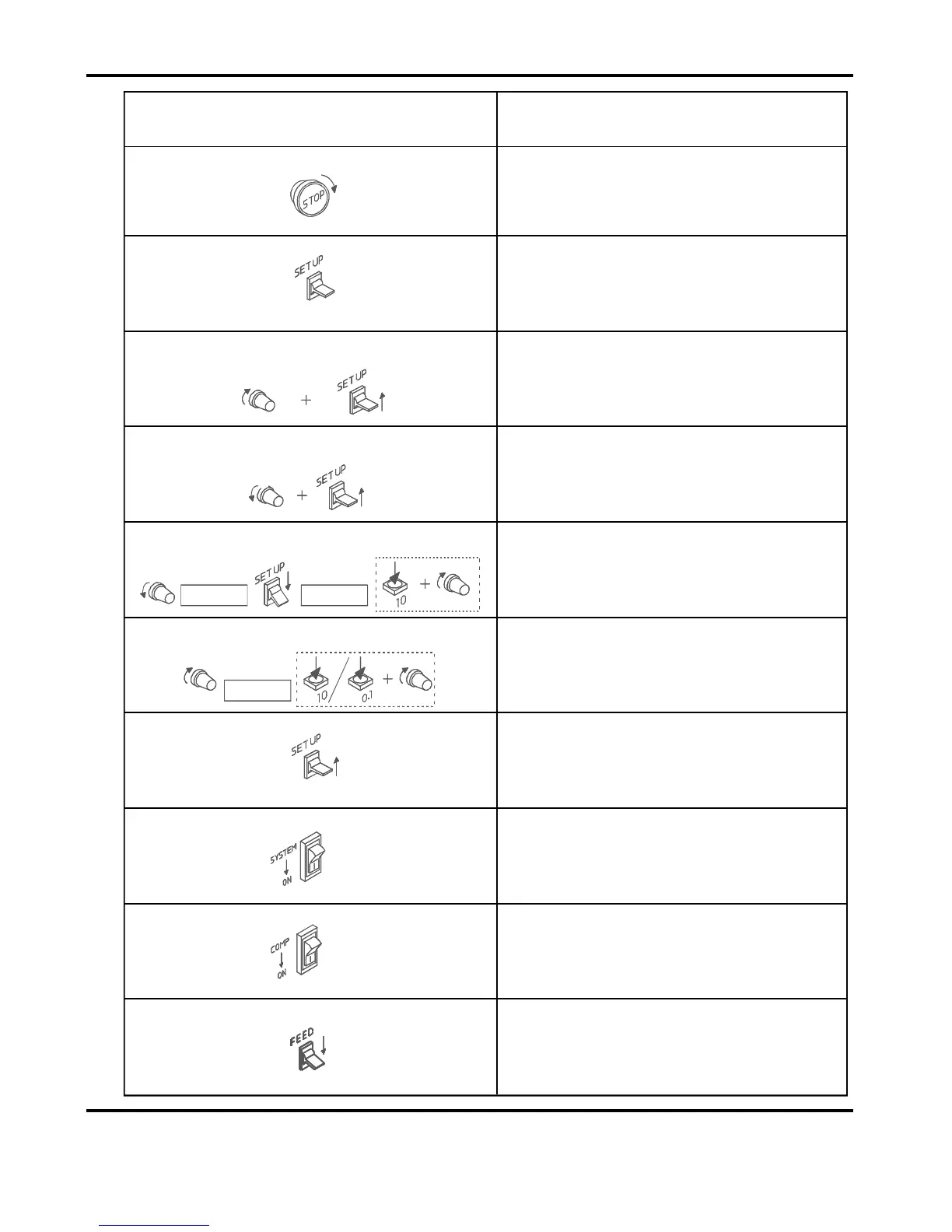
Step1
Step4
SETFOLD&CREASE
(’on’or‘off’)
Mid-Posn.
Step3
SETMACHINETO‘SETBYFOLD’
(’SEtFoLd’or‘SEtPos’)
SETPAPERLENGTH
Step8
Step9
Step10
Step6
Step5
SETFOLDTYPE
Step7
QuickStartGuide
TurntheEmergencyStopbuttonclockwise
toswitchthepoweron.
SettheSetUpswitchtoitsMid-position.
TurntheSettingDialclockwiseuntilthe
displayreads‘SEtFoLd’or‘SEtPos’,flick
theSetUpswitchupwardstochangefrom
onetotheother.
TurntheSettingDialanti-clockwiseuntilthe
displayreads‘CrEES’or‘FoLd’,flicktheSet
Upswitchupwardstoselect‘on’or‘oF’for
eachasrequired.
TurntheSettingDialanti-clockwiseto
selecttheMaindisplay,flicktheSetUp
switchdown,pressthepushbuttonandturn
theSettingDial.
FlicktheSetUpswitchuptoitsMid-
position
SwitchtheSystemswitchon.
SwitchtheCompressorswitchon.
SwitchtheFeedswitchontobeginfeeding
sheets
Step2
OPERATION
INSTRUCTIONS
SelectTypIcal
MainDisplay
LcF10 tYPEL
Typical
Display
ToChangeFoldType
LEn100.0
Typical
Display
ToChangePaperLength
TurntheSettingDialclockwisetoselect
‘LEn’,pressthepushbuttonandturnthe
SettingDialtosetthepaperlengthin10mm
or0.1mmincrements.
Page9SYSTEM



 To Next Page