11
3.3 Reckless stage
Remove specimen holder for fast hand scanning of slides.
Left-handed and right-handed operation stages are available for option.
Left hand operation stages is available for option. It should be used with the short stage knob for
avoiding to interfere the fine focus knob..
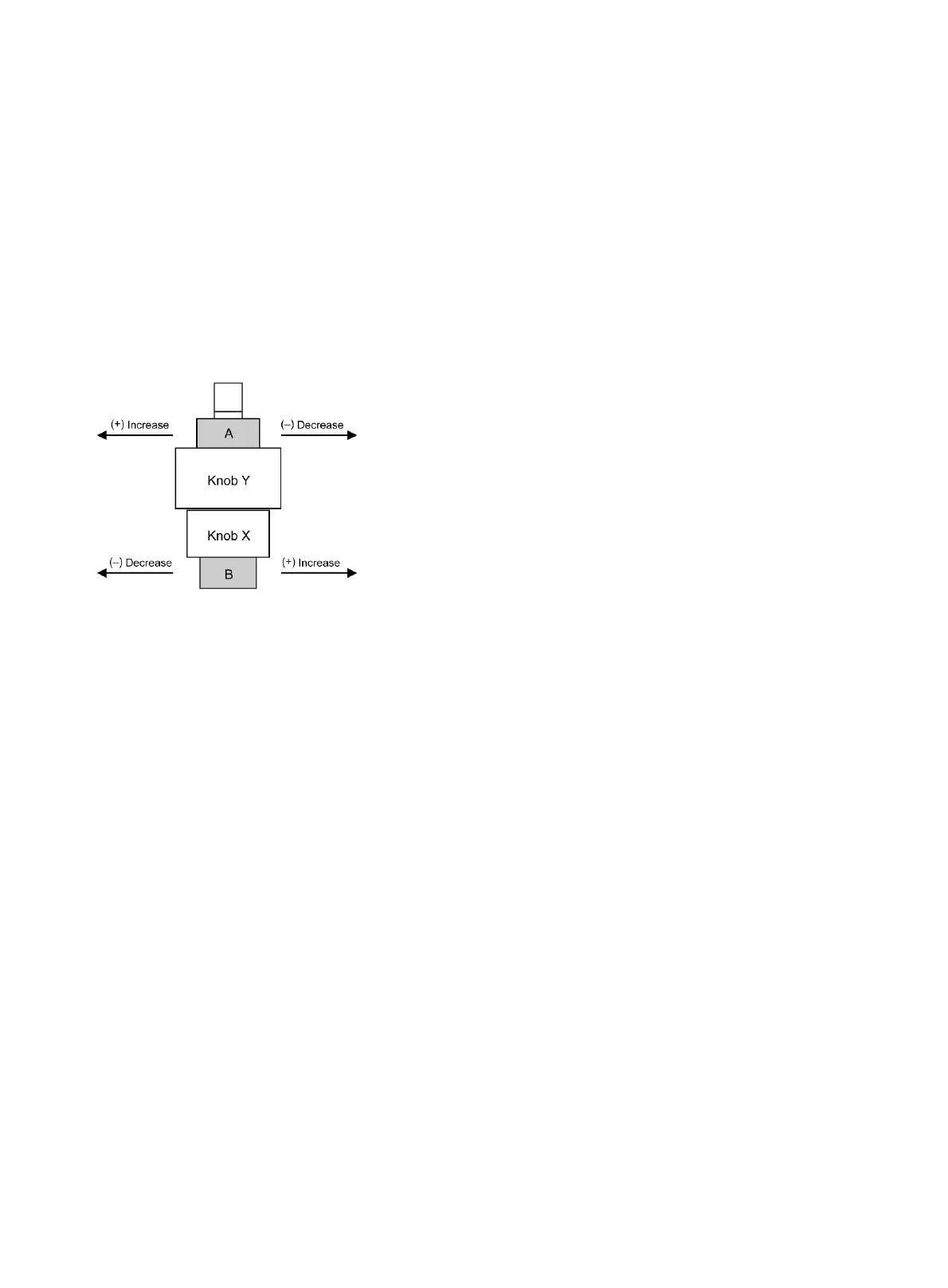
Torque adjustment
The torque of the y-axis and x-axis travel knobs can be adjusted by torque adjusting knobs.
For y-axis to (+) increase or (-) decrease the torque, turn Knob Y while holding A
For x-axis to (+) increase or (-) decrease the torque, turn Knob X while holding B
3.4 Specimen holder
Attach the specimen holder, using the two mounting holes.
3.5 Objectives
Lower the stage completely. Screw the objectives into the revolving nosepiece so that clockwise
rotation of the nosepiece brings the next higher magnification objective into position.
3.6 Condenser
Raise the stage by turning the coarse focus knob.
Completely lower the condenser carrier by turning the condenser focus knob.
Insert the condenser into the dovetail mount with aperture scale facing forward towards the user.
Secure it with the condenser clamp screw.
Turn the condenser focus knob to raise the condenser as far as it will go.



 To Next Page