25
Note:
If equipment is used in a manner not specified by the manufacturer, the warranty may be void.
To avoid getting wet, do not use the microscope near water.
8.5 Bulb replacement
The lamp and the lamphouse become very hot during and after a period of operation.
Risk of burn – Do not touch the lamp during or immediately after period of operation.
Make sure the lamp has cooled sufficiently before attempting to replace the lamp.
8.5.1 30W Halogen
In order to prevent electric shock always turn the power switch off and unplug the power cord
before installing or replacing the bulb.
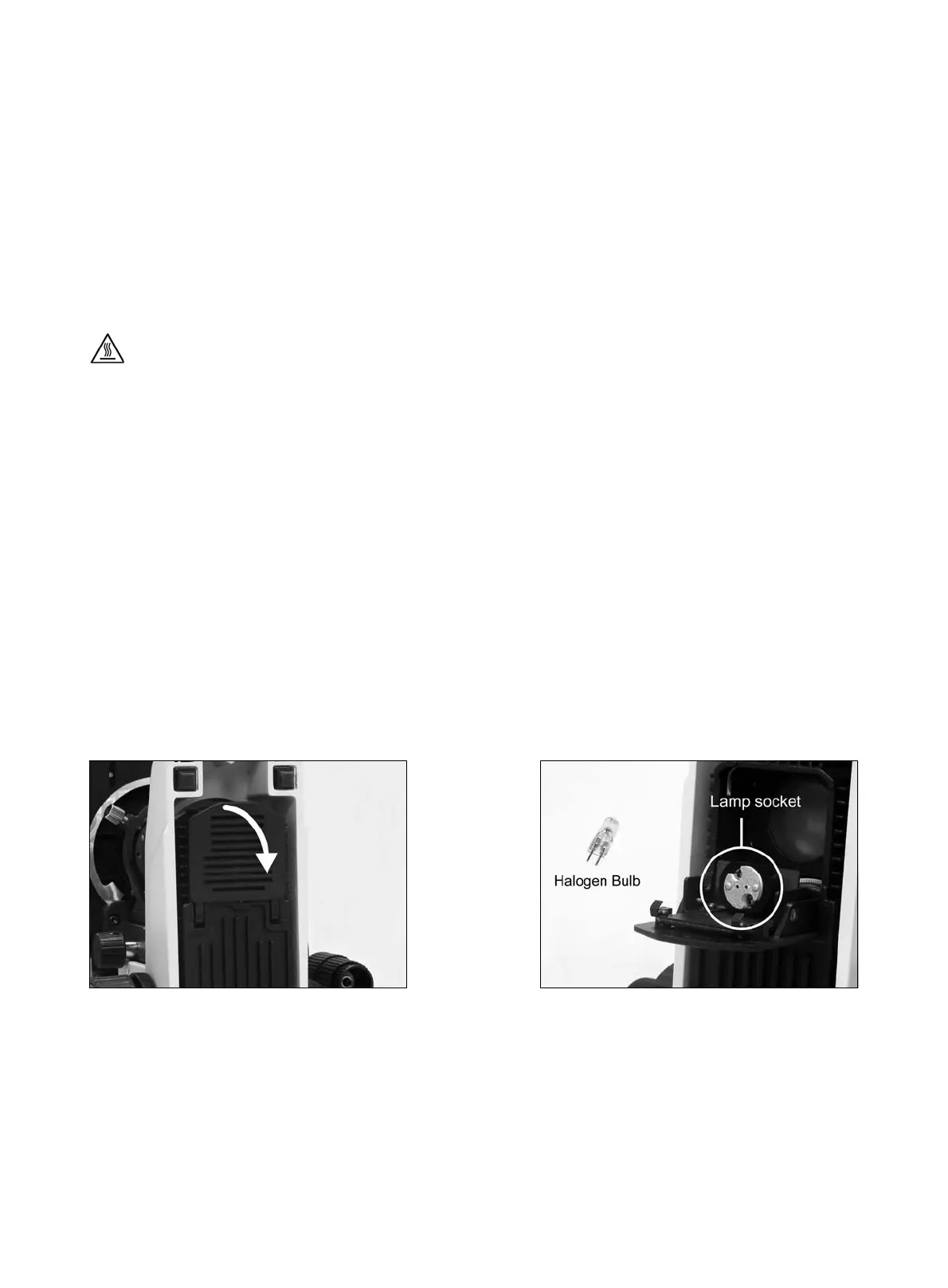
Place microscope on its back and pull back the lamp house cover plate. (Fig.14)
Firmly insert the bulb into the socket pinholes until it reaches the limit. Be careful not to tilt the bulb
when mounting. (Fig.15)
When installing the bulb, do not touch the glass surface of the bulb with bare fingers.
Doing so will cause fingerprints, grease, etc., to burn onto the lamp surface, reducing the
illumination provided by the bulb. If the surface is contaminated, wipe it clean using lens tissue.
Close lamp house cover plate and secure until it snaps into position. (Fig.16)
(Fig.14) (Fig.15)



 To Next Page