29
Network Camera User Manual
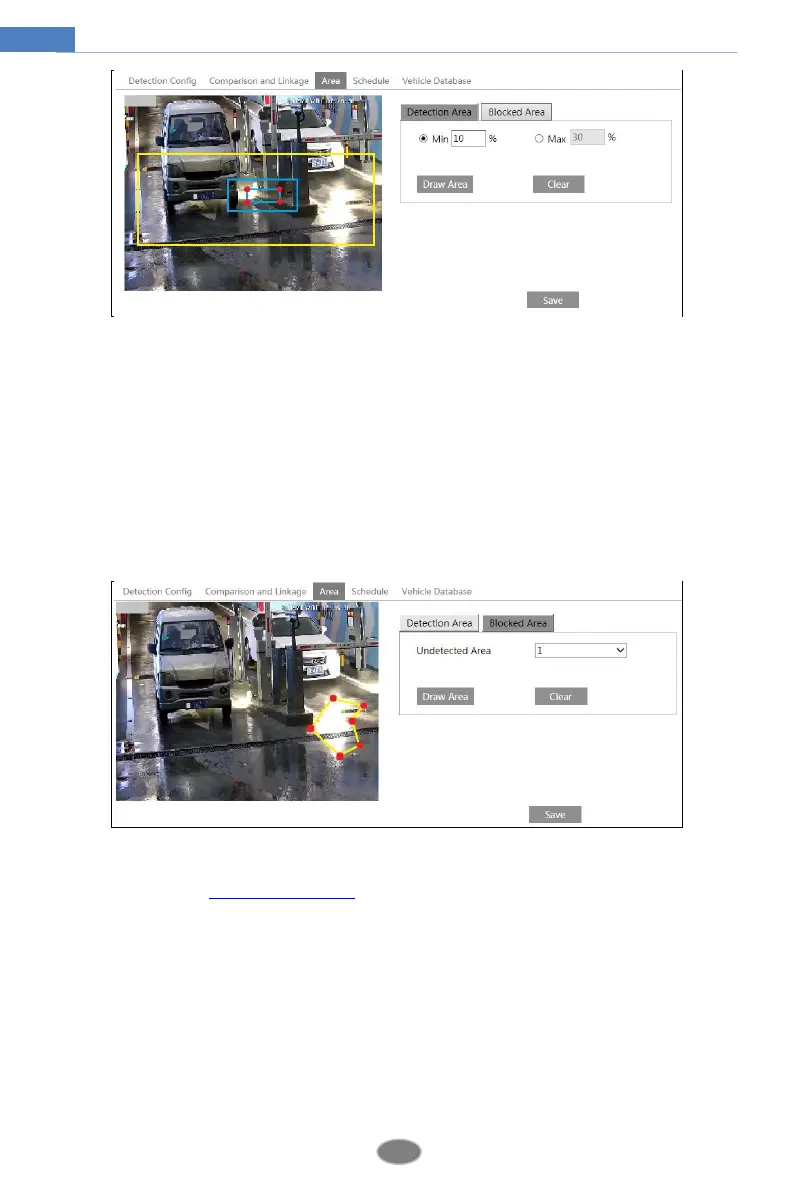
To set the detection area:
Click “Draw Area” and drag the border lines of the rectangle to modify its size. Click “Stop
Draw” to stop drawing the area. Click “Clear” to clear the area. Then set the detectable size
by defining the maximum value and the minimum value (The default size range of a single
number plate image occupies from 5% to 50% of the entire image).
To set the blocked area
Select the number of the undetected area. Then click “Draw Area” to draw a closed area. Up
to 4 areas can be set up. After you set the blocked area, this area will not be detected.
5. Set the schedule of the ANPR. The setup steps of the schedule are the same as schedule
recording setup (See Schedule Recording).
6. Add vehicles to the vehicle Database. Click the vehicle database tab to go to the following
interface.












 To Next Page