30
Network Camera User Manual
Add vehicles
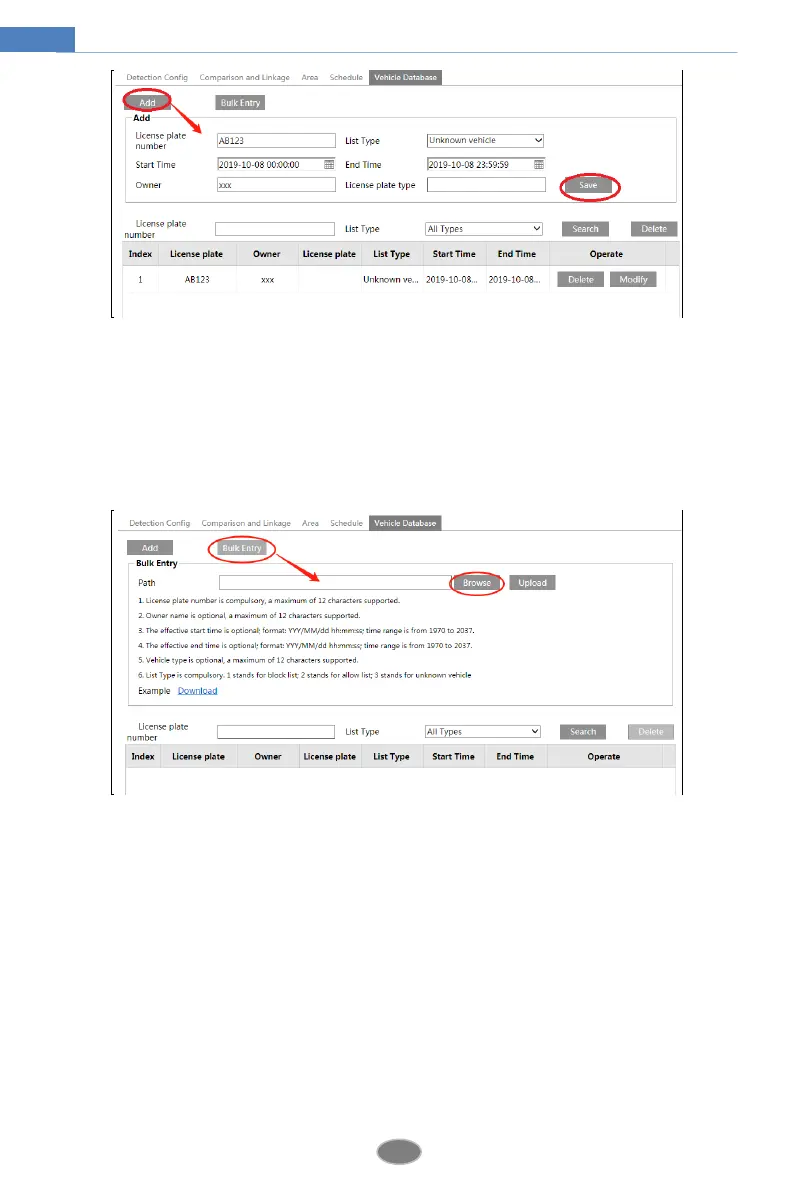
Click “Add” to show a vehicle adding box as shown in the above figure. Enter the license
plate number, select list type, start and end time, enter owner and license plate type. Then
click “Save” to save the vehicle.
List type: unknown vehicle, allow list and block list can be selected.
Click “Bulk Entry” to add multiple vehicles at one time as shown below.
Please edit the vehicle information according to the requirements shown on the above
interface. If you don’t know how to edit the file, please click “Download” to download an
example file and then follow the example to edit. After that, click “Browse” to choose the
vehicle information file and click “Upload” to import all vehicle information.
Search vehicles
After the vehicles are added, you can search them in the vehicle list. Enter the license plate
number and list type and then click “Search” to search the added vehicle information. Click
“Modify” to modify its information. Click “Delete” to delete this vehicle information.
7. Set the license plate comparison and alarm linkage. Click the “Comparison and linkage”
tab to go to the following interface.












 To Next Page