20
5.4.4 Secondary area
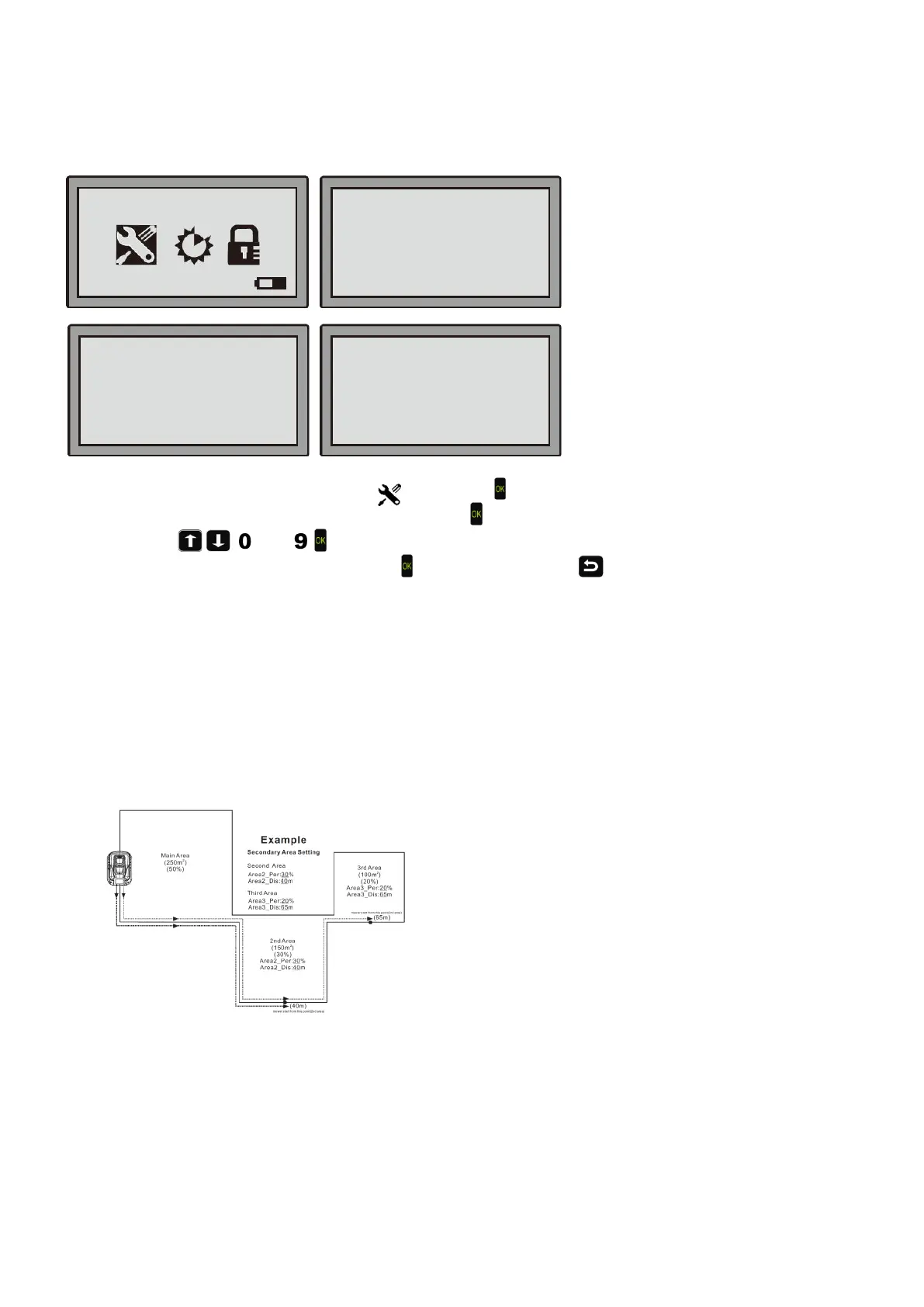
Step 1: Move the cursor to “General setting” , then press ;
Step 2: Move the cursor to “Secondary areas”, then press
.
Step 3: Use the
, , , […], , buttons to move the cursor and set the values.
Step 4: On the prompt "Save it?", hit the OK key
to save the changes or to discard and return to the previous
menu.
Note:
Area2_Per: (2nd Area _Percentage)
It sets the proportion of the secondary area in relation with the entire surface.
Area2_Dis: (2nd Area _Distance)
It sets out the distance (in meters) that the robot needs to reach the secondary area, following the boundary wire. It
is recommended to measure the distance to half way within the second area, so that you can be sure that the
Robotic Mower will be in the second area when it starts mowing.
For example:
The total working area is 500 m
2
,the main area is 250 m
2
, the secondary area is 150 m
2
, the third area is 100 m
2
,
the settings are as below:
For the above example:
For the main area: the robotic mower will start to cut the grass just after it has left the charging station.
For the 2
nd
area: the robotic mower will travel 40 meters along the boundary wire from the charging station, then start
to cut the grass.
For the 3
rd
area: the robotic mower will travel 65 meters along the boundary wire from the charging station, then start
to cut the grass.
The mower will allocate working time to each area proportional to the area percentage.
Set Date and Time
Mow in the Rain
Language
■Secondary areas
Information
Area2_Per : ____ %
Area2_Dis : ____ m
Third area
Area3_Per : ____ %
Area3_Dis : ____ m
08-59-21 Mower


 To Next Page