PRODUCT TECHNICAL MANUAL
FONOMAC 3
V2.20 – 06/2012
37
MTELFONOMAC3220_EN
A2. Connecting Via Serie Controller
The steps to correctly connect the Fonomac 3 are the following:
1. Make sure the Fonomac 3 is connected to Via Serie controller through the connector.
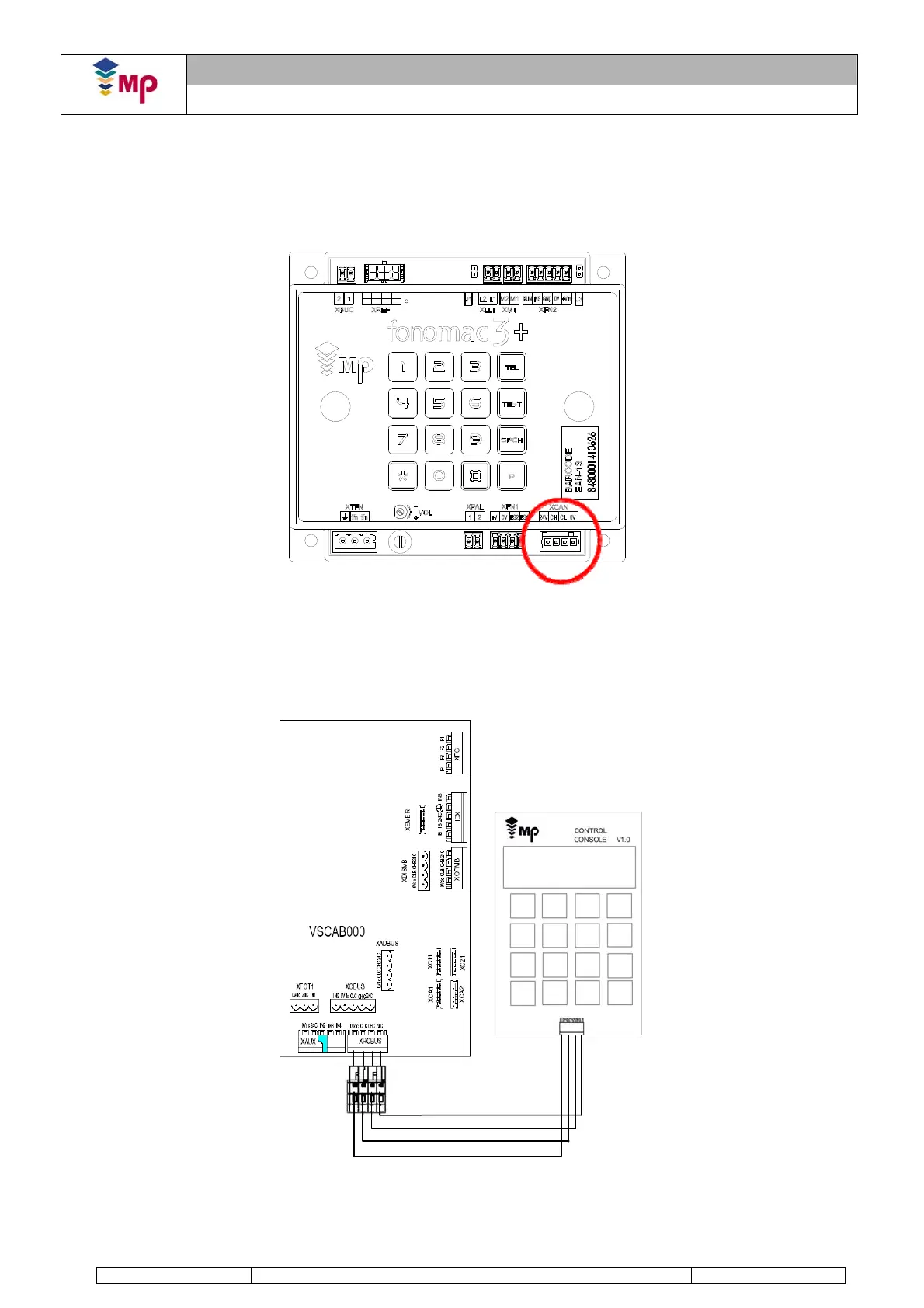
2. Connecting the console. The Fonomac 3, in Via Serie installations, is powered through the XCAN
communication connector. Since the Fonomac 3 is connected to the controller, the connections available in
Via Serie will be used. This connection can be made in several ways depending on the type of options of
each controller. Some of them are suggested below:
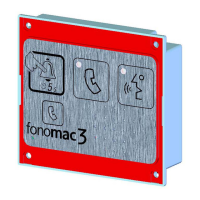
- Connecting the car circuit. Using the XRCBUS connector
FIGURE 2: XCAN CONNECTOR FOR CAN-BUS CONNECTION
brown
blue
grey
black
FIGURE 3: CONNECTION OF THE CONSOLE IN THE CAR CIRCUIT


 To Next Page