USER MANUAL V1.0 | Updated January 19, 2019 18
ALARM
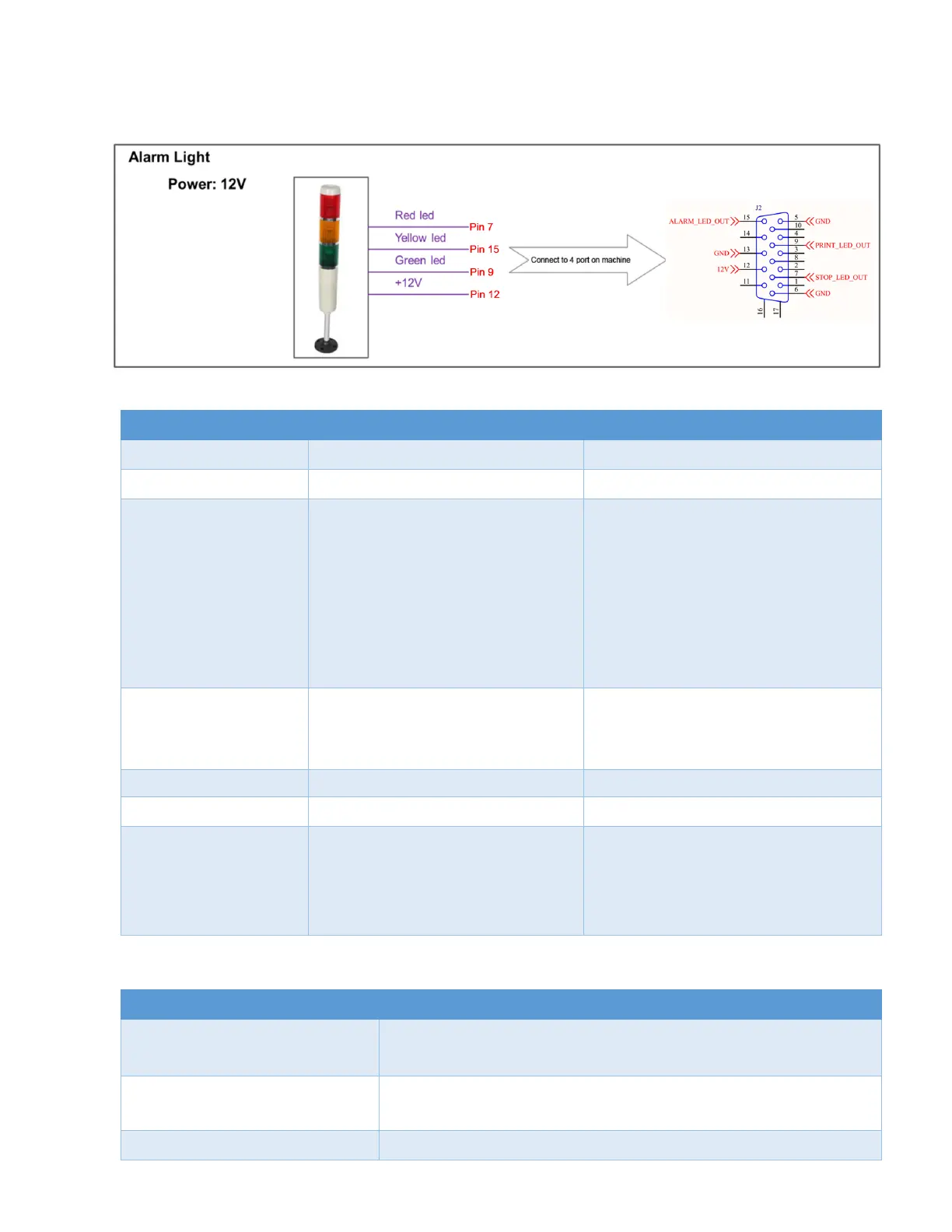
Allow users to monitor operation of Machine from distance via the light signals from the Alarm.
This table below will show detail of each pin on DB15 port that alarm beacon will be used for:
STOP_LED_OUT (0V)
STOP STATUS (RED LED)
The printer will Stop print because
some of reasons below:
1. Printer on but don’t enable
printing.
2. No cartridge error.
3. Invalid cartridge error.
4. Out of ink.
PRINT_LED_OUT (0V)
PRINT STATUS (GREEN LED)
User select on Start print menu.
The printer in printing status
without any issue.
ALARM_LED_OUTPUT (0V)
ALARM STATUS (YELLOW LED)
The printer get some issue and
need to warning to operator but
it still able to print.
1. Ink low
Error Description
Stop print (Normal event)
User select Stop print from menu. Printing will be stopped.
Red light will turn on.
Cartridge is connected to printer that is not provided by
your supplier whose selling this printer.
No cartridge is connected to printer.



 To Next Page