09
5. Main Menu
ENGLISH
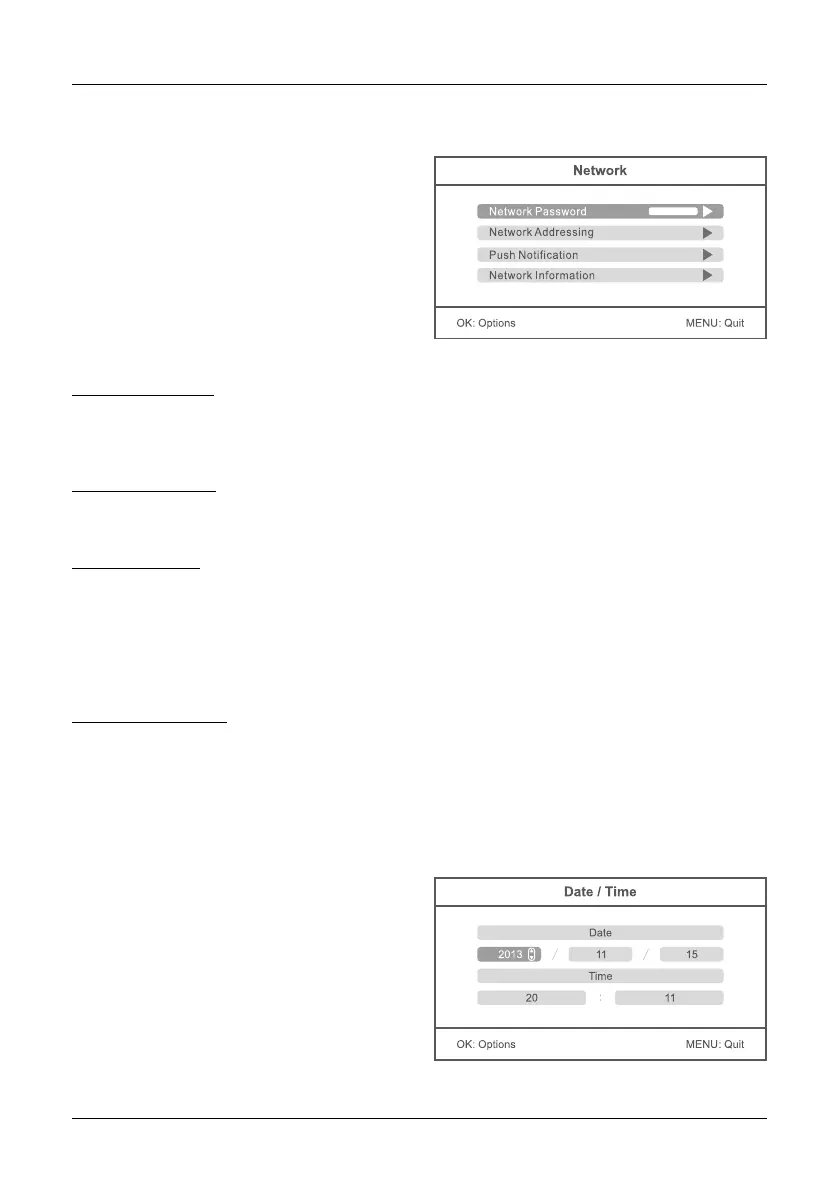
Press the p or q button to select the menu
item NETWORK. Confirm with OK.
Press the p or q button to select the menu
item DATE / TIME. Confirm with OK.
Press the t or u keys to select an option. Press
the p or q keys to a corresponding value set.
To save and exit the menu, press the OK button.
Network Password:
Enter any password as a security (12 characters max.). The same password you must enter in the
app on your smartphone or tablet. The function of the application to a mobile terminal is explained
in a later section.
Network Adressing:
Choose between a dynamic IP address (DHCP) or a static IP address. The dynamic IP address
applies in most cases.
Push Notification:
„Enable / Disable“ set the push notification (on or off). The notification is done on your mobile
device when the camera detects motion. With the „minimum push interval“ you can set the dis-
tance between the camera detection and notification (2, 5, 10, 20 or 30 minutes). Put in „period“
the period of time in which a push notification to be done. Under „Registered Mobile“ you will see
the selected mobile devices. If „None“ is displayed on the screen, no mobile devices are currently
connected to the camera system.
Network Information:
Here all the network information will be displayed when a network connection is available. This
option is available only at the IP version.
Network:
Date / Time:


 To Next Page