5. Main Menu
18 ENGLISH
5.4 Camera
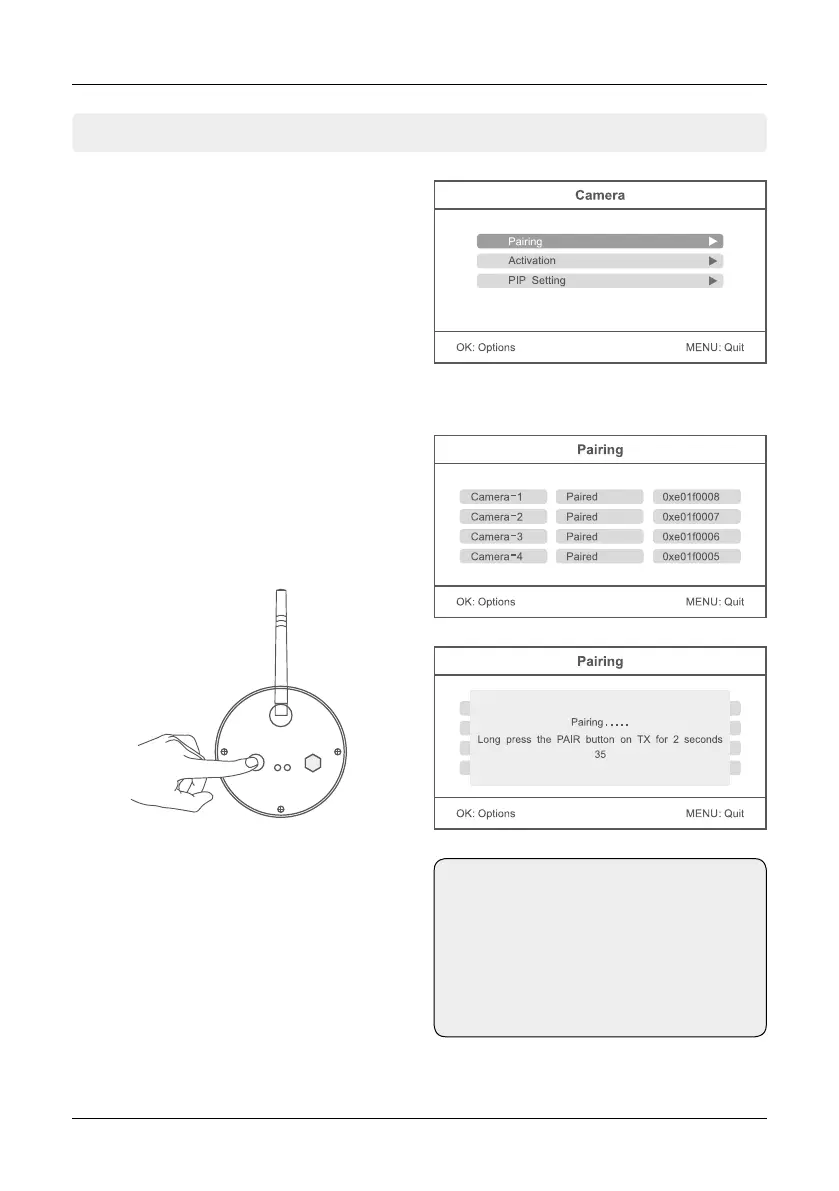
Press in the real-time monitoring the MENU but-
ton to enter the main menu.
Press the t or u button to select the menu
item CAMERA. Confirm with OK.
Press the p or q button to select the menu
item „Pairing“. Now use the p or q button to
select a camera from which you want to pair
and confirm with OK. Then a message box
appears that prompts you to press the pairing
button on a camera.
Press within 35 seconds on the back of the ca-
mera the pairing button for about 2 seconds.
Now the camera is connected to the monitor
and there are no other wireless frequencies
disturbed.
If pairing fails, the system prompts “Pairing fai-
led”. Please perform pairing again.
Pairing
Note:
The cameras have already been factory
paired with the monitor. You must per-
form this step only if interference to other
wireless frequencies or if you buy more
individual cameras.


 To Next Page