6. Operating with Android devices
24 ENGLISH
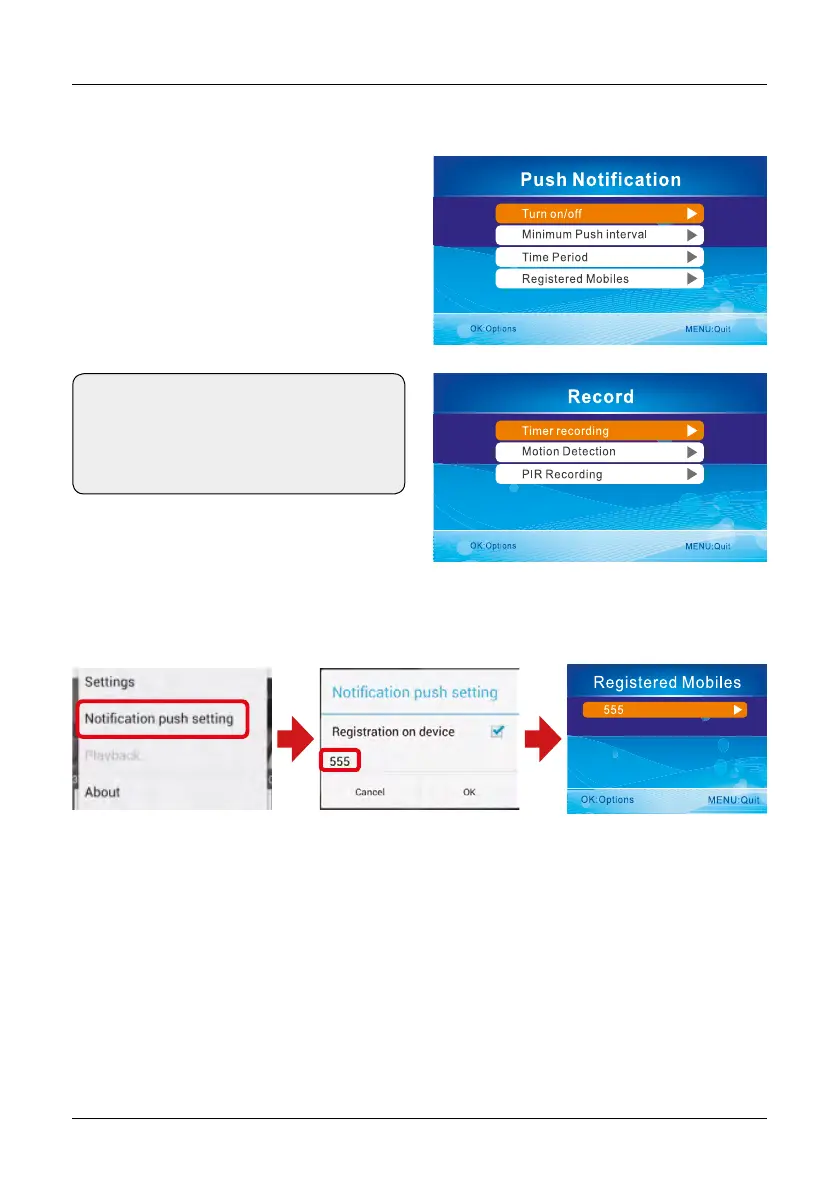
Go to the Main Menu -> System -> Network
-> Push notification. in the menu item „Enab-
le / Disable“, you can set the push notification
on or off. By „minimum time interval“, the time
delay of a push notification can be set.
Click at the Android app to „push notification settings“ to register an account. When motion is
detected by the camera, it sends a push notification to your phone.
Important notes:
1. Only when the receiver in the real-time state, to view the image.
2. If the Device ID was unable to get to the monitor, indicates that monitor did not normally
connect outer net, need to check your network.
3. If everything is normal, but still not in the mobile phone client to view images, please close the
client software running always in the background, please try it again.
4. The network adapter does not support hot-swappable, before open the monitor, The network
is connected with the monitor.
Setting the Push Notification
Note:
Only if the motion detection and/or heat
detection in the menu item „Recording“
is enabled, a push notice may be served.


 To Next Page