19
5. Main Menu
ENGLISH
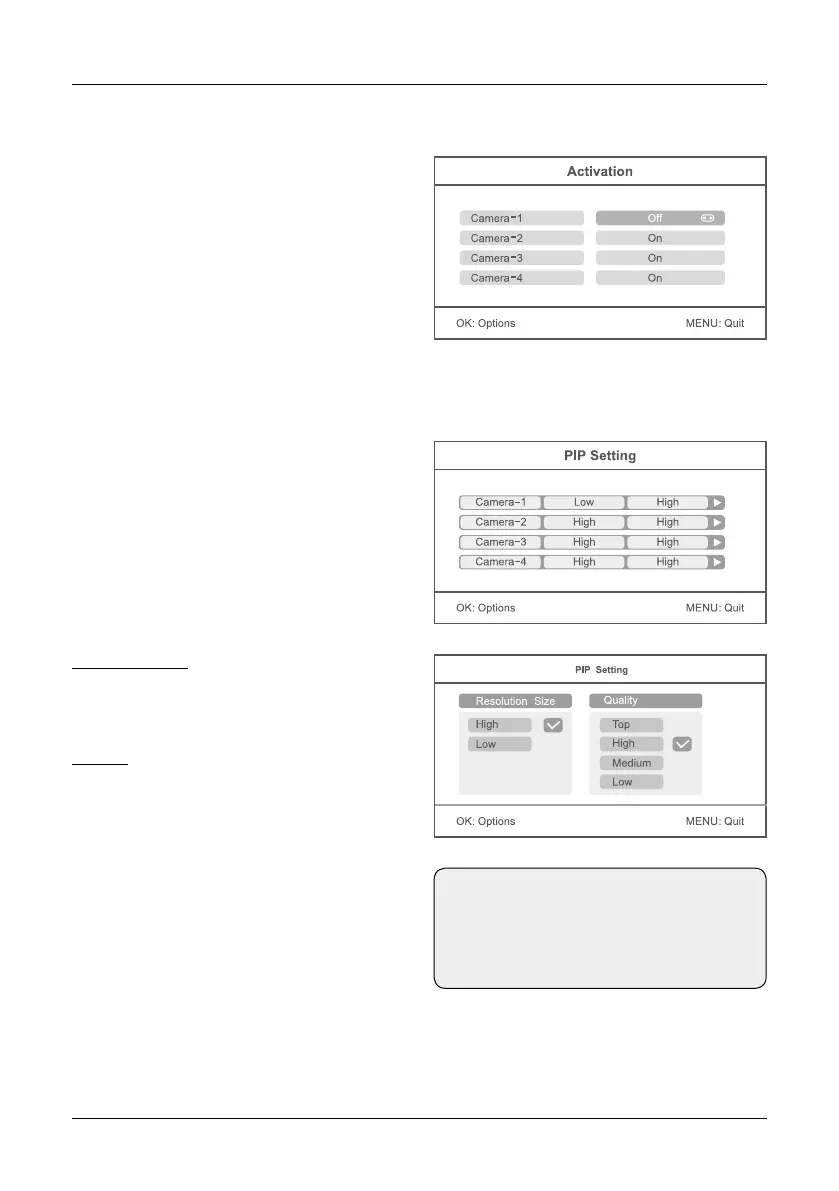
Press the p or q button to select the menu
item „Activation“. Now use the p or q button
to select a camera which you want to activate.
Press the t or u button to enable or disable a
camera. When a camera is disabled, it has no
function and will not record video or activate
an alarm.
Press the p or q button to select „PIP Setting“
and confirm with OK. Now use the p or q button
to select a camera and confirm again with OK.
Resolution Size:
Press the p or q button to select a video re-
solution. You can choose between „high“ and
„low“. Confirm your selection with OK.
Quality:
Press the p or q button so set the quality of
the videos. You can choose between „Low“,
„Medium“, „High“ or „Top“. Confirm your selec-
tion with OK.
To exit the menu and save the settings, press
the MENU button.
Activation
PIP Setting
Note:
Higher the resolution and the quality is
set, more memory is required for each
video on the SD card or USB device.


 To Next Page