Appendix A: Installing Client Software
FaxFinder Client User Guide 31
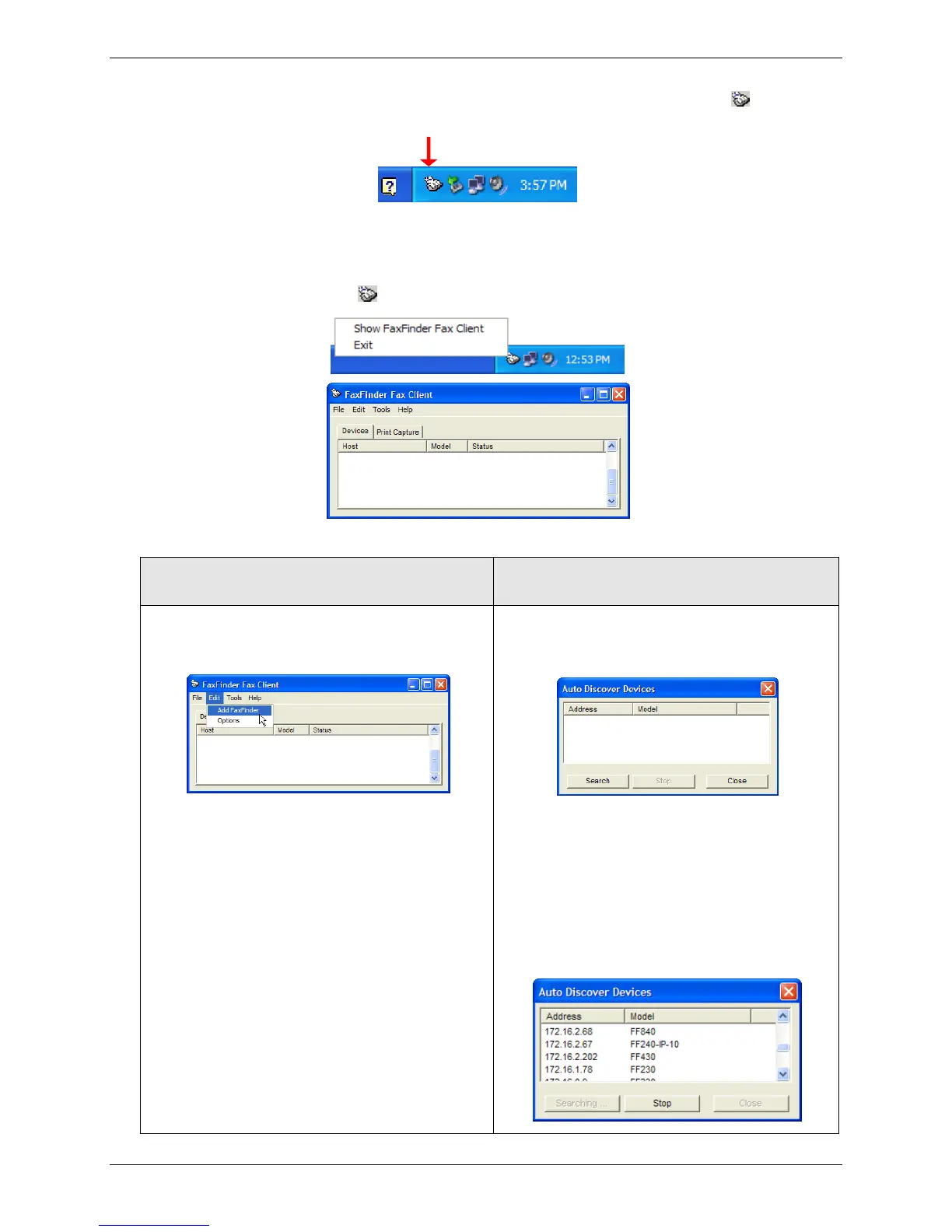
● If the software is set to launch when the computer boots up, the FaxFinder icon, , appears in
the system tray in lower right corner.
System Tray Icon
● If the FaxFinder icon is not in the system tray, click Start | All Programs | FaxFinder | FaxFinder
Client.
2. Click the FaxFinder Client icon, , and select Show FaxFinder Fax Client.
3. Add or Auto Discover Devices the FaxFinder.
● If you have the IP address, click Edit and
select Add FaxFinder to add the unit
manually.
a. If you do not have the IP address, open
Tools and select Auto-Discover
Devices.
b. Click Search to search the available
network for available FaxFinder units.
c. Right-click on a name or IP address to
open a popup menu and click Add.
Note: Depending on your configuration, your
firewall may require you to select
Allow Access to search.



 To Next Page