User Manual of VT1000
- 26 -
SIM has PIN code set Remove PIN code by inserting SIM in
you phone and deleting the code
SIM is warped or damaged Inspect SIM, clean the contacts. If
re-inserting does not help try another to
see if it will work.
Roaming not enabled If you are in a different country your SIM
account must have roaming enabled
Battery is low Recharge the unit and the GSM will start
working.
Problem: SMS from VT1000 states ‘Last……’
Possible Cause: Resolution:
Unit does not have clear view of the sky Move the antenna of the unit to a
location where the sky is visible.
VT1000 is in an inner place Wait for the target to come out
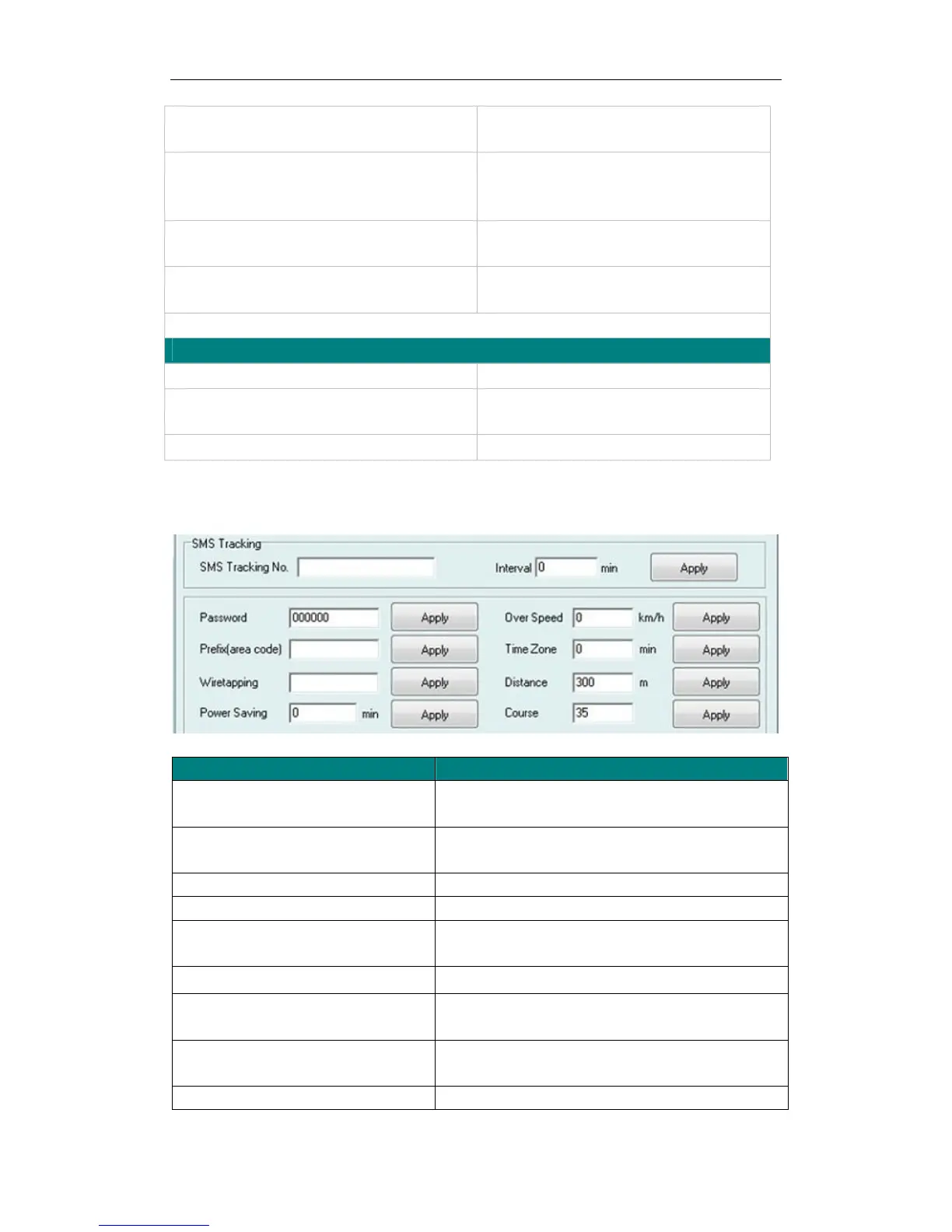
Appendix 1 Configure by computer
Item Description
SMS tracking No. Interval To put a mobile phone number for automatic tracking
by SMS at certain time interval in minutes
Password To set SMS command password, the default is
000000,
Over Speed To set speed limit for over speed alarm
Prefix(area code) To set country code
Time Zone To set time zone, GMT*60 (minutes), if in west half
western hemisphere, “-” is necessary to put ahead
Wiretapping To set wiretapping mobile phone number
Distance To set track and upload data by certain distance in
meters
Power Saving To set time enter into standby mode when shaking
not detected to save power and GPRS data traffic
Course To set upload data via angle shifting by certain angles


 To Next Page