User Manual of VT1000
- 6 -
5. First Use
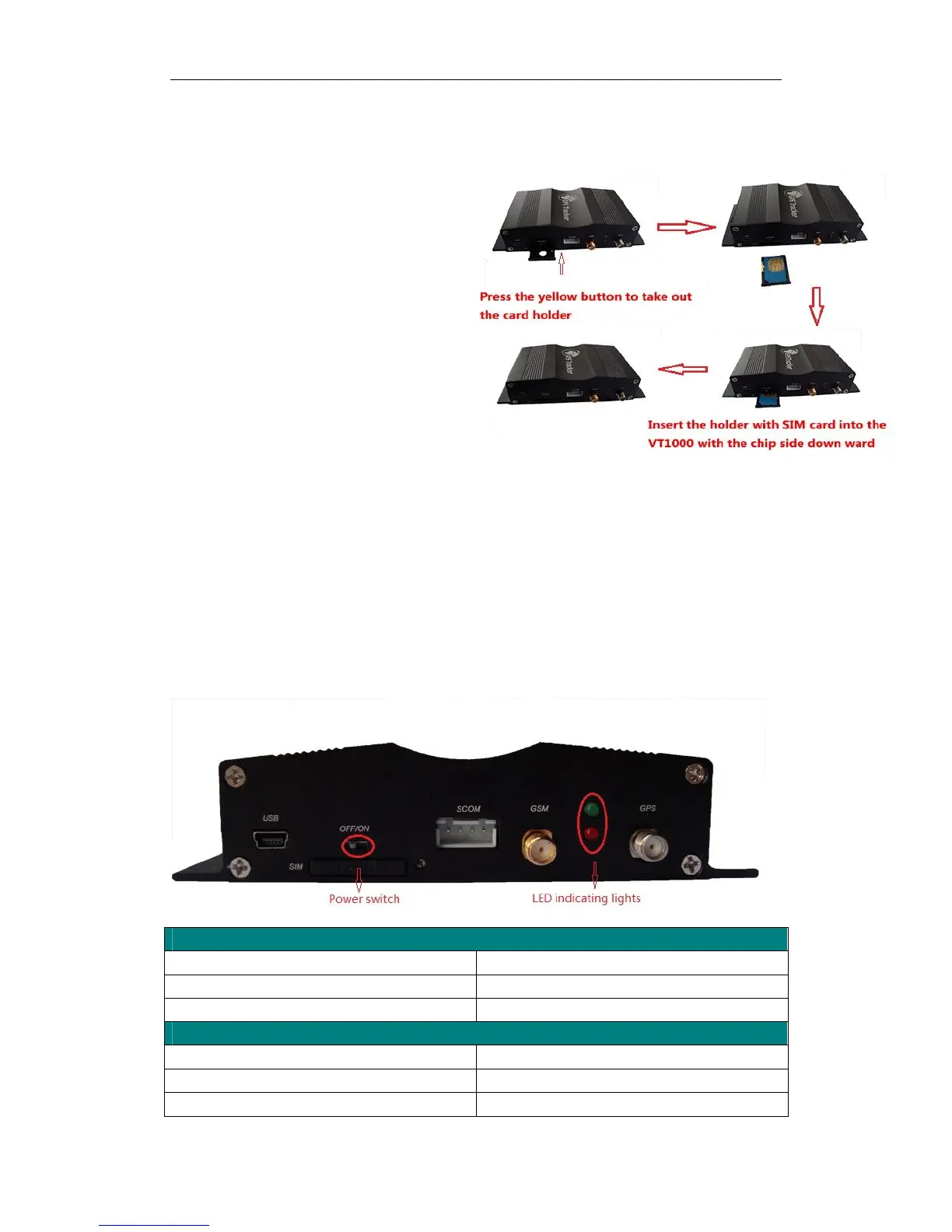
5.1 Install SIM Card
Check that the SIM has not run out of credit
(test the SIM in a phone to make sure it can
send and receive SMS);
Before installing the SIM card, turn off
the power for VT1000,
then install the SIM card as following:
5.2 Charging
Connect the device with external power like car battery, and turn on its power switch and it will do
charging automatically.
5.3 LED indications
Push the power switch to turn on/off VT1000
GPS LED (Red)
Flashing (every 0.1 second) Initializing or back-up battery power is low
Flashing (0.1 second on and 2.9 seconds off) Device has A GPS fix
Flashing (1 second on and 2 seconds off) Device has no GPS fix
GSM LED (Green)
Flashing (every 0.1 second) Initializing
Flashing (0.1 second on and 2.9 seconds off) Device is connected to the GSM network
Flashing (1 second on and 2 seconds off) Device is not connected to the GSM network



 To Next Page