Panel setup menu VJ-2638/1638X/1938WX/1638WX OPERATION MANUAL
264 5.1 Setup menu
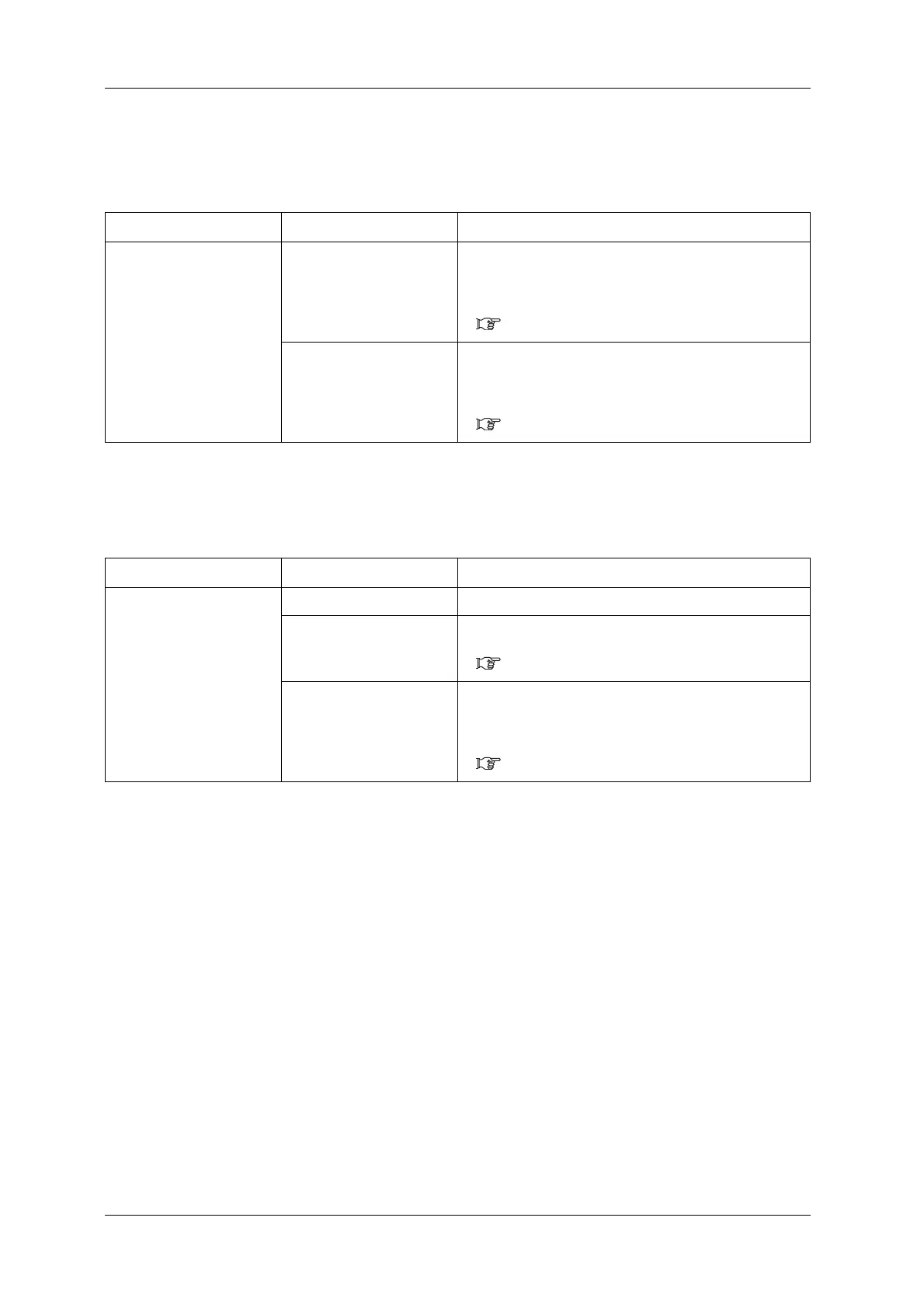
5.1.15.2 Printing Mode Auto Cleaning
Set the auto cleaning interval during printing.
5.1.15.3 Pre-printing Mode Auto Cleaning
Set the value for auto cleaning before printing.
Setup item Setting Description
PrintingTime <Off> to 5 mins to 180 mins Selects the time for auto cleaning while printing.
• Off: Auto cleaning is not performed.
• Others: Perform the head cleaning selected in the Cleaning
menu after the setting time has elapsed.
6.2.3 Head cleaning
— • [Enter] key: saves the setting and shifts to the previous
menu.
• [Cancel] key: cancels the setting and shifts to the previous
menu.
5.1.15 Auto Cleaning menu
Setup item Setting Description
Before Print <Off> The auto cleaning is not performed.
On • Perform the head cleaning selected in the Cleaning menu
before printing.
6.2.3 Head cleaning
— • [Enter] key: saves the setting and shifts to the previous
menu.
• [Cancel] key: cancels the setting and shifts to the previous
menu.
5.1.15 Auto Cleaning menu













 To Next Page